
The
most powerful
WireGuard® VPN MFA

Fully private.
Each connection gets authenticated.

Secure your WireGuard® VPN with MFA/2FA that verifies every connection — on desktops and headless machines alike, running entirely on your own infrastructure, and extending to external SSO providers when you want it.

Existing Security Problems

Why key-only access is not enough

WireGuard® is a secure and fast VPN protocol — not an identity system.
Three ways it leaves a deployment exposed without connection-level MFA for VPN access.

A stolen key is a valid credential

WireGuard® authenticates the key, not the person holding it. Copy the config off an unlocked laptop and the tunnel comes up — from anywhere, with no challenge.

Portal/client MFA is not tunnel MFA

MFA on a management UI protects the UI. MFA at client sign-in protects the app. Neither stops a device holding a valid key from bringing the tunnel up.

Off-boarding leaves keys behind

WireGuard® keys never expire. Without a second factor tied to identity, revoking access means finding and removing every key you ever issued.

Free Open-Source Features

WireGuard® VPN MFA/2FA essentials

Everything you need to add 2FA to your WireGuard®, ships in the open source release, with the free desktop client.

MFA on every connection

The second factor is checked every time before the tunnel comes up.

Built-in factors, no third party

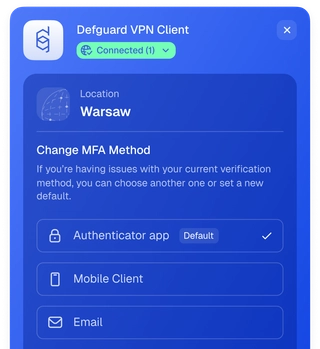
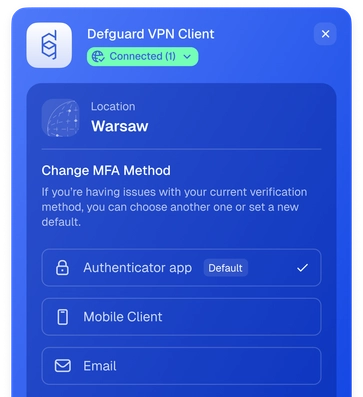
Mobile biometric authentication, TOTP or an emailed code — each user chooses their preferred method in their Defguard profile.

Choose factors per VPN location

Each VPN network you define is configured on its own, with the flexibility to choose MFA methods.

MFA from your terminal

Headless machines enroll from a QR code in the terminal or connect with a one-time code.

Self-Manage WireGuard® 2FA methods

Allow your users to choose a second factor — Google Authenticator or any TOTP app, biometrics or email — in a profile setting, not a support ticket.

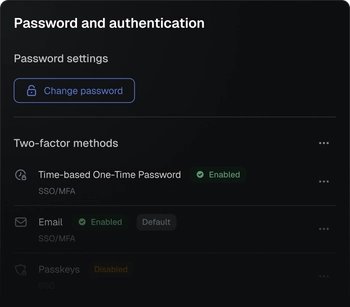
Defguard profile settings with self-managed two-factor methodsDefguard profile settings with self-managed two-factor methods

Enrol, disable or replace a factor without an admin. Each user sets up their own from their Defguard profile.

Every method says where it applies. Methods marked SSO / MFA carry a VPN connection.

Restrict self management when necessary. Maintain control with system settings.

Business/Enterprise Features

Take WireGuard® 2FA/MFA to the next level

Go beyond the tunnel with advanced multi-factor authentication, access control, and device management.

External Identity Provider MFA integration

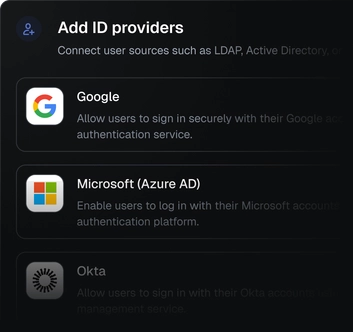
Defguard supports integration with external identity providers — also when it comes to MFA during the VPN connection.

Adding external identity providers to a Defguard VPN locationAdding external identity providers to a Defguard VPN location

WireGuard® VPN 2FA enforced with Google Workspace, Microsoft Entra ID, Okta or JumpCloud MFA.

Each connection is individually authenticated at the WireGuard® protocol level, ensuring no gaps.

You decide whether a location's MFA uses the Defguard MFA provider or an external one.

MFA workflows

Coming in 2.2

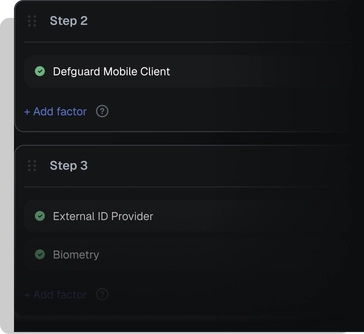
Build a flow of authentication methods. Mix Defguard biometric authentication with Google 2FA or any other combination.

Defguard MFA flow editor with multi-step authentication methodsDefguard MFA flow editor with multi-step authentication methods

Partial authentication grants nothing. The tunnel comes up when the final step is satisfied, not before.

Use a combination of authentication methods — define a flow for each network depending on security requirements.

Every step start, completion and failure is logged, plus a final event listing the methods used in order.

TPM and hardware keys - YubiKey, Swissbit

Roadmap

Go beyond software-based MFA with hardware-backed security.

Credential sealed in the TPM

A credential sealed in the TPM cannot be copied off the device the way a private key or a TOTP seed can.

Coming in 2.3
Hardware security keys such as YubiKey

FIDO2/WebAuthn — the standard behind passkeys and hardware keys such as YubiKey and Swissbit, including the ones you already use with Cisco Duo. WireGuard MFA with security keys is coming in Defguard 2.2.

Coming in 2.2
TPM and hardware keys as workflow methods

TPM and FIDO2 keys appear as methods a step can accept, alongside TOTP, email and biometrics — not as a separate path.

Our roadmap and backlog are open —track the MFA workflows progress on GitHub →

From laptops to cron jobs

One checkpoint for the people who sign in — and the machines that can't.

01

End user MFA

Everyone connecting confirms with a second factor — mobile biometrics, TOTP or an emailed code, chosen in their own profile.

02

Hardened access to critical resources

Give the networks holding your most sensitive systems a stricter method than the rest, without changing anything for others.

03

Headless machines

A method that is unavailable is refused up front with guidance — never silently dropped from the flow.

04

Scripted VPN automation

Scheduled jobs and CI runners bring the tunnel up unattended, taking their one-time code from Bitwarden or another terminal.

defguard-client status
No active connections.
defguard-client connect Warsaw
Defguard enrollment QR code

One VPN MFA solution for every role in your organization

Give every employee the right balance of security, simplicity, and seamless access when running WireGuard® with MFA.

IT / admins

MFA is turned on per VPN network with no separate product to licence, and users enrol their own factors so it never reaches the helpdesk.

CISO / CTO

The factor is checked at connection, and identity data, factors and logs stay on infrastructure you run.

End users

Choose mobile biometrics, TOTP or an emailed code, and use the same flow on a laptop or in a terminal.

Get the most out of WireGuard® security and Defguard reliability