

Defguard 2.2 Release Beta 1 is now available
October 12, 2026
7 min to read
This is a beta release, not meant for production use. Use it to test brand-new functionalities.
Defguard 2.2 makes MFA something you design: named flows built from ordered steps, each step holding the factors that may satisfy it. Beta 1 adds the parts that make those flows practical to roll out: users can set up MFA from the desktop client after enrolment, and administrators get control over the client MTU and the Windows interface metric.
The FIDO2 security key factor, bulk actions in the Firewall module, correct DNS behaviour when several locations are connected at once and the redesigned Mobile Client all carry over from Alpha 1 and are part of this release.
Until now, a user who needed a factor they had not set up had to be enrolled again. Beta 1 changes that: when a user without MFA connects to an MFA-protected location, the desktop client detects the missing configuration and asks them to set it up in the application.
The user confirms the change with a factor they already have and can pick which one. A user with no factors yet confirms with an email code, and the email factor is configured automatically. The instance stays enrolled throughout, so nothing has to be removed and added again.
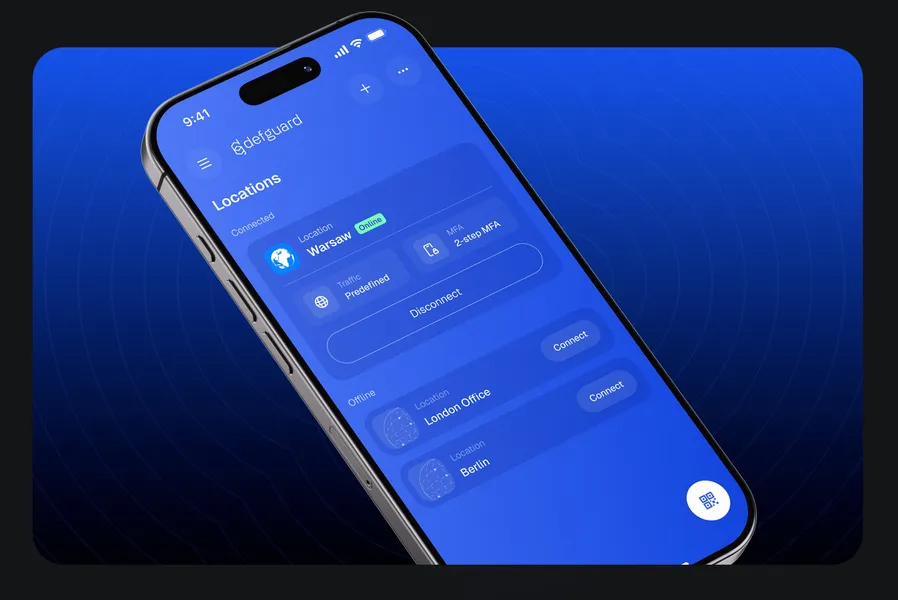
The desktop client was rebuilt in 2.1, which left the mobile app looking like a different product. Users moving between the two met two different interfaces for the same job.
Beta 1 ships a Mobile Client redesigned to match the rest of the refreshed Defguard family. It takes part in the new MFA flows both as a factor and as a connecting client, with the exception of FIDO2.
A user approving a desktop connection with biometrics, or connecting from the phone itself, sees the same product in both places. Try it through the Android beta in the Play Store, the iOS public test on TestFlight, or the bundles in the release assets.
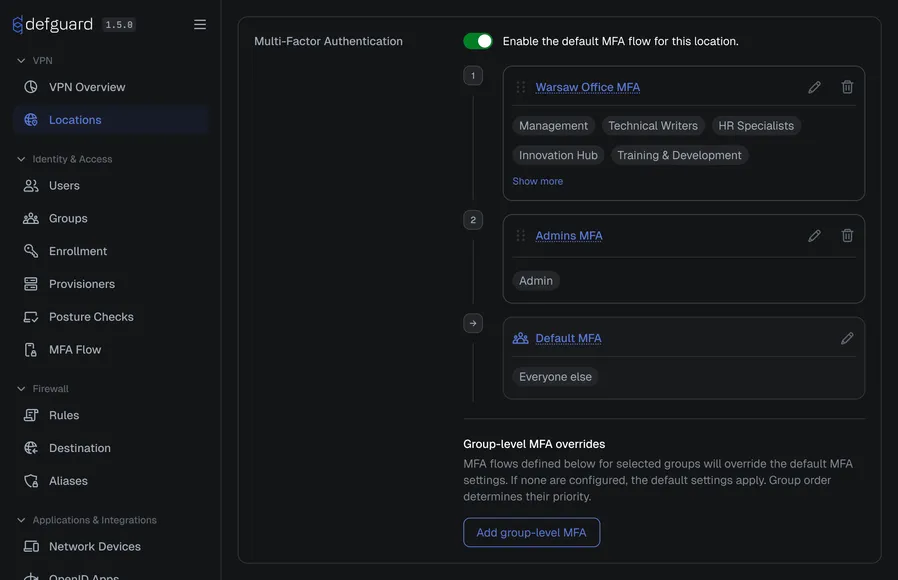
One MFA setting for a whole location forces the same answer everywhere: the same proof for the printer network and for the production database. Administrators who wanted a stronger requirement on one location, or a fallback for users without a given factor, had nowhere to put it.
Defguard 2.2 introduces the MFA flow: a named, ordered list of steps, where each step holds the factors allowed to satisfy it: authenticator app, email code, external ID provider, FIDO2 security key, the mobile client or biometrics. The user proves one factor per step, the tunnel comes up only after the last step succeeds, and a flow written once can be assigned to any number of locations.
Give the office network a single step with an authenticator app and an email code as alternatives, so nobody is locked out for lacking one of them. Give the production location two steps, because there you genuinely want a second proof.
The Open Source plan covers one flow with a single step. More than one flow, more than one step and the External ID Provider factor need Business, and group-level MFA overrides on a location need Enterprise.
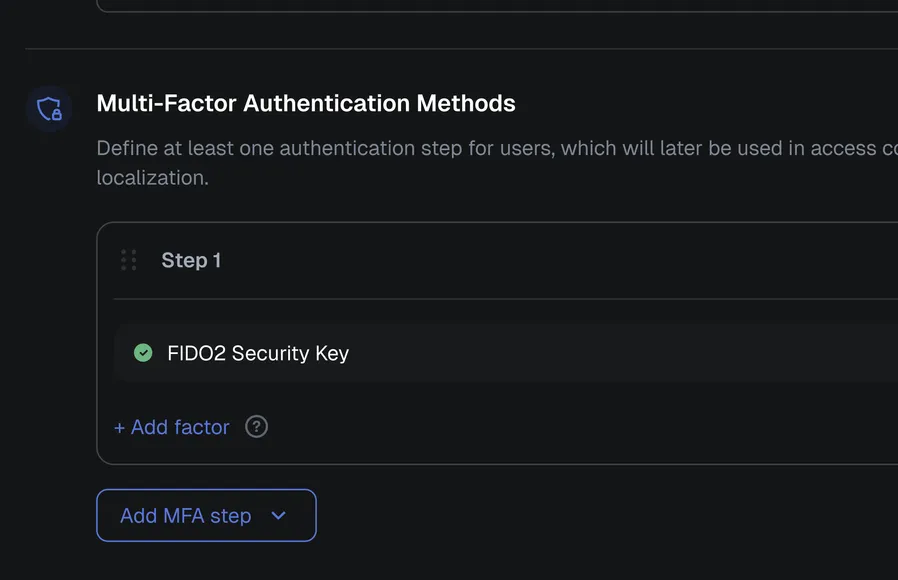
Codes typed from a phone can be phished, and a growing number of security policies no longer accept them for privileged access. Defguard has so far answered that with biometric approval through the mobile app, which still rests on the user’s phone rather than on a hardware key such as a YubiKey or a Swissbit token.
Defguard 2.2 lets users register a FIDO2/WebAuthn key, the standard behind passkeys, in their profile as a passkey, naming each one and adding as many as they need, including the keys they already carry for Cisco Duo. Administrators add the FIDO2 Security Key factor to a flow and assign that flow to a location, on the desktop client only, as the mobile client cannot present it.
An engineer connecting to the production location touches the Swissbit key in their laptop instead of reaching for a code. A second key, registered as a backup, keeps a lost one from turning into a locked-out user.
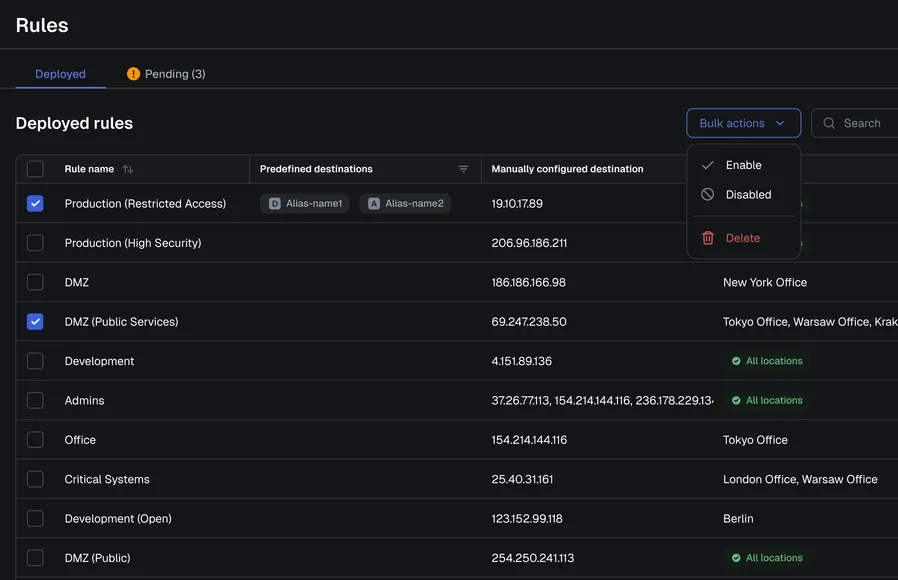
Firewall rules, destinations and aliases could only be handled one object at a time. A rule set of any size turned an ordinary cleanup into an afternoon of repetitive clicking.
Beta 1 lets you select entries together in the table views and act on them in a single operation. The same applies to rules, destinations and aliases alike.
Retiring a decommissioned subnet means selecting its rules and removing them in one action. Nothing is left half-finished, so the policy never sits in an inconsistent state.
Multi-location connectivity worked at the networking level, but
DNS did not: Defguard wrote a flat
nameserver and search configuration that cannot scope resolution per interface. On
Linux with systemd-resolved several interfaces competed as the DNS default route, and on
Windows adapter-level suffixes produced a similar ambiguity.
Defguard 2.2 now applies each location’s own resolvers and domains side by side. Queries reach the resolver that owns the domain instead of whichever interface happened to win.
A contractor connected to two client sites at once resolves internal hostnames from both. The usual workaround, disconnecting one location to reach the other, is no longer needed.
A packet size that is too large for the network can leave some websites loading slowly or not at all, and one reported case involved a Starlink connection. Until now, the alternatives were lowering the MTU on the firewall’s WAN port or on a router at the client site.
Beta 1 lets administrators set a custom MTU that the client apps apply. The original request also asked for other WireGuard settings, which are not covered by this release.
Windows gave the WireGuard adapter a very low interface metric, so the VPN was preferred for all outbound traffic, including DNS. With split DNS, that overrode local resolvers such as a local AdGuard instance.
Beta 1 makes the interface metric configurable, so the VPN no longer has to win every DNS query on Windows.
The auto-provisioning flow for Windows environments wrote each user’s enrolment token into Active Directory with a PowerShell script.
Beta 1 does the same thing from the admin UI as a bulk action: you select the users and choose the Active Directory field that should receive the token. The auto-provisioning guide describes the rest of the setup.
Multi-step flows are new, so clients older than 2.2.0 cannot present them. A location whose flow an older client cannot handle is not sent to that client at all, and simply does not appear until it is updated.
Older clients still connect to flows that have an equivalent in the pre-2.2 model: a single step holding internal factors, or a single step holding External ID Provider alone. Newer clients always work with older servers, so client applications can be updated first.
Check the client vs server feature compatibility matrix before upgrading a server ahead of your fleet.
Run the latest server components with the one-line script in pre-release mode. The Mobile Client is available through the Play Store beta, TestFlight and the release assets.
We want as much feedback as possible, so open a GitHub discussion or report missing features and bugs as issues. The full changelog is on GitHub.