

Defguard 2.2 is the first enterprise VPN solution to bring multi-step multi-factor authentication (MFA/2FA) to the WireGuard® connection itself.
For IT and security teams, this means the strength of authentication can match the risk of each network. Production and admin locations can demand a hardware key on top of a code while the office network stays a single step, with no separate MFA/2FA product to run next to the VPN. A stolen laptop holding a valid WireGuard® key still cannot connect without passing every step.
A VPN is a special category because it controls access to your internal resources at large. We believe strong and capable MFA/2FA should be an integral part of a VPN solution.
What an MFA/2FA flow is
An MFA/2FA flow is a named, ordered list of steps. Each step holds the factors allowed to satisfy it, and the user proves one factor per step. Factors inside a step are alternatives, while every further step asks for another proof.
The WireGuard® tunnel is established only after the last step succeeds.
Until then, the device is not a peer on the Gateway at all. Defguard issues the pre-shared key the connection needs, which works like a session token, only after the final step, and the Gateway accepts the device only with that key. A device that holds a valid WireGuard® key but has not finished the flow cannot complete a handshake, so no traffic from it reaches the network behind the location. Passing the first step and failing the second gets the user nowhere. When the device disconnects, the key is deleted, and the next connection starts the flow again from step one.
MFA/2FA factors available in a flow
A step can offer any of these factors, each at most once, and the user picks one of them:
- Authenticator app (TOTP codes), on the Desktop and Mobile Client
- Email verification code, on both clients, once the instance has working SMTP
- External ID provider, a login through your OpenID provider, such as Keycloak running on your own infrastructure, Microsoft Entra ID, Google or Okta
- FIDO2 security key, on the Desktop Client, and on the Mobile Client over NFC
- Defguard Mobile Client, where the phone approves a desktop connection by scanning a QR code and confirming with biometrics
- Biometrics, when the phone itself is the connecting device
Assigning MFA/2FA flows to locations
In Defguard, a location is a WireGuard® VPN network that users connect to, served by its own Gateway, or by several Gateways for high availability. Organizations typically run one location per site or environment, such as an office, a data centre or production. Each location has its own address range, routing and access rules, and its own MFA/2FA requirement.
MFA/2FA flows exist independently of locations. You build a flow once and assign it to every location that needs that level of proof. Editing the flow changes it on all of those locations at once, so tightening the requirement for every production location is a single edit. A flow that a location still uses cannot be deleted: Defguard names the locations that depend on it and asks for a replacement first, so no location loses its MFA/2FA by accident.
Different locations can carry different flows. Give the office network a single step with an authenticator app and an email code as alternatives, so nobody is locked out for lacking one of them. Give the production location two steps, because a second proof is the reason that location has MFA/2FA at all.
Group-level MFA/2FA overrides
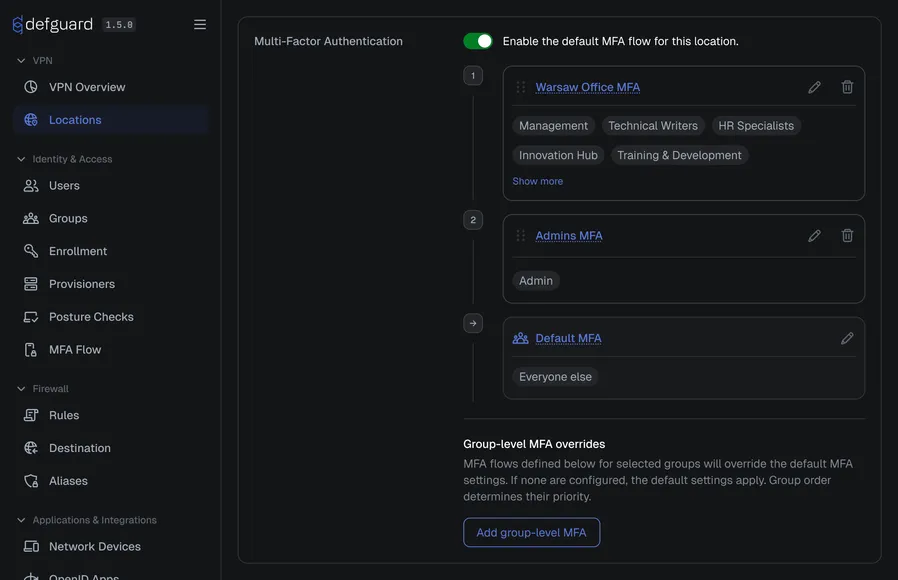
A single location can ask different people for different proof. Every location has a default flow that applies to everyone, and group-level overrides add exceptions for specific groups. Contractors, for example, can be asked for a hardware key on top of a code, while staff on the same location use a code alone.
When a user is in more than one of those groups, the order of the list decides: Defguard goes down the list and uses the first group the user belongs to. Put Contractors above Admins, and a contractor who is also an admin gets the Contractors flow. Users outside all listed groups get the default.
Factors are checked again when the connection starts
Defguard checks the submitted factor again at the moment the connection starts. A factor that is not part of that step, not covered by the license, or not set up for that user or device is rejected, and no tunnel is established. An unavailable factor never shortens or skips a flow.
Client compatibility
Multi-step flows need Defguard client 2.2.0 or newer, on desktop and mobile. Older clients still connect to flows that have a pre-2.2 equivalent: one step of internal factors, or one step holding only the External ID provider.
A location that an older client cannot represent is not sent to that client at all, so it is never offered without its MFA/2FA. Newer clients work with older servers, which means the 2.2 client can go out to your fleet first and the second step can follow once it has landed.
Licensing
- Open Source: one MFA/2FA flow with a single step
- Business: more than one flow, more than one step, and the External ID provider factor
- Enterprise: the FIDO2 security key factor and group-level overrides
See pricing for the plans.
Documentation: MFA/2FA flows and methods and Configuring MFA/2FA for a location