


Trusted by businesses across the globe
VPN‑native WireGuard® device posture checks
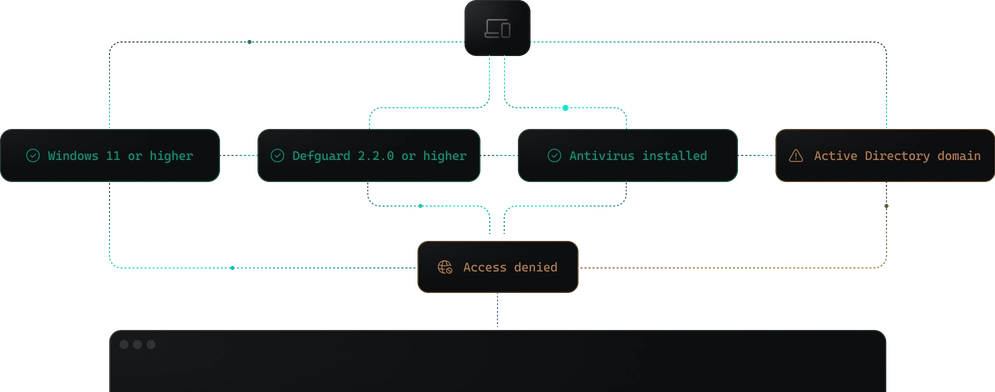
Non-compliant devices are refused by the VPN itself, with no MDM or EDR agent running beside the Defguard client.
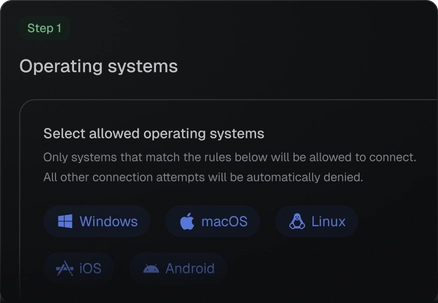
Cover every platform
Set a minimum OS version everywhere, plus encryption, update age, antivirus or domain membership where the platform reports them.
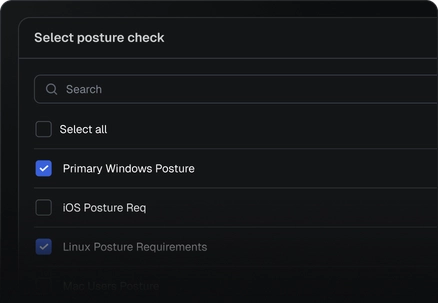
Segment by compliance
Give each VPN location its own compliance tier, so a device that clears the wiki can still be refused at production.
Refuse on any failure
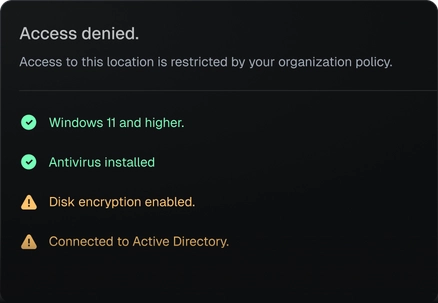
Anything the control plane can’t confirm fails, and the refused user sees every unmet requirement.
How device posture enforcement works
The device only reports its state, while the verdict, and the per-session key the gateway needs, come from your Defguard control plane.
The control plane fetches reports from the Edge, the only Defguard component that accepts public HTTPS traffic.
Gateway peers exist only after a pass, so a hand-written config or a stock WireGuard® client has nothing to connect to.
Refused users see every unmet requirement, so the helpdesk ticket arrives with the diagnosis already in it.

Security building blocks
Posture checks sit beside MFA and firewall rules, so one control plane decides who connects, from which device, and to what.
MFA flows
Chain authentication methods into one flow, such as Defguard biometrics followed by Google 2FA, with every step logged.
MFA flows in the 2.2 alpha →Firewall rules
Allow or deny traffic per user, group, device and destination, enforced by the gateway of each VPN location.
TPM and hardware keys
Hardware keys such as YubiKey arrive in 2.2, and in 2.3 a credential sealed in the TPM that cannot be copied off the device.
Hardware keys in the 2.2 alpha →
Questions about device posture checks
Which Defguard plan includes Device Posture Checks?
Device Posture Checks are part of the Defguard Enterprise plan. They need Defguard Core 2.1 or later, plus Desktop Client 2.1.0 or Mobile Client 1.7.0 or later on each device. Older clients never receive a VPN location that has posture checks assigned, so the location disappears for those users until they upgrade; roll the new clients out before you assign the first check.
Do I need an MDM to run device posture checks?
No. The Defguard client, which every protected VPN location requires anyway, reads the device's state itself, so the checks also work on contractor laptops that no MDM manages. Defguard has no MDM or EDR integration and does not read their compliance verdicts. One requirement does assume a managed fleet: Active Directory membership, read on Windows only, which accepts any domain and which unmanaged laptops usually fail.
Can a user fake a device posture check in Defguard?
Someone with full control of the device could, because the Defguard client reports the device's state and Defguard's own architecture record says those reports are not hardware-backed attestation. A device cannot skip the check, though: the gateway admits it only with the per-session key the control plane issues after the checks pass, and only the Defguard client can connect. Hardware-backed device attestation is planned for Defguard 2.3.
How do Defguard device posture checks compare to ZTNA and NAC products?
Defguard checks posture when a device connects to its WireGuard® VPN and again at each reconnect, with nothing evaluated mid-session. ZTNA services and network access control (NAC) systems have checked device posture for years, often with more signals from EDR and MDM tools and with fresh evaluations every few minutes or hours while connected. In Defguard the check is part of the VPN itself, decided by Defguard's control plane on your own infrastructure, with code you can read.
Does Defguard send device posture data to a vendor cloud?
No. The Defguard client sends its report to your Defguard Edge, and your Defguard control plane fetches it from there and makes the decision on your own infrastructure; no Defguard or third-party cloud sits in that path. Pass and fail events are stored in the activity log in your own database and can be streamed to your SIEM, while raw reports are currently written to the control plane's debug logs, on your servers.
How do I make sure only compliant devices connect to my WireGuard® VPN?
Assign one or more posture checks to the VPN location in Defguard. Each device is checked when its Defguard client connects and must meet every requirement of every check on that location; a device that misses one is refused with a list of what failed. For a VPN with MFA and device verification, turn on MFA for that location: the device is checked first, and Defguard issues the per-session key only after both pass.
Can WireGuard® check device posture?
Not by itself. The WireGuard® protocol builds the encrypted tunnel and carries no information about the device's state. Defguard adds the check before that tunnel exists, and on a protected VPN location the gateway holds no static peers, so only the Defguard client (Desktop Client 2.1.0 or Mobile Client 1.7.0 or later) can connect; the official WireGuard® apps, hand-written configs and network devices cannot. The tunnel itself remains a regular WireGuard® tunnel.
How do I enforce disk encryption and antivirus before VPN access?
Add them as requirements in a Defguard posture check. Disk encryption is read on Windows (BitLocker on the system drive), macOS (FileVault) and Linux (LUKS or ZFS encryption), while antivirus is a Windows-only requirement that passes when Windows reports an active product; signature age is not checked. On Macs, only the DMG build downloaded directly from Defguard can read FileVault, and the App Store build reports encryption as off, so those Macs fail.
What does Defguard check on iOS and Android devices?
On iOS, Defguard checks two things: the operating system version and the Defguard mobile client version. On Android, it also checks whether the last security patch is within 30, 60, 90 or 180 days. Operating system versions compare by major release, so you can require Android 15 but not a specific build, and if a posture check leaves out iOS or Android, phones on that platform are refused wherever the check applies.
What is device posture management?
The term means checking a device's security state, such as OS version, patch age or disk encryption, before it reaches company systems and, in many products, again while it stays connected. Defguard applies it to WireGuard® VPN access: you set device posture policies, which Defguard calls posture checks, per VPN location, and a device that fails is refused when it connects. Defguard checks at each connection, not continuously during the session, and does not inventory, remediate or wipe devices.